

Faster interfaces, higher productivity
ERPNext Version 14 delivered major improvements to the user interface, Workspaces, in-app navigation, printing and customization, making the experience faster, more flexible and more modern.
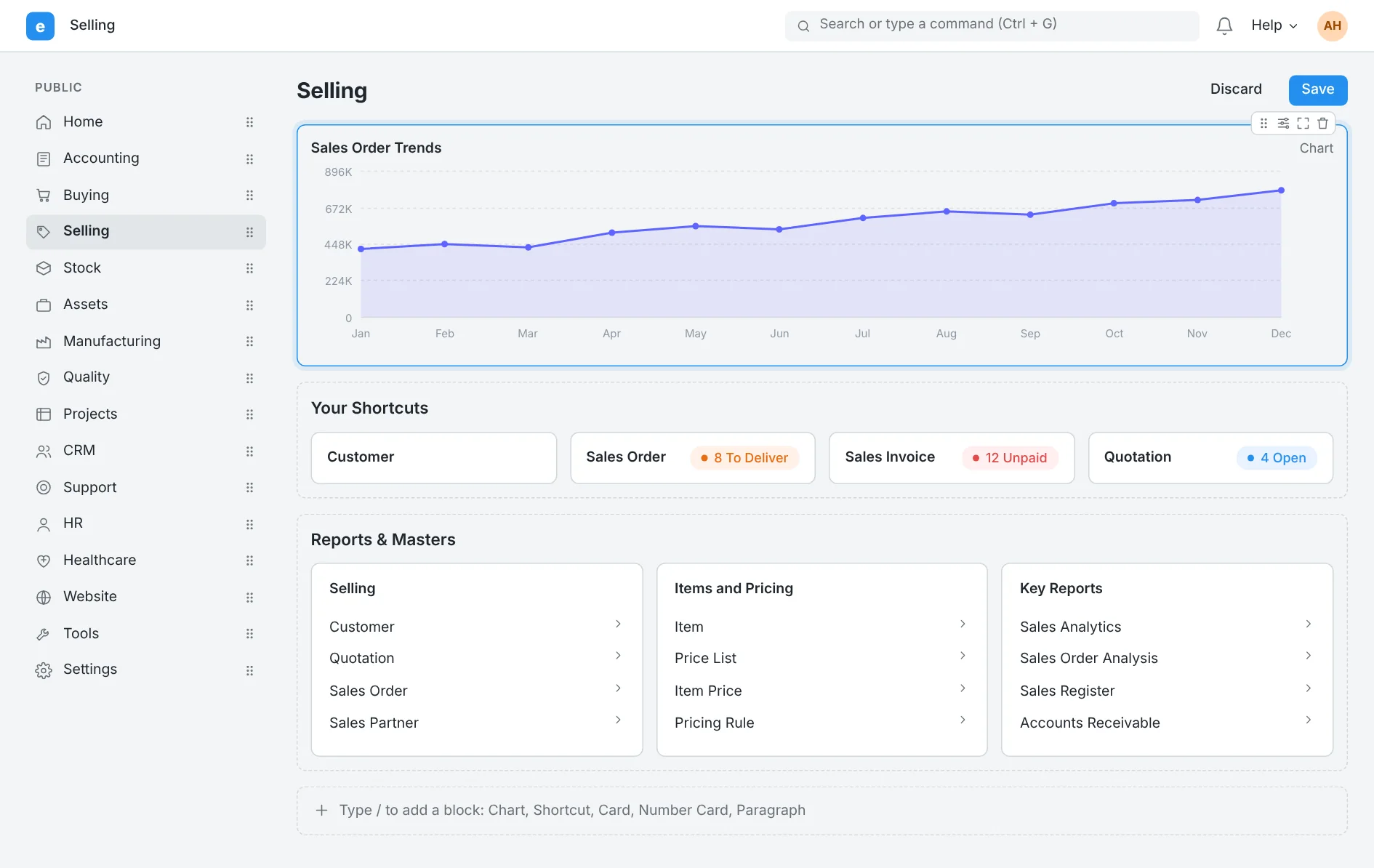
Fully customizable Workspaces
Fully customizable Workspaces
ERPNext V14 made Workspaces more flexible to customize, with the ability to drag and move components and arrange work items to fit the needs of each department in the company.
Drag & Drop to arrange Workspace items
Fully customizable reports and shortcuts
A faster, more productive experience for users
Major upgrades to Print Format Builder
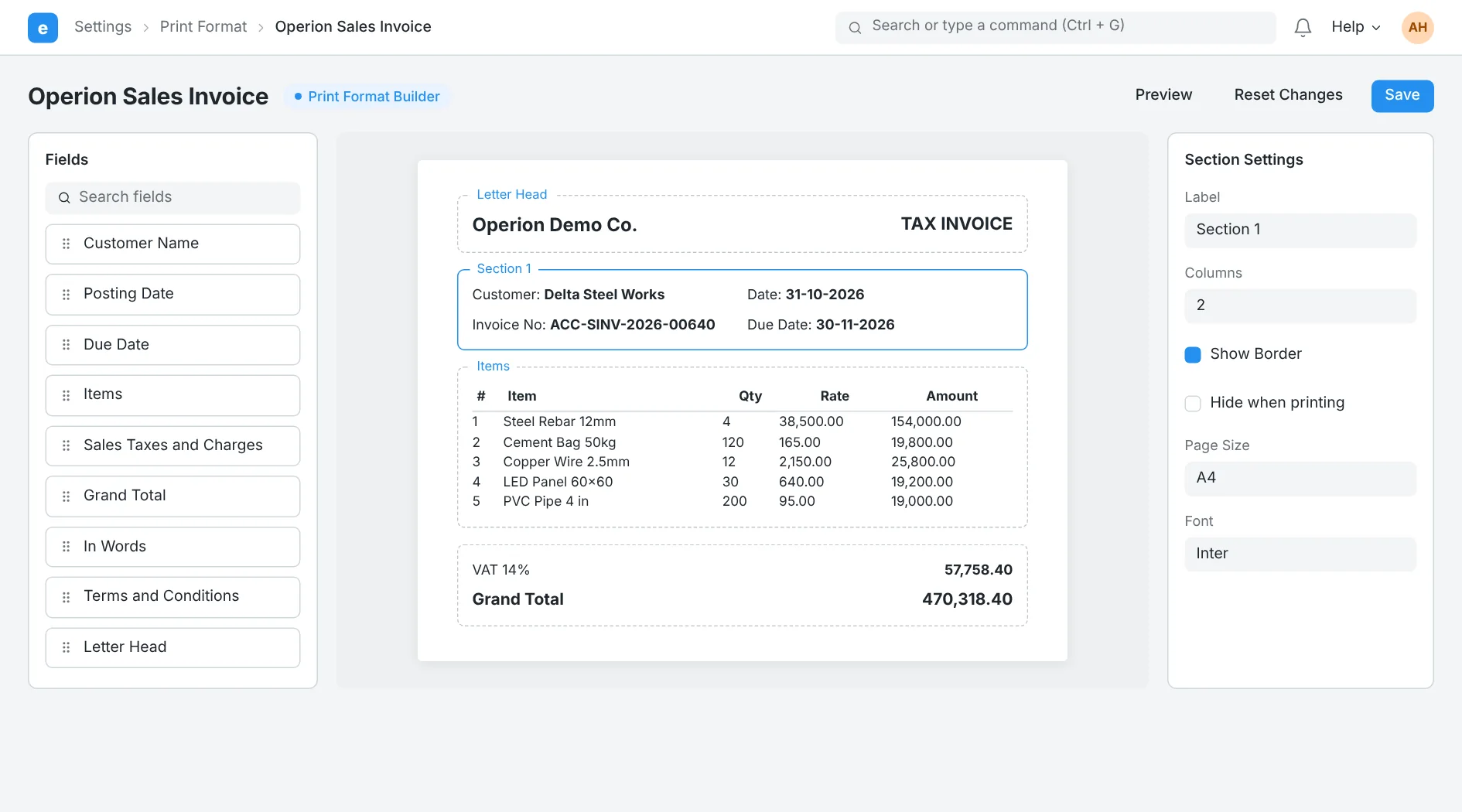
Print Format Builder in ERPNext V14 received major improvements, with better support for print formatting, custom fonts and easier layout editing, without complex modifications.
Create more professional print layouts
Support for custom fonts and modern formatting
Customize Sections and Fields with ease
Print Builder: more professional print formats
Tab View: faster navigation within documents
A new navigation experience: Tab View
ERPNext V14 introduced a new way to navigate within documents using tabs, making it faster and more efficient to reach the different sections on a screen.
Faster navigation between document sections
More organized interfaces for users
Better subcontracting and inventory management
ERPNext V14 delivered strong improvements in Subcontracting and inventory management, with better support for stock valuation, Batch Valuation and more accurate cost management.
Improved Subcontracting processes
Greater flexibility in cost and inventory management
Advanced improvements in inventory costing
ERPNext V14 offers more advanced capabilities for managing inventory cost, with better support for Batch Costing, LIFO and UOM Barcodes management.
Better management of barcodes and units of measure
Accounting and Automation in ERPNext V14
Smarter financial automation and faster reports
ERPNext Version 14 introduced major improvements in accounting, financial operations management, reporting and operational automation, improving performance speed and the accuracy of financial tracking in companies. Subcontracting: better management of outsourced work
Major upgrades to the Subcontracting Module
ERPNext V14 introduced an upgraded system for managing outsourced work (Subcontracting), with dedicated documents and improvements that help companies track suppliers, purchasing and production more easily.
Dedicated documents for Subcontracting operations
Better management of suppliers and purchase orders
Improved tracking of receiving and production
Improvements to inventory management and accounting cost
ERPNext Version 14 provided more advanced options for inventory management and accounting valuation, with Batch-wise Valuation and multiple valuation methods that help companies manage item costs more accurately.
Better management of barcodes and inventory
Inventory Costing: more accurate stock valuation
Faster BOM updates
An improved BOM update tool speeds up management of bills of materials and manufacturing operations.
Saudi e-invoicing
KSA E-Invoicing support for compliance with ZATCA requirements.
Improved Scrap management
Better management of scrap material within manufacturing operations and job cards.
Payment terms tracking
Clearer reports for tracking the status of payment terms and outstanding payments.
Bulk processing of operations
Run operations on multiple documents at once from List View to save time.
Faster financial reports
Improved performance of financial reports and the General Ledger for higher speed and better accuracy.
HR and Integrations in ERPNext V14
Better management of employees and organizational structure
ERPNext Version 14 introduced modern improvements in HR, organizational structure and internal operations management, with strong enhancements to integrations and the in-app user experience.
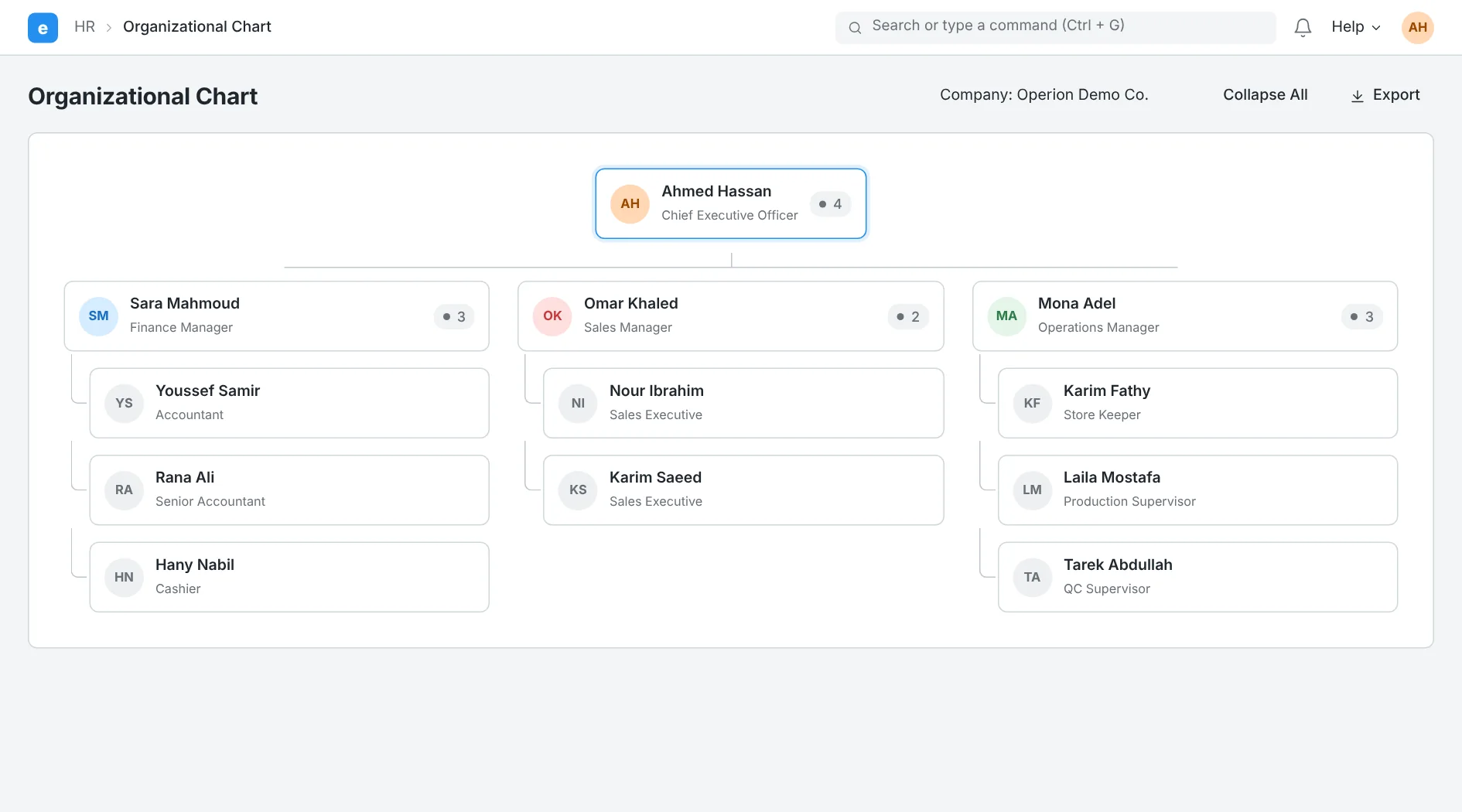
Organizational Chart: an interactive, modern org structure
The Organizational Chart
ERPNext V14 added an interactive Organizational Chart that helps companies present their management and organizational structure visually and professionally, with easy interaction and export.
A visual view of the entire organizational structure
Interact with and navigate between employees and departments
Export the chart as a PNG
Improvements to integrations and smart operations
ERPNext Version 14 focused on improving integrations and day-to-day operations management, with better support for automation, bulk processing and tracking of operational activity within companies.
Broader support for currencies and integrations
Bulk processing of operations and documents
Improved Assets management and reporting
ERPNext Integrations: more flexible automation and operations
Support for more currencies
Flexible support for exchange rate providers and different currencies for multi-branch, multi-country companies.
Bulk Processing
Run operations on a large number of documents at once to cut time and effort.
Asset Splitting
Split pooled assets into several separate assets more flexibly.
SLA Management
Apply service level agreements to communication processes and track compliance.
Faster reports
Improved performance of reports, Financial Statements and the General Ledger.
A better user experience
Newer interfaces and faster navigation across the system to improve the everyday user experience.
Related pages
ERPNext v16
Explore ERPNext Version 16: custom financial reports, MRP, serial and batch tracking, subcontracting and HR upgrades. Talk to an Operion expert.
Learn moreERPNext v15
Explore ERPNext V15 features: stock reservation, Serial & Batch Bundle, Multi-level BOM, and faster accounting. Talk to Operion experts about upgrading.
Learn moreERPNext v13
Explore ERPNext Version 13: modern Workspaces, Dark Mode, demand forecasting, and stronger quality and inventory tools. Talk to an Operion expert today.
Learn moreReady to switch to ERPNext?
See how ERPNext can make your business more efficient and cut costs, with Operion beside you from analysis to go-live and support.