Smart RackField sales & distribution on ERPNext 16
Your whole field team, books always right
Your reps in the field, your books in ERPNext
Smart Rack is a complete platform for distribution companies: one mobile app for every field role, from van sales and pre-sales reps to merchandisers, delivery drivers and supervisors, plus an ERPNext app that validates and re-prices every move before turning it into a submitted invoice, payment or journal entry. The app works fully offline and prints on the spot, and the invoice the customer holds is exactly the one in your books.
Works fully offlineInstant printed invoicesStandard ERPNext entries
The rep's day on one screenRoutes and verified visitsFrom catalogue to invoiceSmart promotionsCollections and cheques under controlDay close and van settlementVan stock and load requestsDelivery and proof of deliveryMerchandising: shelf and surveyTargets, incentives and challengesSupervisor: team and approvalsMobile Control CenterThe rep's day on one screenRoutes and verified visitsFrom catalogue to invoiceSmart promotionsCollections and cheques under controlDay close and van settlementVan stock and load requestsDelivery and proof of deliveryMerchandising: shelf and surveyTargets, incentives and challengesSupervisor: team and approvalsMobile Control Center
v16Built on ERPNext and Frappe
6Roles in one app
7Management workspaces
Android + iOSOffline-first mobile app
Before & after
A day in the field, before and after Smart Rack
Same rep, same route; the difference is everything between the first visit and the approved settlement.
Without Smart Rack
Invoicing
A paper book and a calculator, with discounts the rep decides himself.
Custody
Cash and cheques counted at day end; shortages surface days later.
Connectivity
The app stalls on a weak signal and the rep goes back to paper.
Management
Nobody knows who visited or sold until accounts re-key it all.
vs
With Smart Rack
Invoicing
An instant printed invoice with computed offers, identical in ERPNext.
Custody
Every collection in the rep's custody account, settled and approved daily.
Connectivity
The whole day works offline and syncs later with zero duplicates.
Management
Live numbers, a live map and approvals from the phone at any time.
Product video
Meet Smart Rack
A quick motion tour of what the product does.
Feature tour
Take a tour of Smart Rack
Screens from the mobile app in the approved design shown in the user manual, and from the Smart Rack workspaces in ERPNext.
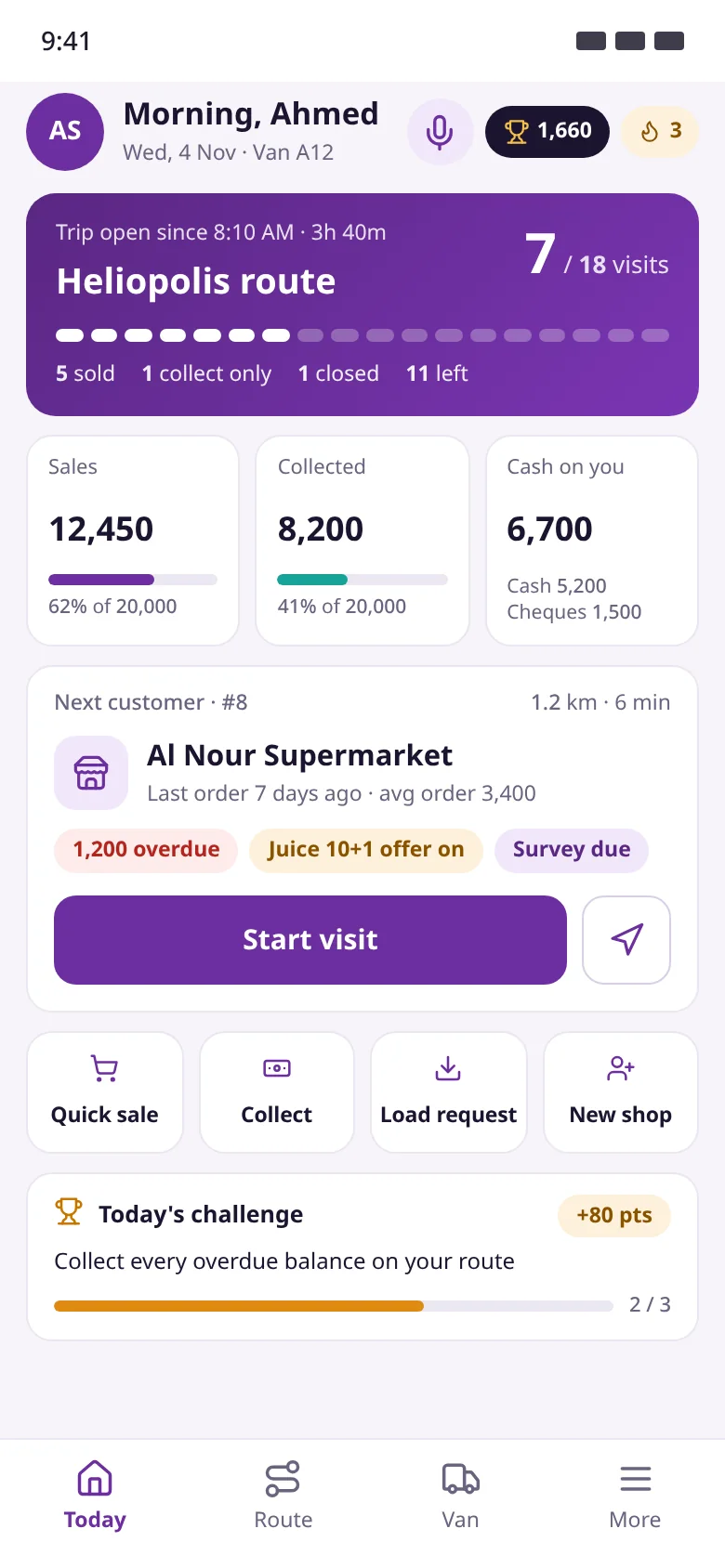
01Home screen
The rep's whole day in one place
The app opens on the trip, the numbers and the next customer. The rep sees how far along the route he is, sales and collections against target, and what is due at the next stop.
Trip card with visits done vs planned
Sales and collections vs target, custody on hand
Next customer with overdue balance, offers and tasks
Monthly points, today's challenge and the voice assistant
Route progressMonthly pointsOne-tap visit start
02Invoice
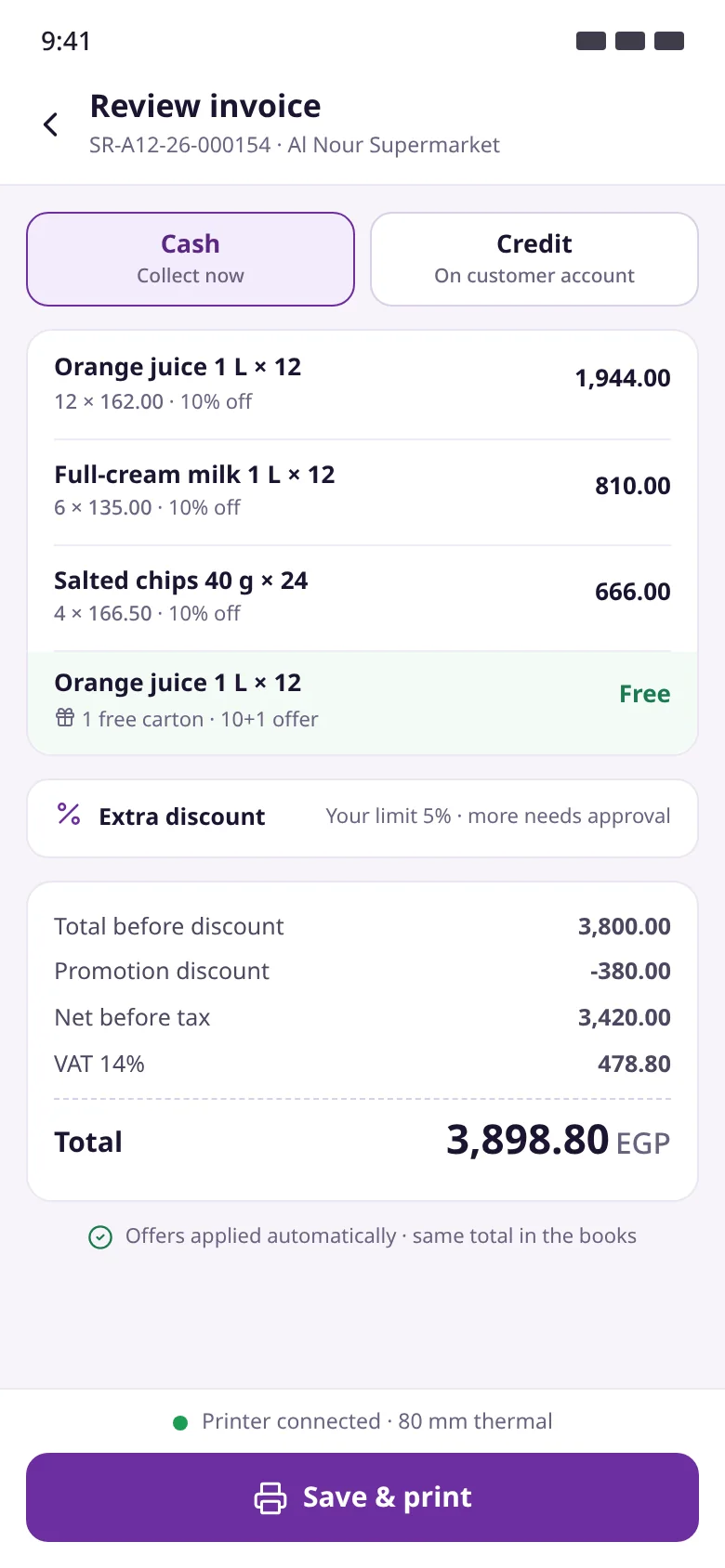
What the customer holds is what you post
Offers apply to every line automatically and free goods show in green. The server recomputes with the same engine, so the same total reaches ERPNext.
Cash or credit within the credit limit
Per-line discounts and automatic free goods
Extra discount within the rep's limit, above it by approval
Instant thermal printing, even offline
Free goods appliedSame total in ERPNextSave & print
03Day close
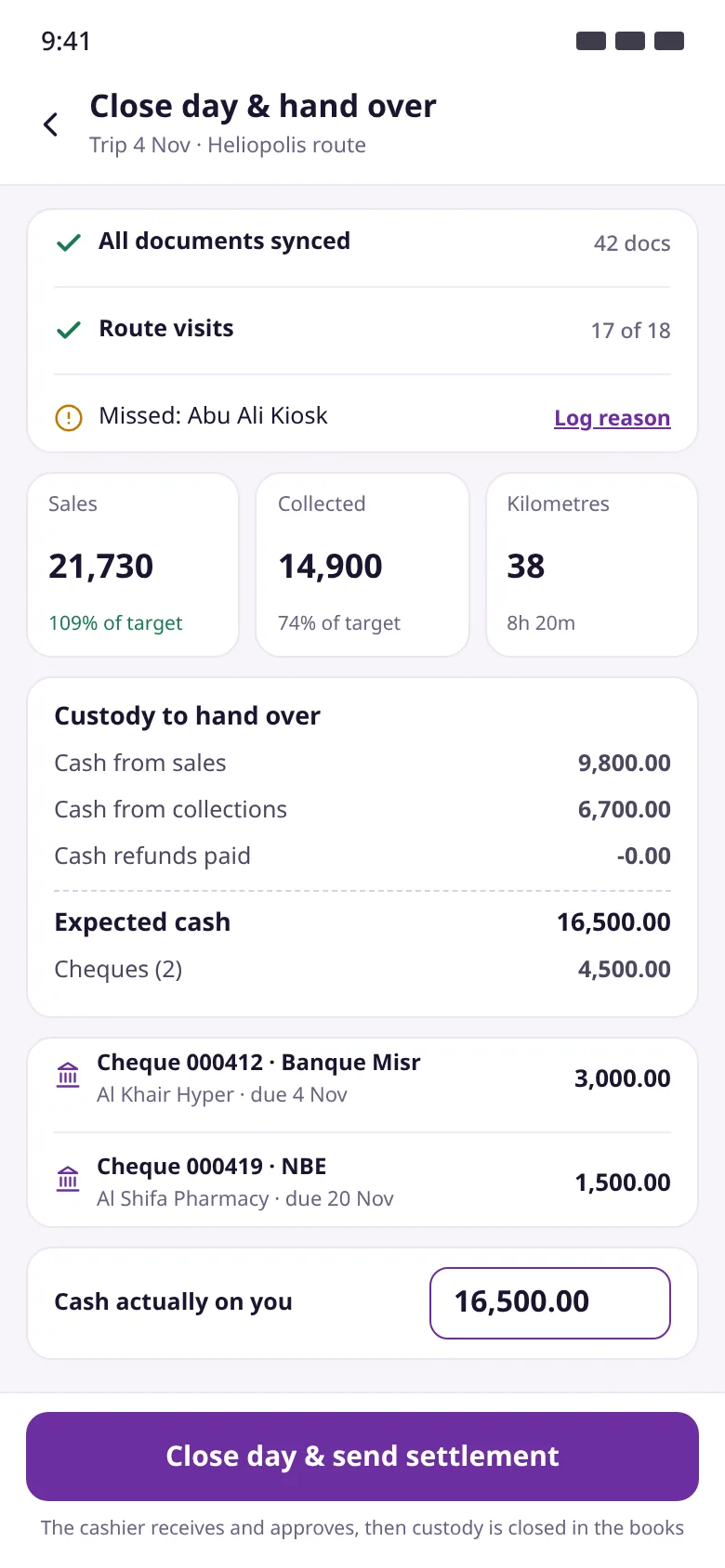
Clear custody, every single day
Before closing, the app checks that every document is synced and the route covered. The rep hands over cash and cheques, creating a settlement only the cashier can approve.
Checklist for sync and missed visits
Expected cash from sales and collections
Cheques listed separately with number and bank
Draft settlement approved by treasury only
Close-day checklistExpected cashActual cash
04Delivery
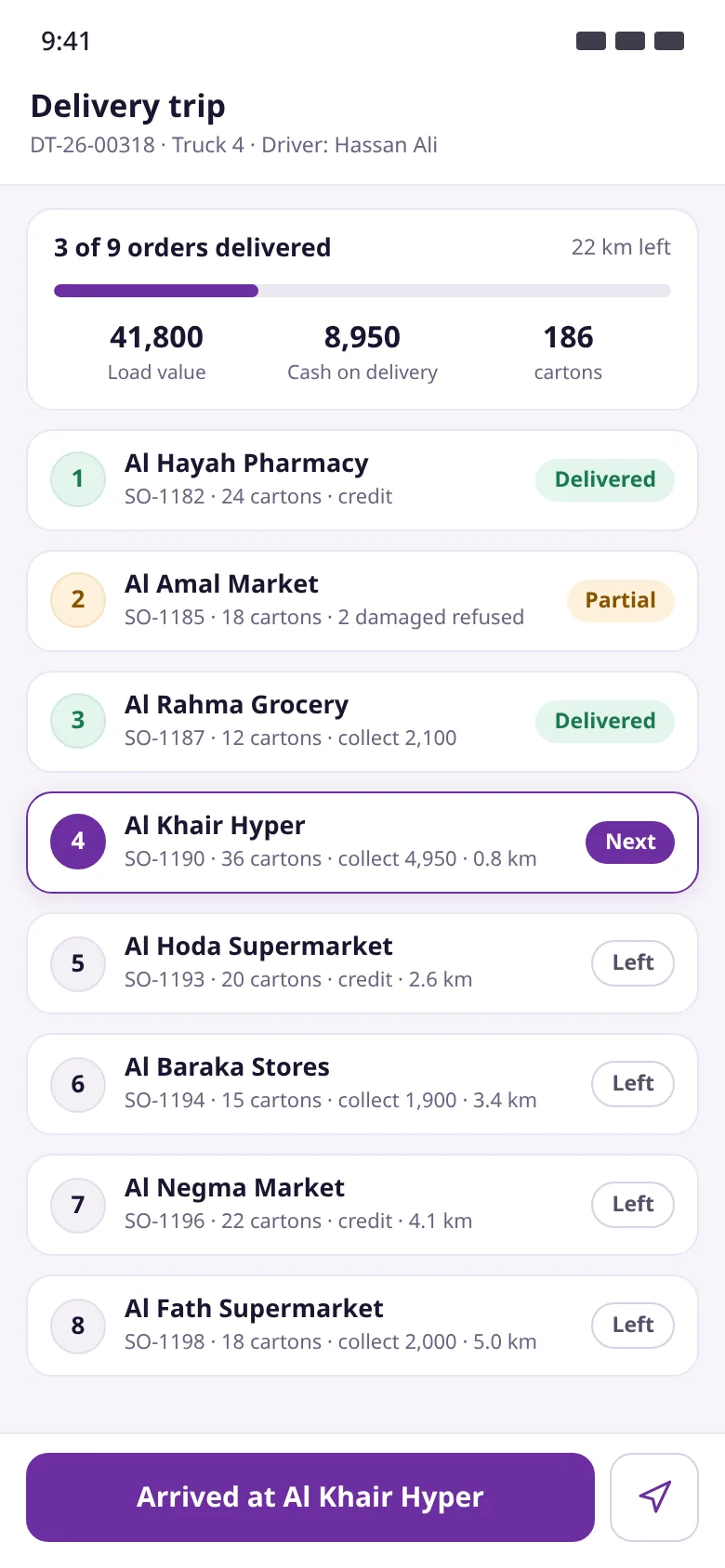
Proven delivery, invoiced as delivered
Drivers see their orders in sequence with load value and cash to collect. On arrival they prove delivery, and the Delivery Note and invoice follow for what was actually handed over.
Trip progress and distance left
Statuses: delivered, partial, next, left
4-digit code, signature or photo
Cash collected on delivery
Trip progressCurrent orderProof of delivery
05Control center
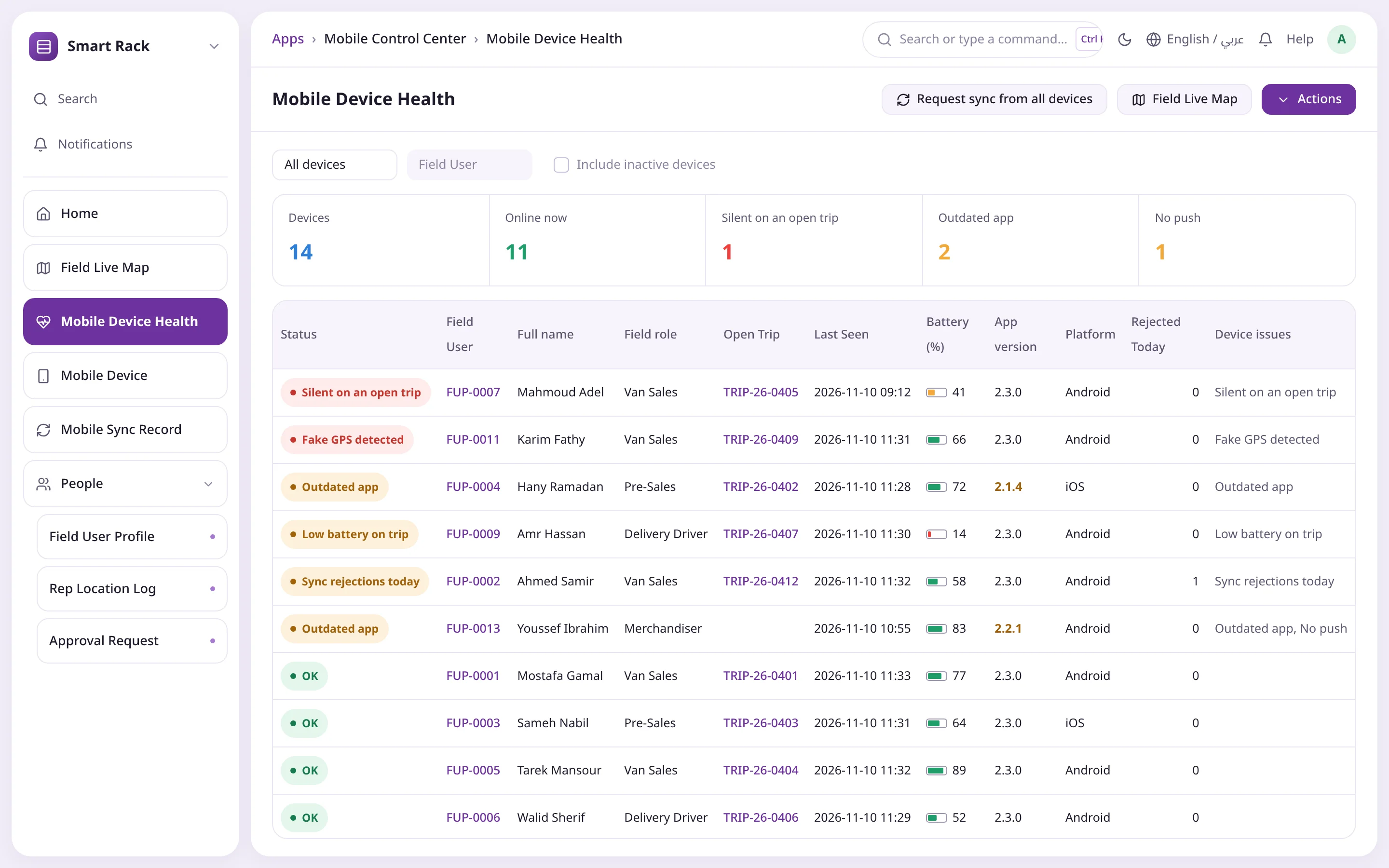
Every phone in the field, in view
The Mobile Device Health report ranks devices by their most serious issue, with last seen, battery and open trip. One click requests a sync from every device.
Online now and silent on an open trip
Fake GPS and outdated app detection
Request sync from all devices via silent push
Wipe or deactivate a lost phone
Device summaryWorst issue firstSync all devices
Route progressMonthly pointsOne-tap visit start
Free goods appliedSame total in ERPNextSave & print
Close-day checklistExpected cashActual cash
Trip progressCurrent orderProof of delivery
Device summaryWorst issue firstSync all devices
Every feature
Everything your field team needs, in one platform
From opening the day to an approved settlement, every step is built around standard ERPNext documents with clear permissions and limits.
The rep's day on one screen
The home screen opens straight on the trip, the numbers and the next customer, so a visit starts with one tap.
Trip card: route, start time and visits done vs planned
Sales and collections vs target, custody split cash and cheques
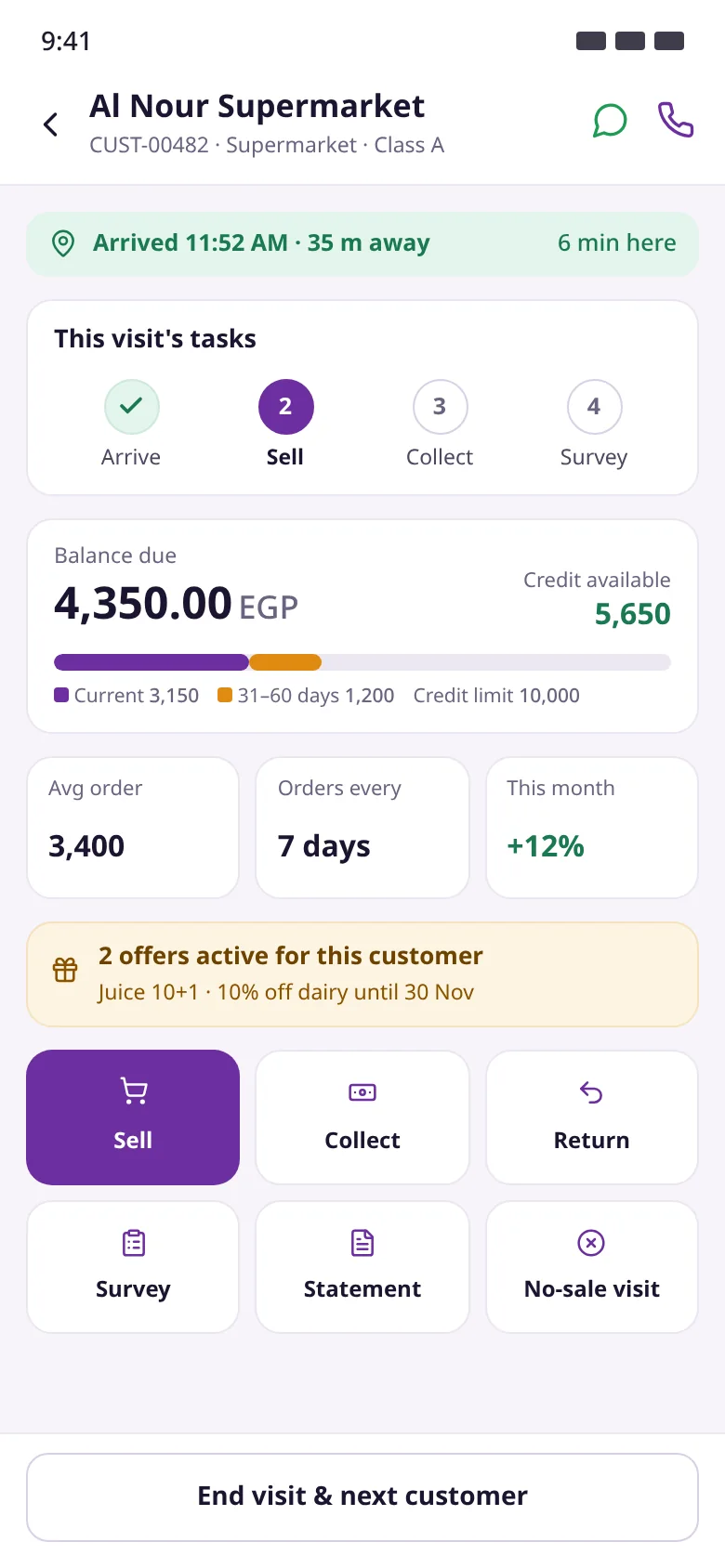
Next customer with distance, overdue balance and live offers
Quick actions: sale, collect, load request, new shop
Routes and verified visits
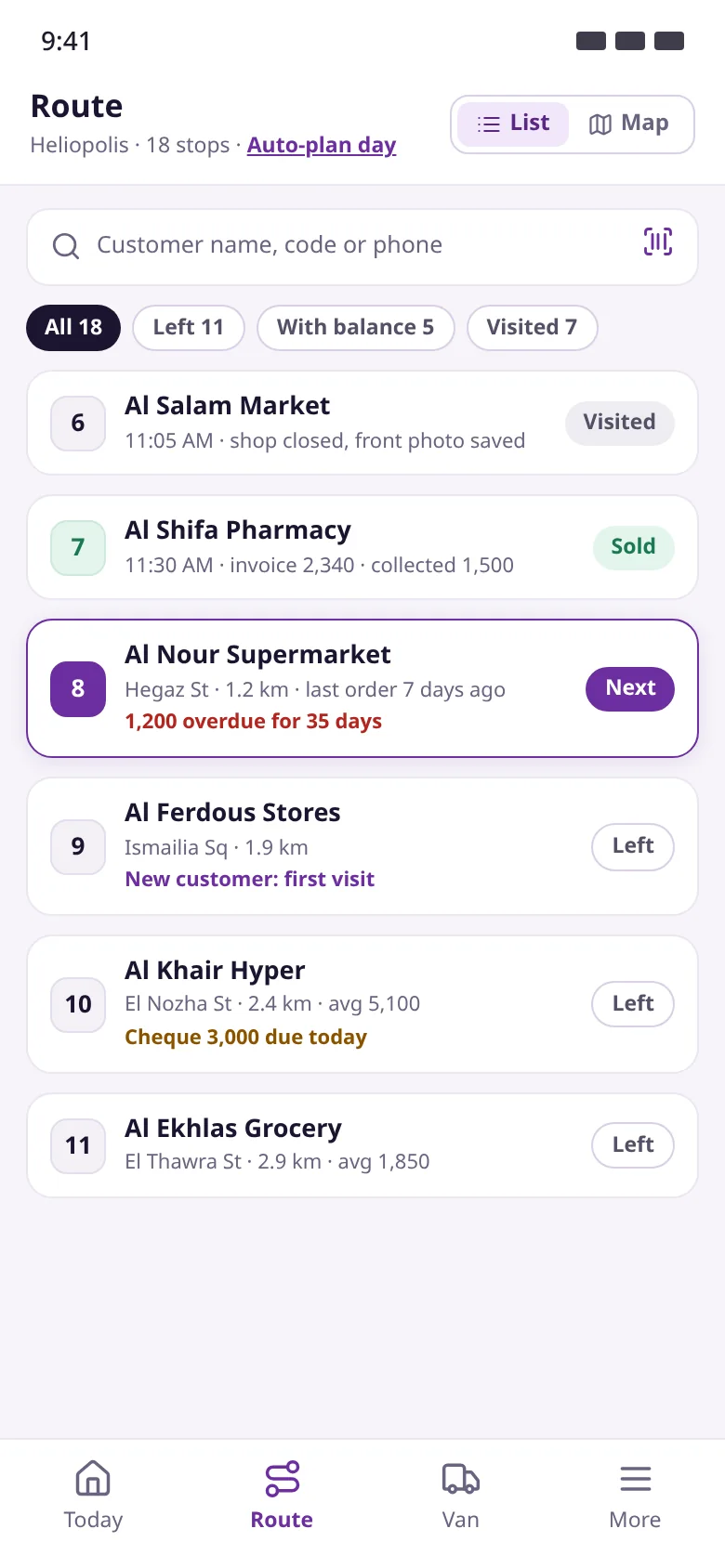
Today's customers in order with a status each. Starting a visit records time and location against the customer's saved position.
Search by name, code or phone; filter left and overdue
Geofence warns or blocks outside the allowed radius
Visit tasks: arrive, sell, collect, survey
No-sale visits with reason, revisit date and optional photo
From catalogue to invoice
The rep picks items, the app applies promotions and tax automatically, then saves with a final number and prints at once, even offline.
Search and barcode scan, suggestions from purchase history
"Fill the usual order" from recent orders in one tap
Cash or credit within the customer's credit limit
Thermal print with QR code, plus PDF or WhatsApp copy
Smart promotions
Four promotion types computed on the phone and on the server by the same engine, so the printed discount is the posted discount.
Item discount, free goods, bundle and invoice discount
Priorities, quantity or amount slabs, stackable offers
Scope: all customers, a group, a territory or one customer
Budgets stop an offer automatically; per-customer usage caps
Collections and cheques under control
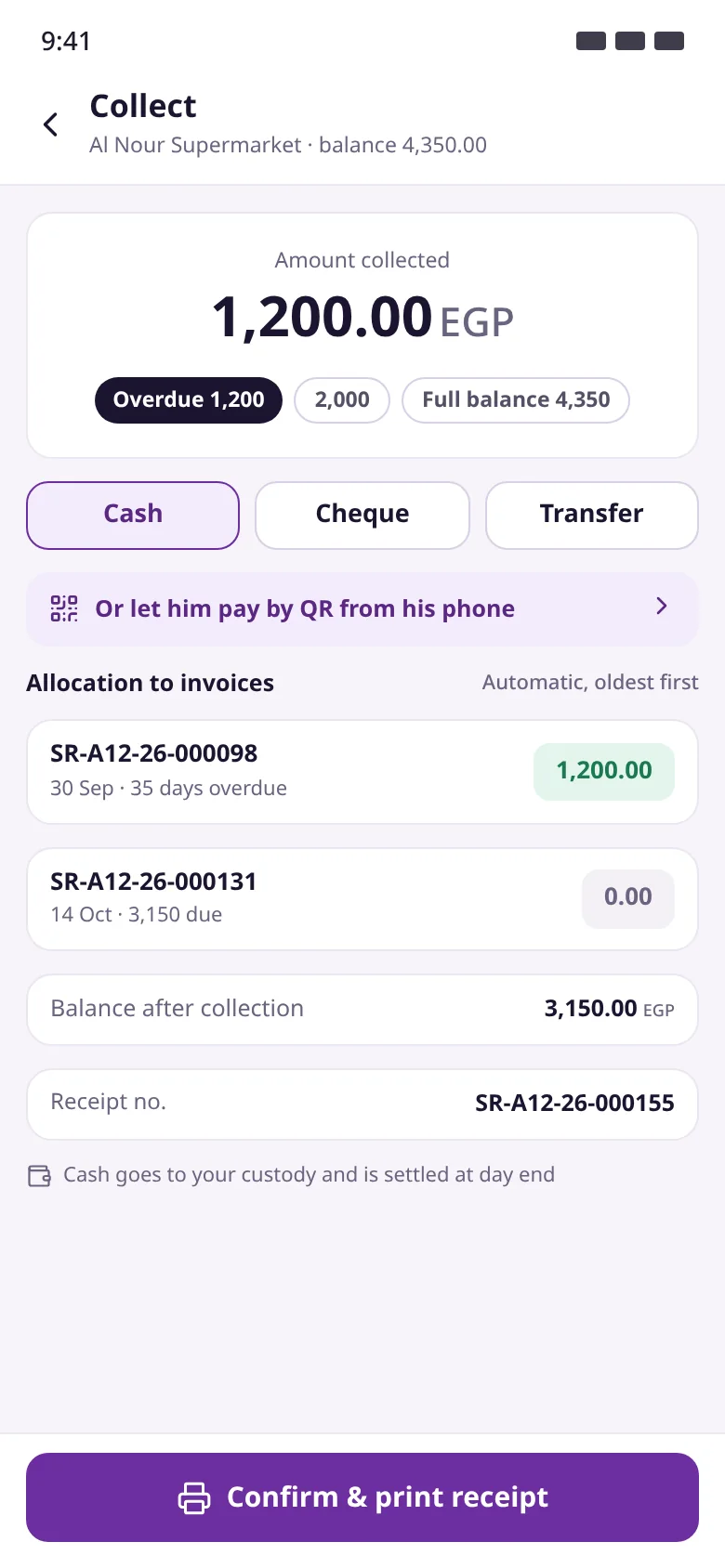
Amounts are allocated to open invoices, oldest first, and a receipt prints. Cheques are tracked from collection to deposit, clearance or bounce.
Cash posts to the rep's custody account until settlement
Cheques with number, bank, date and photo, under collection
Transfer, wallet or QR payment straight to the account
Deposit, clear and bounce buttons create the right entry
Day close and van settlement
A checklist, then cash hand-over and van count in one settlement approved by the cashier. Expected cash comes from the ledger, not the phone.
No day close while documents are unsent
Journal Entry for cash and Stock Reconciliation for differences
Shortage charged to the rep or expensed by policy; overage is income
Reps cannot approve their own settlement
Van stock and load requests
The van balance updates with every invoice, and tomorrow's load request suggests quantities from the last 4 similar days.
Stock value, cartons and items running low
Approved Material Request with status: sent, prepared, on the way, received
Receipt through a transit warehouse so nothing gets lost
Returns against the original invoice; damaged goods to a damage store
Delivery and proof of delivery
Approved Sales Orders are assigned to the driver, who delivers in order and proves delivery; a Delivery Note and invoice follow for what was actually delivered.
Delivery trip with load value and cash on delivery
Full or partial delivery with a shortage reason
4-digit code on the customer's WhatsApp, signature or photo
Revenue at delivery, per IFRS 15
Merchandising: shelf and survey
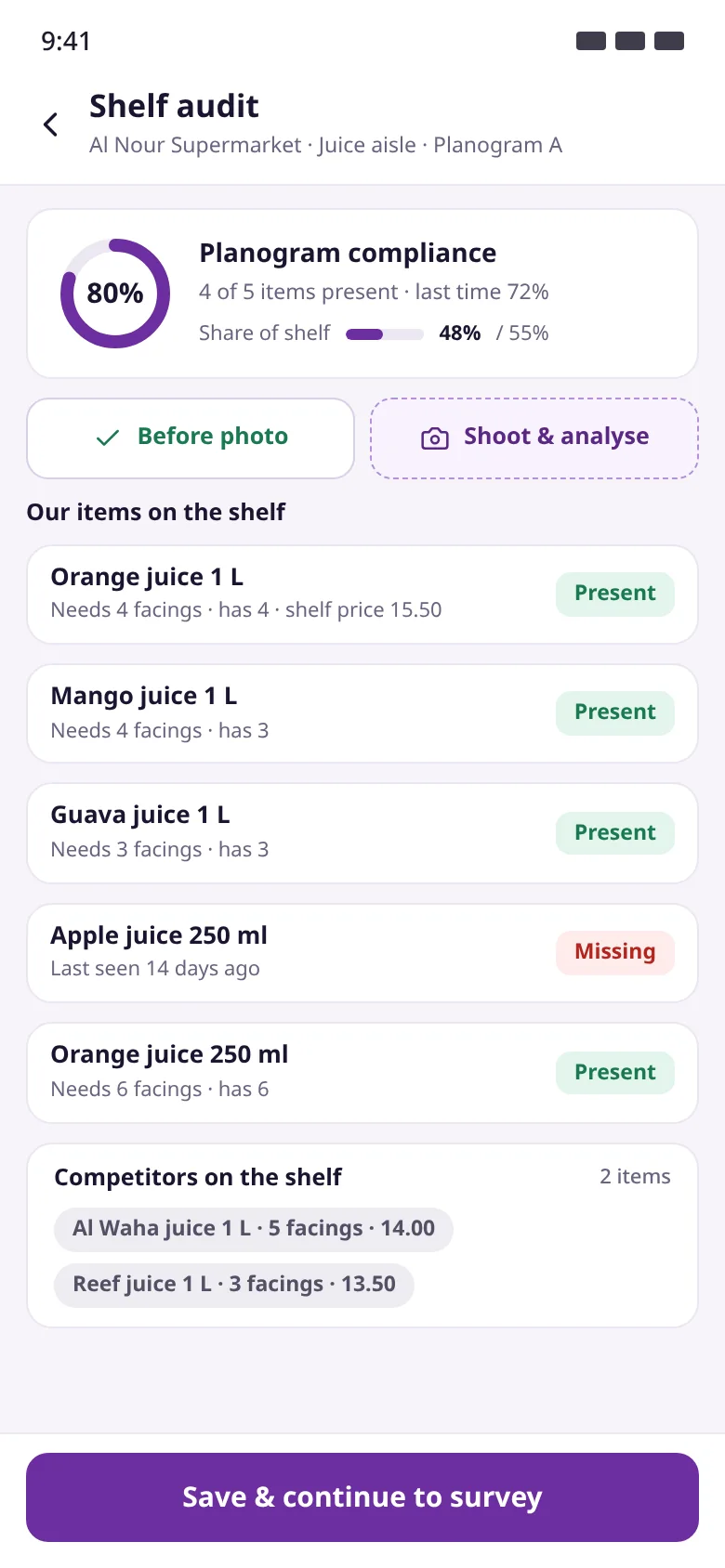
Shelf audits against the planogram and share of shelf vs competitors, plus surveys that appear in the visit by frequency and customer group.
Planogram compliance, required vs actual facings, shelf price
Competitor products mapped to our items
Choice, yes/no, rating, number, text and photo answers
Results in the Field Marketing workspace, tied to customer and visit
Targets, incentives and challenges
Points are earned the moment a document is submitted and reversed if it is cancelled, with levels, daily challenges and a team leaderboard.
Points for sales, collections, route coverage and audits
Levels: Bronze, Silver, Gold, Platinum
Incentive statement pays out once the target threshold is met
Accrual journal entry on statement approval
Supervisor: team and approvals
Supervisors follow their team on a map and approve requests from the phone, wherever they are, with context to decide.
Last location and status per rep: in visit, idle, offline
Approvals for extra discount, credit limit, new customer, cash shortage
Nobody can approve a request they raised
Company numbers for the day or month and top reps
Mobile Control Center
Every phone in the field in one workspace: who is online and who needs attention, with a live map and each rep's route for the day.
Alerts: silent on a trip, fake GPS, outdated app, low battery
Request sync from all devices with a silent push
Wipe or deactivate a lost phone at once
Mobile Numbering Gaps report for every printed number not received
For every role in your company
One app for every field role
Each user sees only the screens of their role, set in the Field User Profile and by the modules licensed to the company.
Van sales & pre-sales reps
Sell, collect and close the day from the phone
Sell from van stock or take orders for later delivery
Cash, cheque and transfer collections with instant receipts
Returns against the original invoice and custody day close
Merchandisers
Measure the shelf, capture the market
Shelf audits against the planogram
Share of shelf, competitors and shelf prices
Surveys tied to customer and visit
Delivery drivers
Deliver in order, prove every drop
Delivery trip from approved orders
Customer code, signature or photo
Cash on delivery and invoice for delivered quantities
Supervisors
Follow the team, approve from anywhere
Team map and status per rep
Discount, credit, new customer and shortage approvals
Team numbers vs target and no-sale reasons
Accounts & treasury
Standard documents, no re-keying
Van settlement approval with entry and stock reconciliation
Field cheque cycle through clearance or bounce
Custody balances and mobile numbering gaps reports
How it works
A rep's day, from activation to settlement
Every step is saved on the device first and becomes a standard ERPNext document when it syncs.
01Activate once
A QR code and 8-character code from the Field User Profile, valid 24 hours and single-use; then daily PIN or fingerprint login.
02Start the day
A Rep Trip opens and the load is received from the transit warehouse into the van.
03Visit
Arrival time, location and distance from the customer, then the customer page with balance, offers and tasks.
04Sell and collect
An invoice or order printed on the spot; cash, cheque or transfer allocated to invoices.
05Sync
Up to 50 documents per batch with no duplicates; the server re-prices, applies limits and answers per document.
06Close the day
Checklist, van count and custody hand-over create a draft Van Settlement.
07Cashier approval
The cashier approves; the cash entry and stock reconciliation post and the trip is settled.
Product screenshots
See Smart Rack in action
Mobile app screens in the approved design, and Smart Rack workspaces in ERPNext for supervisors and accounts.
HomeTrip, today's numbers, the next customer and quick actions.
RouteToday's customers in order with status, search and filters.
Customer pageLocation check, visit tasks, balance due and live offers.
Invoice reviewLines with offers and free goods, totals that match ERPNext.
CollectionOldest-first allocation, by cash, cheque, transfer or QR.
Day closeChecklist, day totals, expected vs actual cash and cheques.
Shelf auditPlanogram compliance, share of shelf, our items and competitors.
Delivery tripThe driver's orders in sequence with load value and cash on delivery.
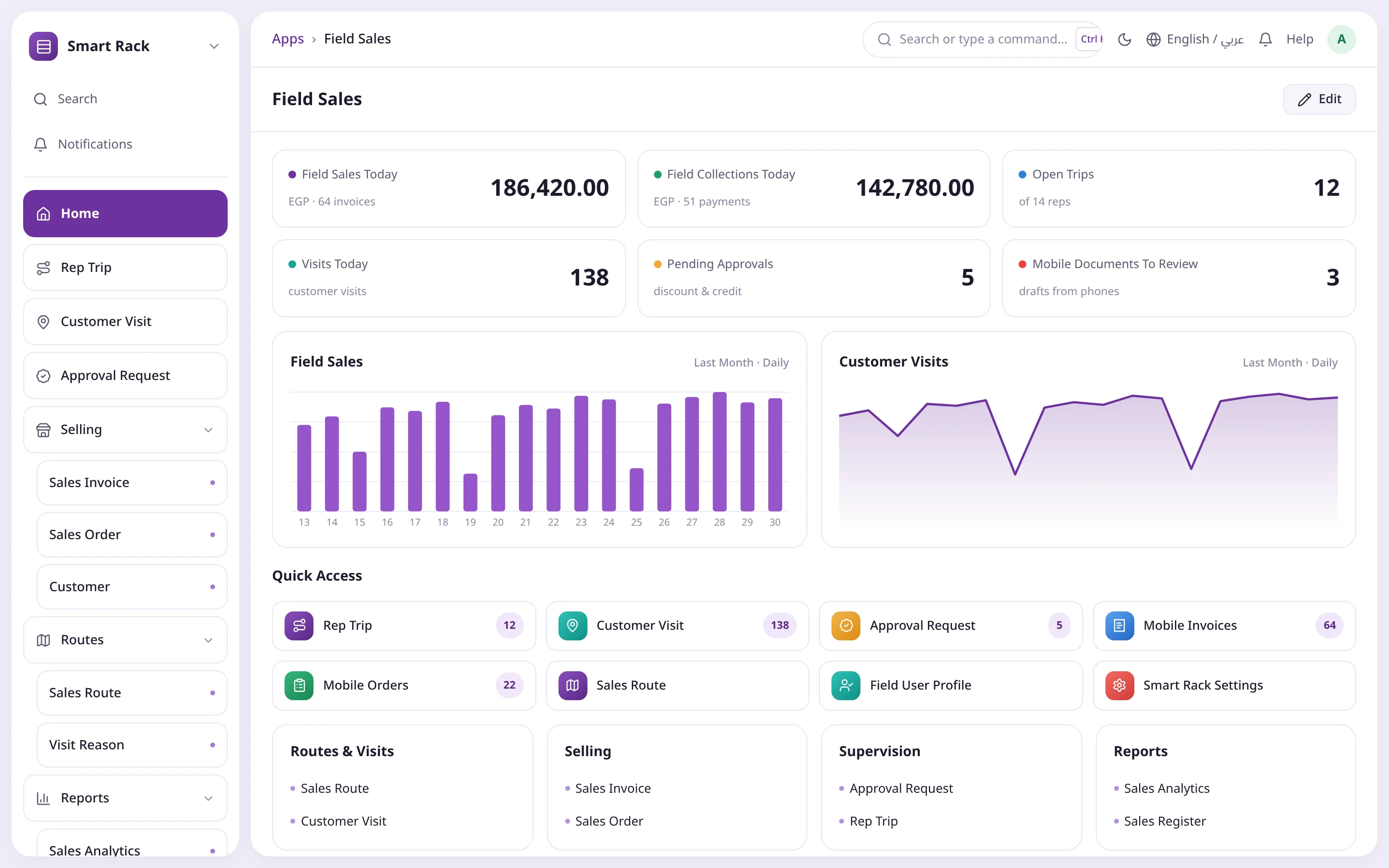
Field Sales workspaceToday's sales, collections, trips, visits and approvals in ERPNext.
Mobile Device HealthEvery phone in the field, worst issue first, with last seen and battery.
Comparison
The difference shows from day one
Without Smart RackWith Smart Rack
InvoicingPaper book, manual mathsInstant printed invoice, final number
PromotionsEach rep his own wayOne engine on phone and server
Weak signalSelling stopsThe whole day works offline
CustodyCounted at day end, no referenceCustody account per rep, approved settlement
ControlNo idea who visited or soldGeo-verified visits, live map, numbering gaps
When reps work on paper, or on an app that lives outside your books, invoices go missing, settlements lag and nobody knows what is really happening on the road.
Paper invoices, missing numbers
Manual invoice books invite errors and abuse, and gaps in the sequence surface far too late.
Cash custody in the dark
You only learn how much cash and how many cheques a rep holds at day end, and shortages show up late.
No signal, no sale
Apps that need a constant connection stop working in warehouses, on highways and in remote areas.
Discounts without control
Each rep applies promotions his own way, so the printed invoice differs from the one in accounts.
No view of the field
Did the rep visit the shop? Is the phone online? Is the GPS faked? Questions without answers.
Double data entry
Accounts re-key reps' invoices and collections by hand, delaying close and multiplying errors.
Components
Seven management workspaces inside ERPNext
Smart Rack appears on the Apps screen with its own logo for management users only; each workspace has a sidebar, number cards, charts and quick access.
Field Sales
Today's sales, trips, visits, approvals and routes.
Treasury & Van Stock
Settlements, field cheques, load requests and custody reports.
Field Marketing
Promotions, planograms, shelf audits and surveys.
Targets & Incentives
Targets, incentive schemes, points and statements.
Delivery
Pending orders and proofs of delivery.
Mobile Control Center
Every device in the field, the live map and device health.
Smart Rack Settings
Settings, field users, devices and control policies.
Field User Profile
Role, supervisor, warehouses, price list, discount limit and numbering prefix, with a custody account created automatically.
Who it is for
Built for sales and distribution companies
Distributors
Van-sales fleets serving thousands of shops on daily routes.
Manufacturers and brands
Pre-sales, delivery and trade-marketing teams under one roof.
FMCG
Food, beverages and home care that live on promotions and shelf space.
Merchandising teams
Shelf audits, planograms, competitors and surveys inside stores.
Sales supervisors and managers
Team, approvals and devices from the phone or ERPNext.
Accounts and treasury
Custody, cheques and settlements as standard entries, no re-keying.
Integration & tech
A native part of ERPNext
Smart Rack is not a parallel system. It is a Frappe app that runs inside your site and uses its documents and permissions.
Runs on ERPNext v16 and Frappe v16, installed from Frappe Cloud or on your own server
No direct ledger posting: every move ends as a submitted Sales Invoice, Sales Order, Payment Entry, Journal Entry, Stock Entry, Stock Reconciliation or Delivery Note
The server validates and re-prices every document with the phone's engine and enforces permissions, credit and discount limits
One-click account setup per company without touching your existing chart of accounts
ERPNext roles Smart Rack Field User and Smart Rack Supervisor alongside accounts and System Manager roles
Device-issued numbers with a per-rep prefix become the ERPNext document name
Fully Arabic and English on the phone and in ERPNext
FAQ
Ready to run Smart Rack in your company?
Book a demo and the Operion team will take you through training, setup and support until your first live route.
Yes. Sales, collections, returns and visits are saved on the device and printed at once, then sent when a connection is back. Each document has a unique device ID, so resending is always safe and never duplicates.
Does Smart Rack write to the ledger directly?
No. Every money or stock move is recorded as a standard submitted ERPNext document such as a Sales Invoice, Payment Entry or Journal Entry, so every number has a document you can open and review.
How do I know the printed invoice matches the books?
The server recomputes prices, promotions and tax with the same engine as the phone. If the result matches, the invoice is submitted at once; if not, it is submitted with a review note or held as a draft for approval.
What if a rep exceeds the discount or credit limit?
The invoice is saved as a draft and an approval request goes to the supervisor automatically; once approved, it is submitted in the supervisor's name. Nobody can approve a request they raised.
How is rep cash custody handled?
Cash collected posts to a custody account per rep and only reaches treasury through a Van Settlement approved by the cashier. Expected cash is the custody account balance in the ledger, and shortages follow your policy.
How are field cheques tracked?
Each cheque posts to a cheques-under-collection account and a Field Cheque record; deposit, clear and bounce buttons then create the right entry automatically.
Which promotion types are supported?
Item discount, free goods, bundle and invoice discount, with priorities, slabs, scope (all, group, territory or customer), budgets and per-customer usage caps.
What if a rep loses the phone?
From the Mobile Device record in ERPNext you can deactivate it at once and request a wipe; the app uploads anything unsent first, then wipes on its next connection. The numbering gaps report reveals any printed number that never arrived.
Which field roles are supported?
Van sales, pre-sales, merchandiser, delivery driver and supervisor in one app that shows each user only their role's screens, plus management and accounts workspaces in ERPNext.
How do we go live?
A one-time setup: install the app, set up accounts, warehouses, price lists, field user profiles and master data, then activate devices. The Operion team supports you with training, setup and technical support.



 Route progressMonthly pointsOne-tap visit start