Smart Go is one Android and iOS app that works straight on your company's ERPNext. The phone shows the form and collects the input; the server validates and calculates with the same permissions and rules, so every document and ledger entry is exactly what your desk would create. Approvals, location-checked attendance, invoices and receipts, point of sale, barcode stock counts, team chat and a morning brief for management, with every role's screens set inside ERPNext and no new app release.
Fingerprint approvalsLocation-checked check-inBarcode sales and counts
Approvals in one inboxCreate documents, same steps every timeDocument view and next stepLocation-checked attendanceEmployee self-serviceMorning brief for managementA full point of sale on the phoneBarcode stock countsTeam chat inside the systemHelpdesk and an AI assistantInstant notificationsControlled from the deskApprovals in one inboxCreate documents, same steps every timeDocument view and next stepLocation-checked attendanceEmployee self-serviceMorning brief for managementA full point of sale on the phoneBarcode stock countsTeam chat inside the systemHelpdesk and an AI assistantInstant notificationsControlled from the desk
2languages, Arabic and English, switched instantly
Before & after
One working day, before and after Smart Go
The difference isn't a nicer screen on the phone. It's that every move in the field becomes a real ERPNext document the moment it happens.
Without Smart Go
Approvals
The purchase order waits for the finance manager to get back to the desk, and the supplier waits too.
Attendance
A paper sheet signed on site and checked by hand at month end.
Sales and collection
The rep writes the order down and the office keys it in the next day.
Management numbers
The owner asks accounts for a report to learn yesterday's sales and cash.
vs
With Smart Go
Approvals
An instant push, then approve with a tap or a fingerprint under the same workflow rules.
Attendance
A check-in inside the shift location's radius creates the Employee Checkin at once.
Sales and collection
A sales order, invoice or receipt from the phone, priced and taxed by the server.
Management numbers
The morning brief shows revenue, cash, receivables and business health on one screen.
Product video
Meet Smart Go
A quick motion tour of what the product does.
Feature tour
A tour inside Smart Go
Real app screens on demo data, as shown in the official user manual.
01Home
What's waiting first, then today's numbers
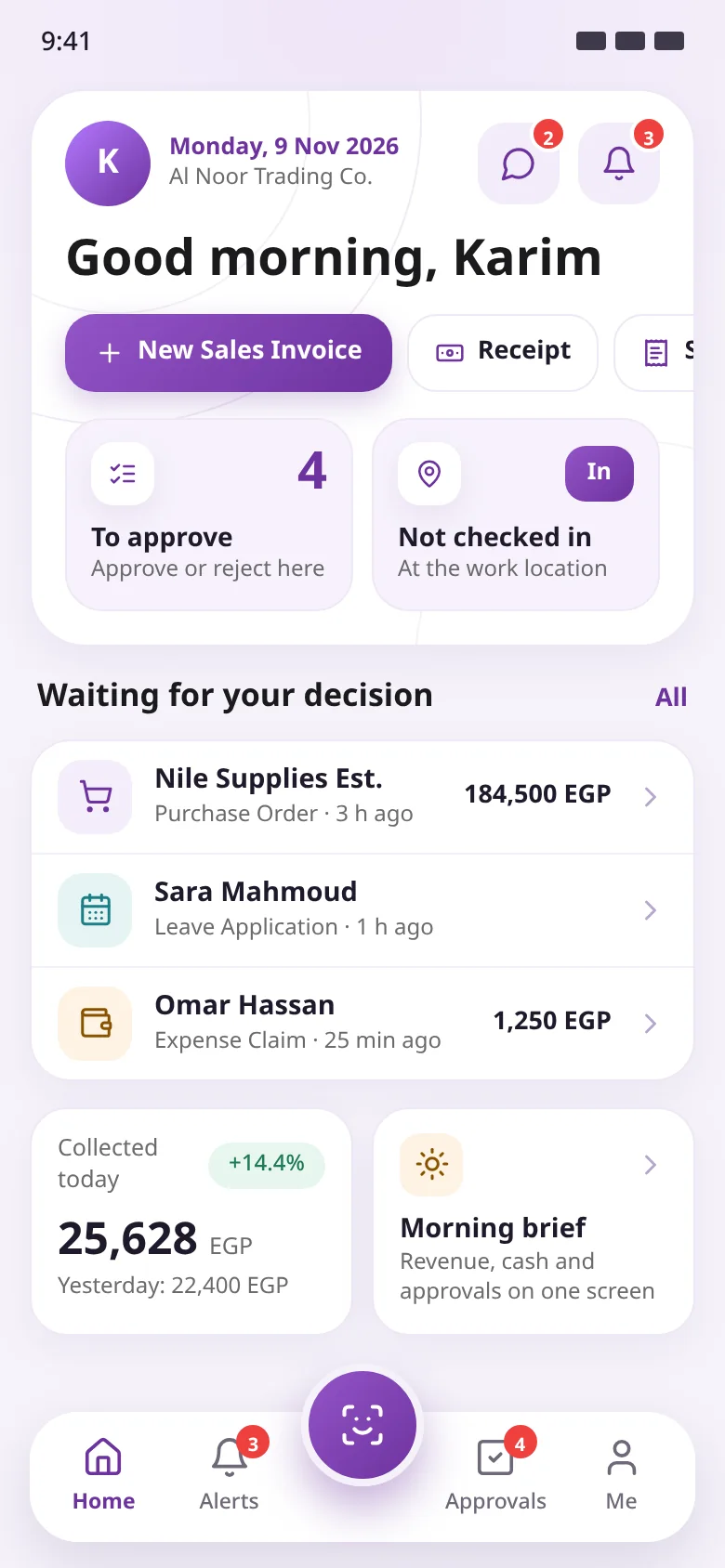
Laid out like the Operion Theme home on the desk. It opens on what needs your decision and your check-in status, then today's collections and the morning brief, with one-tap creation of the documents you make most.
Date, greeting and company
Quick create: sales invoice and receipt in one tap
Your approvals and the check-in button
Chat and alerts with unread counts
Quick createToday's check-inWaiting for you
02Approvals
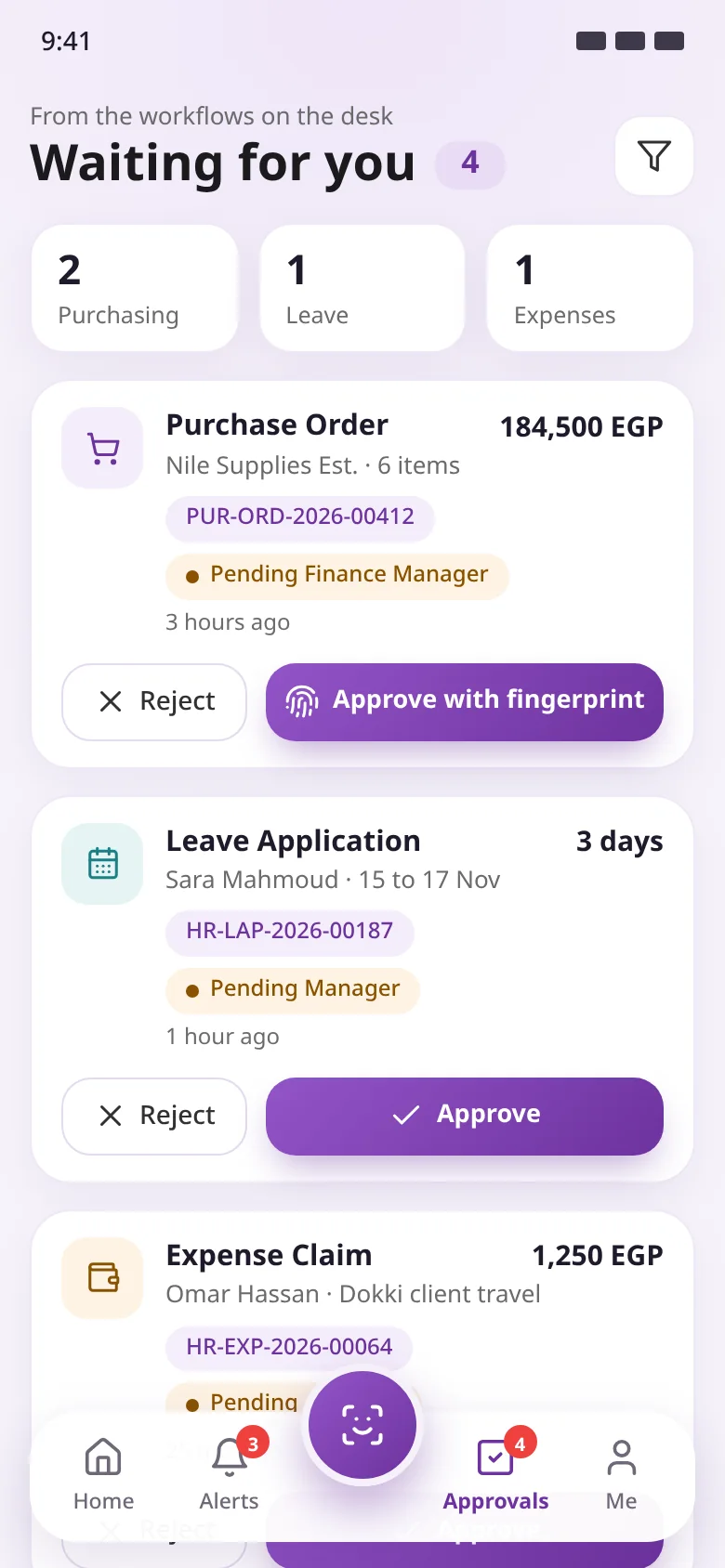
Decide with a tap, or a fingerprint
Everything your workflows need from you in one list, with each request's state and who it waits for. The server runs the same workflow action with the same conditions and roles.
Purchase orders, leave and expenses together
Workflow state and document number on every card
Fingerprint confirmation for sensitive workflows
Open the document to review it before deciding
Count by typeWorkflow stateFingerprint approval
03Create documents
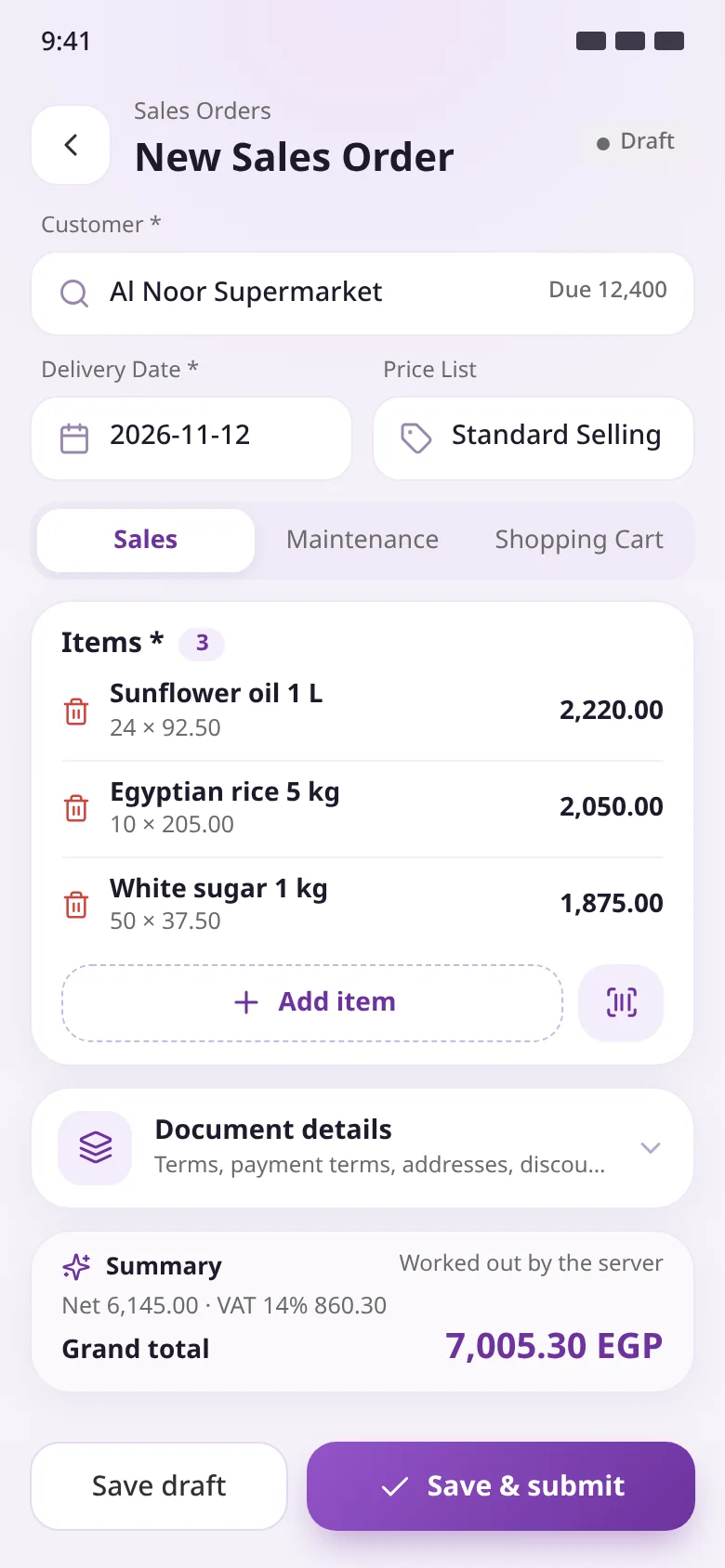
A full sales order from the phone
Pick the customer and add items by search or barcode; the server fetches the price from the customer's price list and the stock on hand. The summary is exactly what the system will book.
Customer and amount dueBarcode scanServer-calculated total
04Attendance
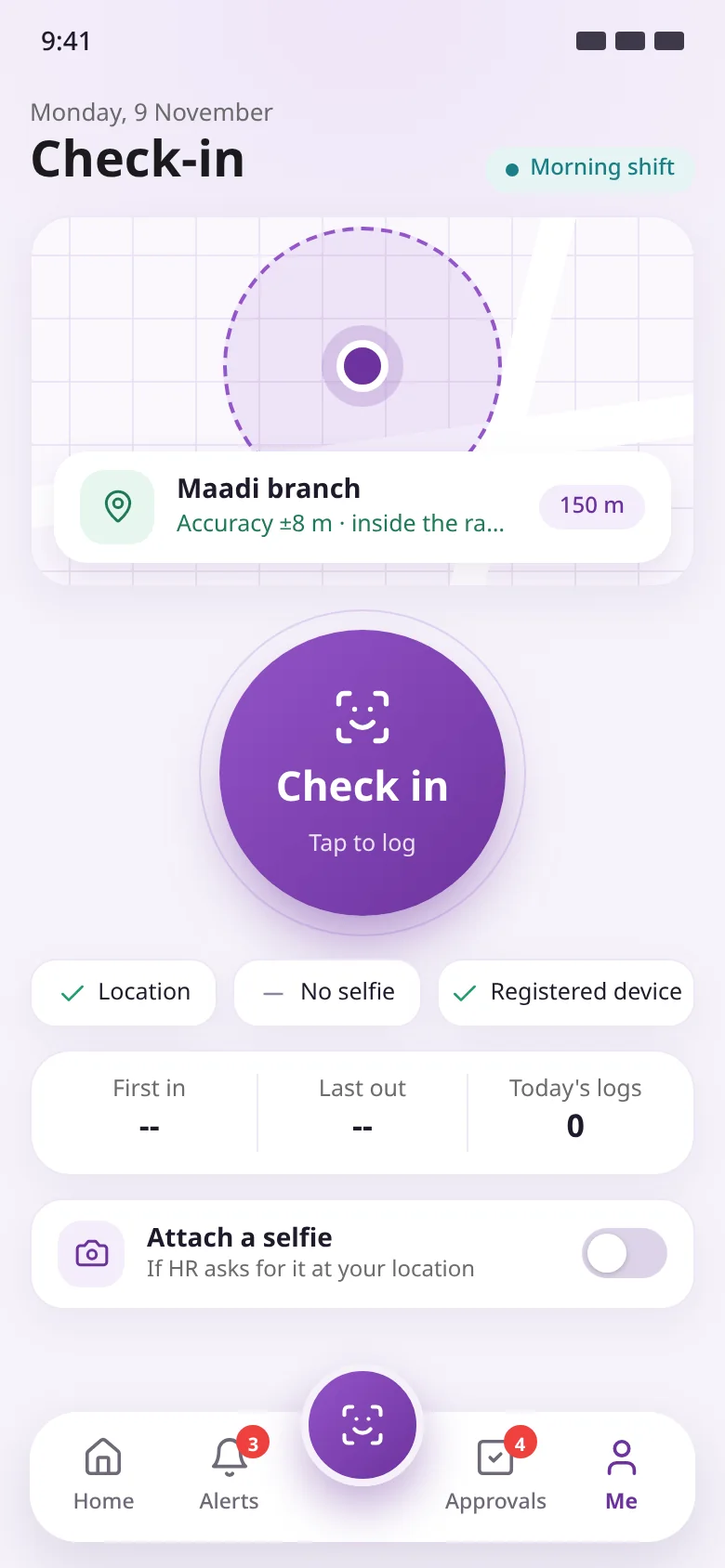
Check-ins only from the right place
The server confirms the employee is inside their shift location's radius before it creates the Employee Checkin. A selfie can be required, depending on the location's setup.
Map with your position and the work radius
One big check-in button on the bottom bar
First in, last out and today's logs
Optional selfie
Work location radiusCheck in with one tapOptional selfie
05Point of sale
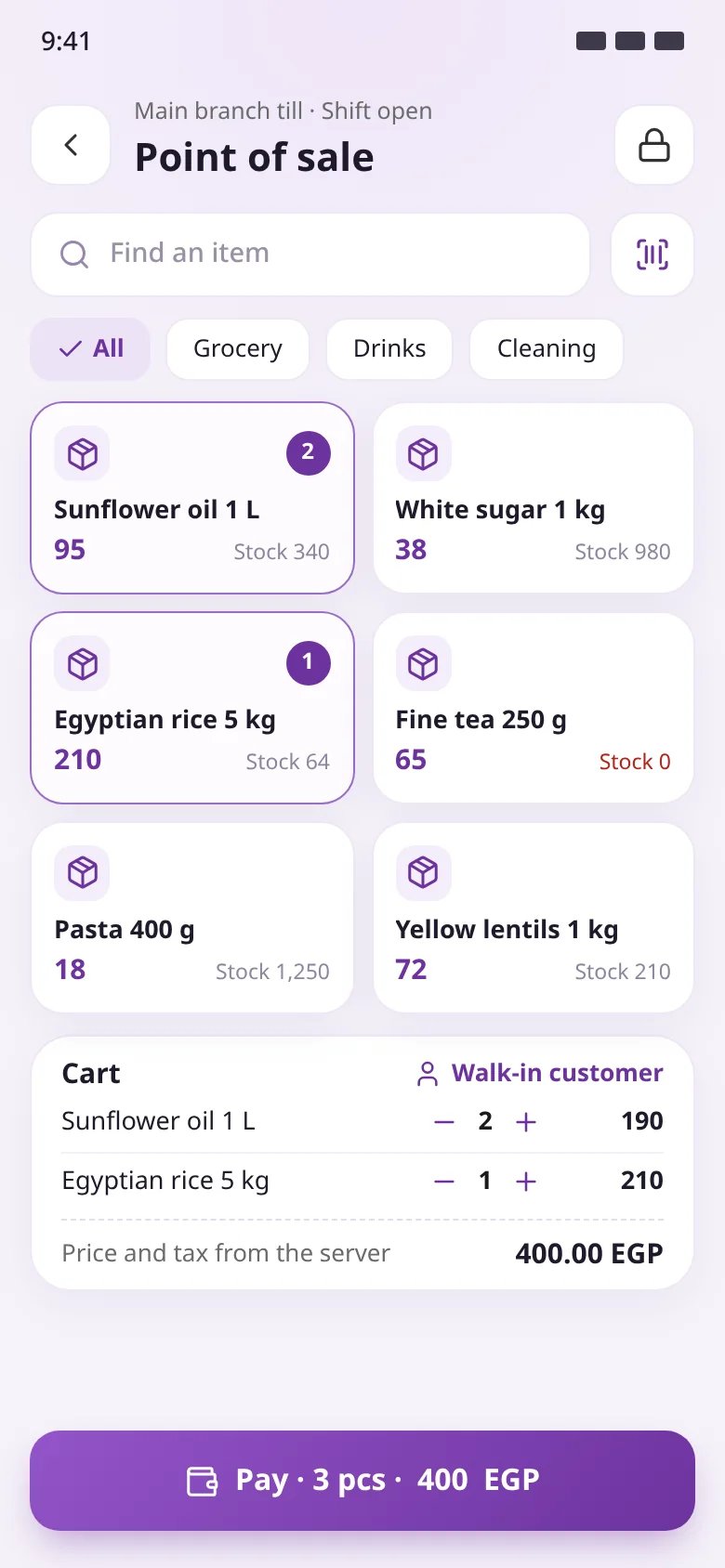
A complete till in the seller's pocket
Built on ERPNext's own POS: the POS Profile sets the warehouse, price list and payment methods, and the price and tax come from the server.
Shifts open with the drawer amount and close with the difference
Items by tap, search or barcode
Stock on hand on every item
Cash, card or split payments
Barcode scanQuantity in cartPay in one tap
06Morning brief
Your whole company before your first coffee
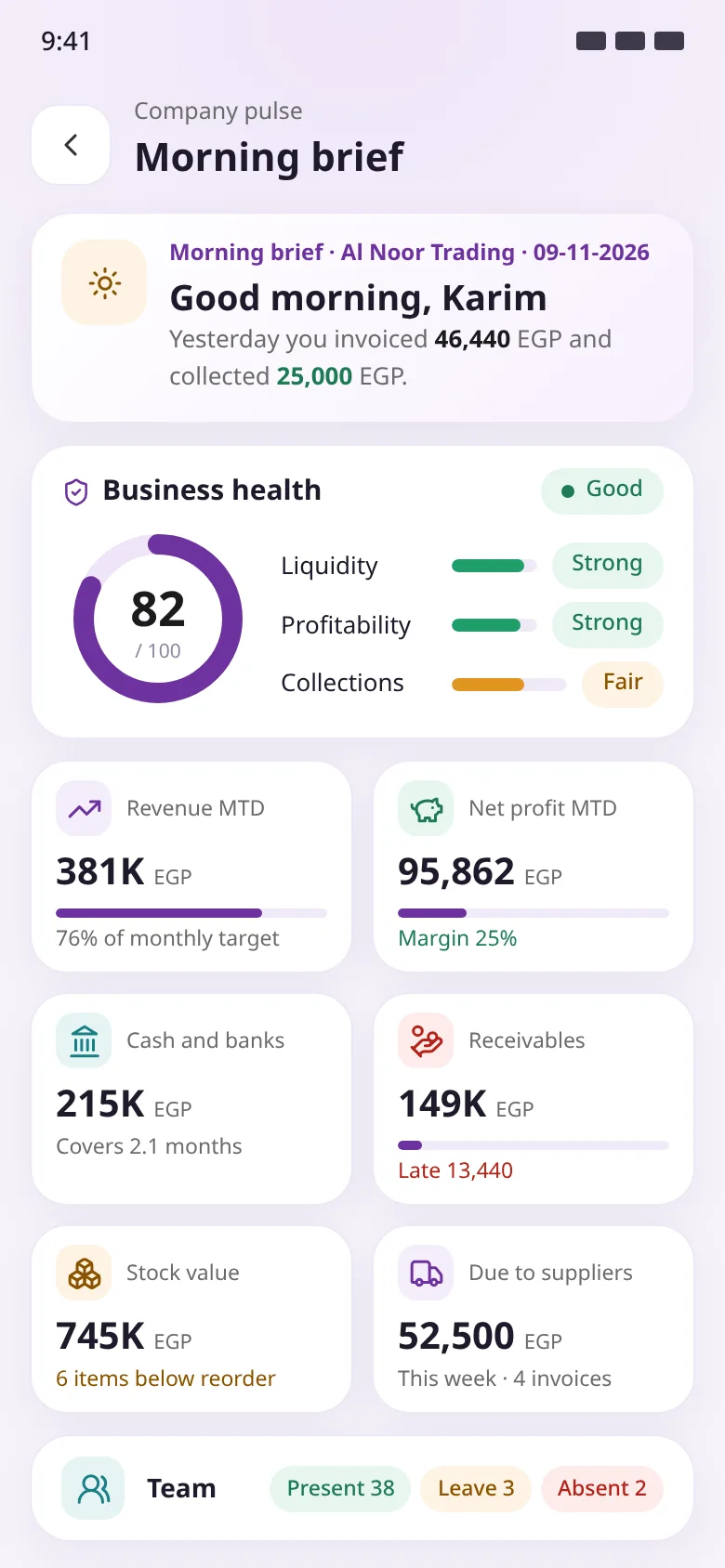
For owners and finance managers: business health, the month's numbers, cash and receivables, stock and today's team on one screen, with the same figures as the desk.
A business health score out of 100
Revenue against target, net profit and margin
Cash and banks, receivables and overdue amounts
Today's team: present, on leave and absent
Business healthRevenue against targetToday's team
Quick createToday's check-inWaiting for you
Count by typeWorkflow stateFingerprint approval
Customer and amount dueBarcode scanServer-calculated total
Work location radiusCheck in with one tapOptional selfie
Barcode scanQuantity in cartPay in one tap
Business healthRevenue against targetToday's team
Every feature
Everything your team needs from ERPNext, on mobile
The server is the judge: permissions, validation, prices, taxes and ledger entries are worked out on the server, not the phone, so a document made in the app matches one made on the desk.
Approvals in one inbox
Everything your workflows are waiting on, plus the leave and expense requests you approve. The server runs the same workflow action, so nobody approves what they can't.
A card per request: document, party, amount, who asked and when
Approve or reject straight away, or open the document first
Fingerprint confirmation for the workflows you choose
Pick which workflows can be approved from mobile
Create documents, same steps every time
Invoice, sales order, quotation, payment or material request: the steps are the same, and validation and totals happen on the server.
Add items by name or by scanning a barcode
Price from the customer's price list, with stock and unit
Full document details: terms, payment terms, addresses, discount, taxes
Save as draft or save and submit
Document view and next step
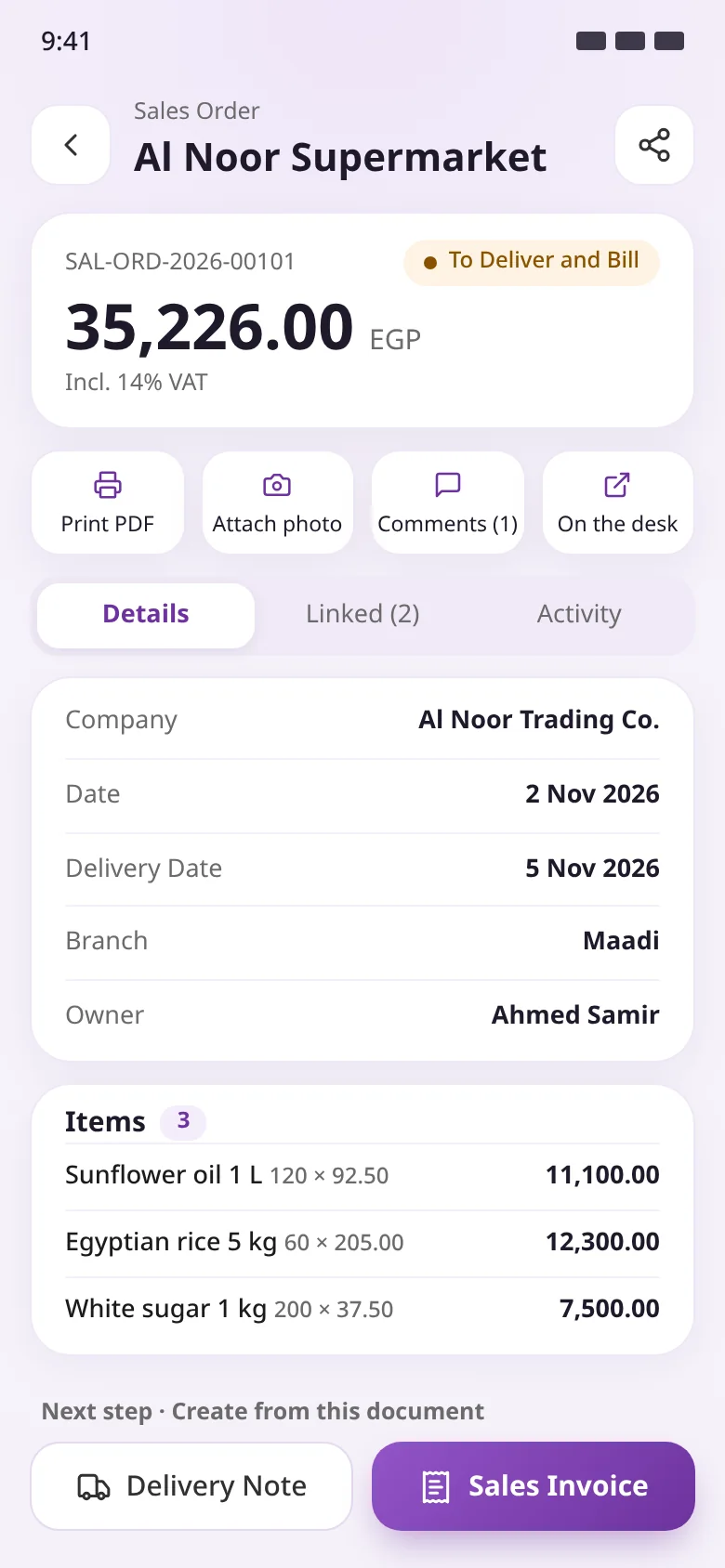
Every document opens as a clear card: status, details, rows, attachments and comments. From there you move to the next step without retyping anything.
PDF in your approved print format
Attach a photo from camera, gallery or a file
Sales order to delivery note or invoice, invoice to payment
Share the document in a chat with one tap
Location-checked attendance
The check-in button sits in the middle of the bottom bar. The server confirms the employee is inside their shift location's radius, then creates the Employee Checkin.
Work locations and radius set in Shift Locations
Optional selfie, as configured
First in, last out and today's logs
Built on Frappe HR, not a copy of it
Employee self-service
Request leave or an expense claim and follow your balances and salary slips. Requests go to the approver set in the system.
Leave balances before you apply
Expense claims and employee advances
Attendance and shift requests
Salary slips on the phone
Morning brief for management
Your day as owner or finance manager on one screen, with the same figures as the Operion Theme morning brief because the app reads the same source.
Business health: a score out of 100 from liquidity, profitability and collections
Revenue against target, net profit and margin
Cash and banks, receivables and supplier payments due this week
Stock value and items below reorder level
A full point of sale on the phone
Built on ERPNext's own POS: the POS Profile sets the warehouse, price list and payment methods, and shifts open and close as on the desk.
Open the shift with what's in the drawer
Add items by tap, search or barcode
Pay by cash, card or several methods, with change worked out
Close with expected amounts and the difference
Barcode stock counts
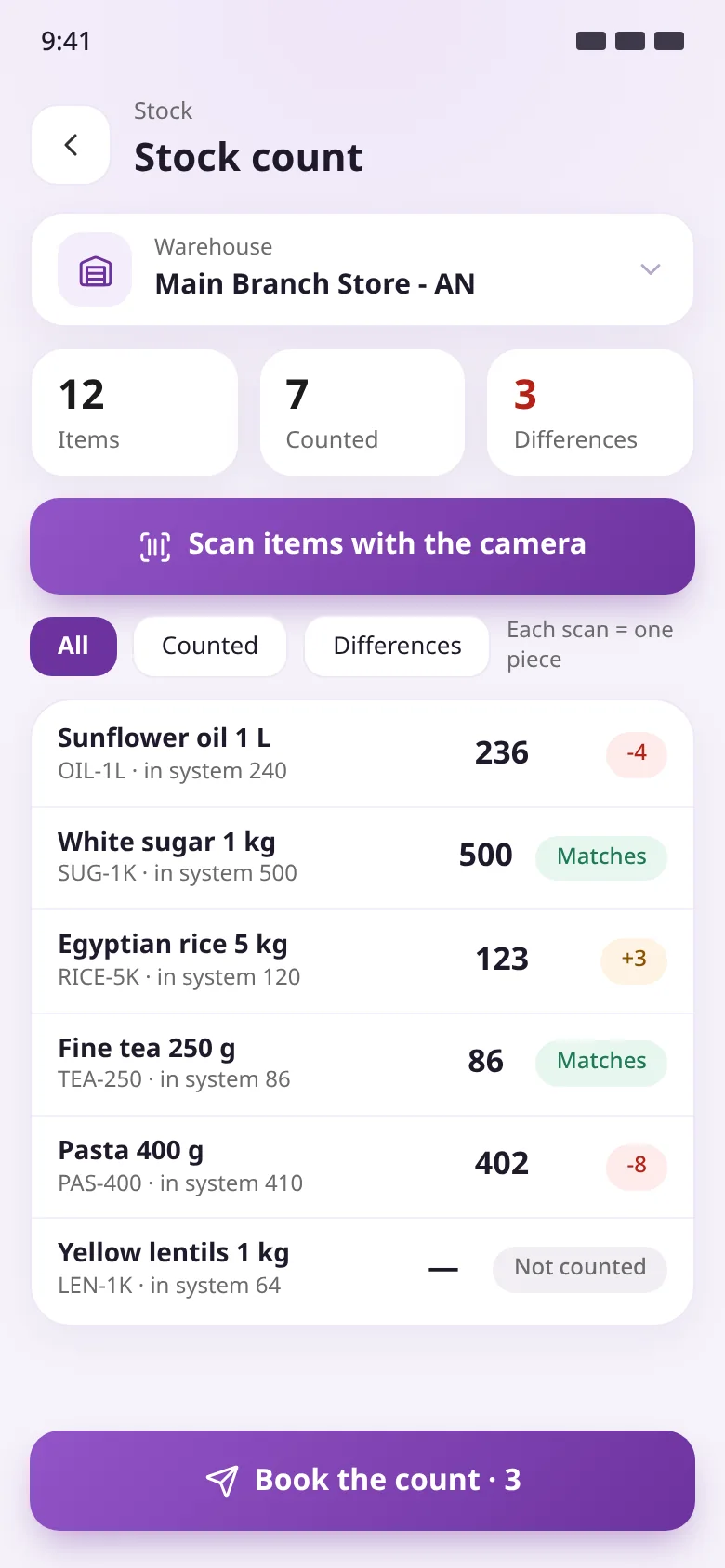
Scan items with the phone camera and enter the actual quantity. The server creates a Stock Reconciliation with the differences only, at the system's valuation.
Pick the warehouse and see its items with system stock
Rapid scanning: each scan is one piece
Review surplus and shortage before booking
Only the items that differ are reconciled
Team chat inside the system
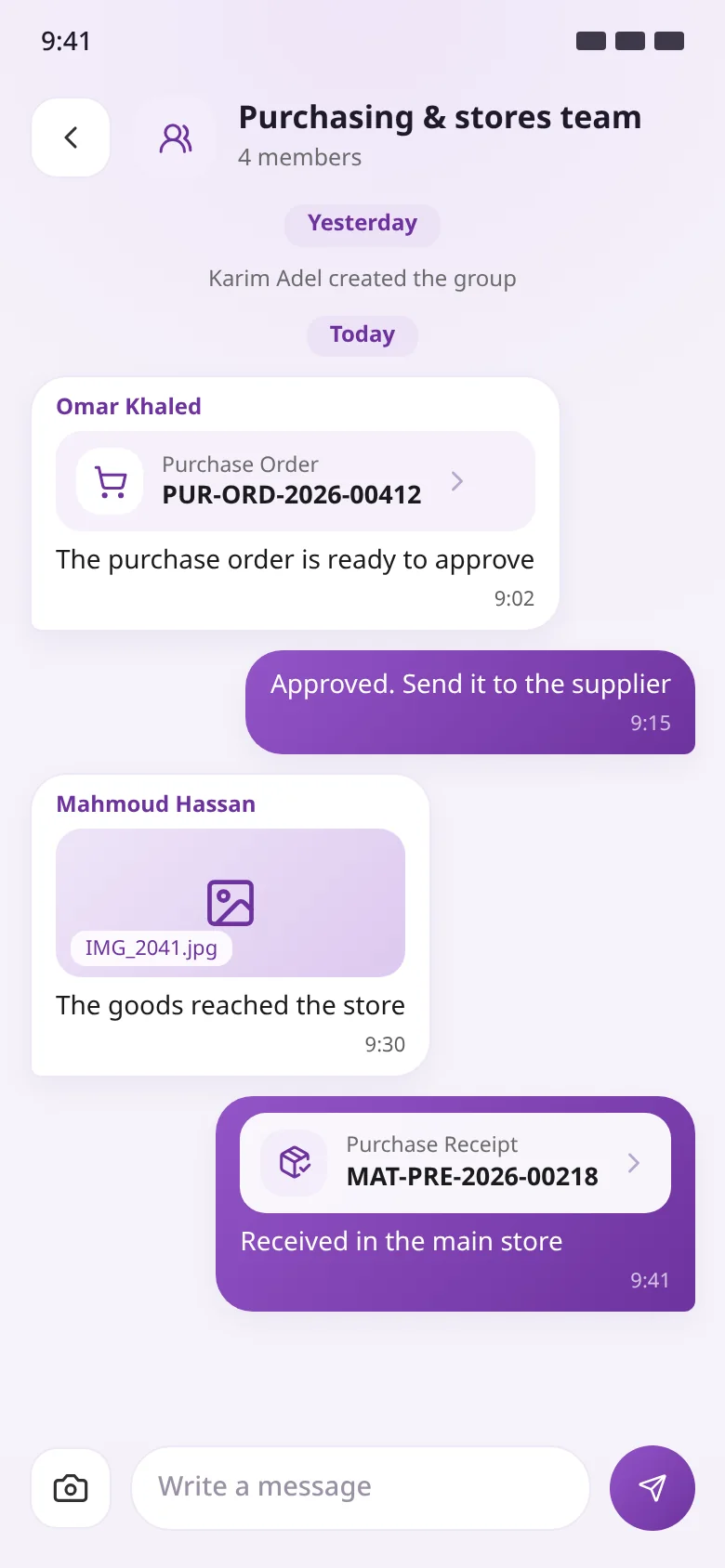
Instant chat between system users with no extra server app, stored only in your own system.
Direct chats or groups for a team or project
Send text, photos, files or a system document
Push alerts and an unread count on Home
Only members can read a conversation
Helpdesk and an AI assistant
A Helpdesk ticket inbox for support agents, and the Ask the system assistant from Frappe Flow working on your data with your own permissions.
My tickets, unassigned and open
Reply to the customer, add internal notes, change status and priority
Ask for a figure or a summary in your language
The assistant asks before creating or sending anything
Instant notifications
Straight to the phone: an approval request, a task assigned to you, an item at reorder level, or a chat message.
Open the document from the alert
Filter by all, unread, tasks and alerts
Quiet hours set by the admin
Controlled from the desk
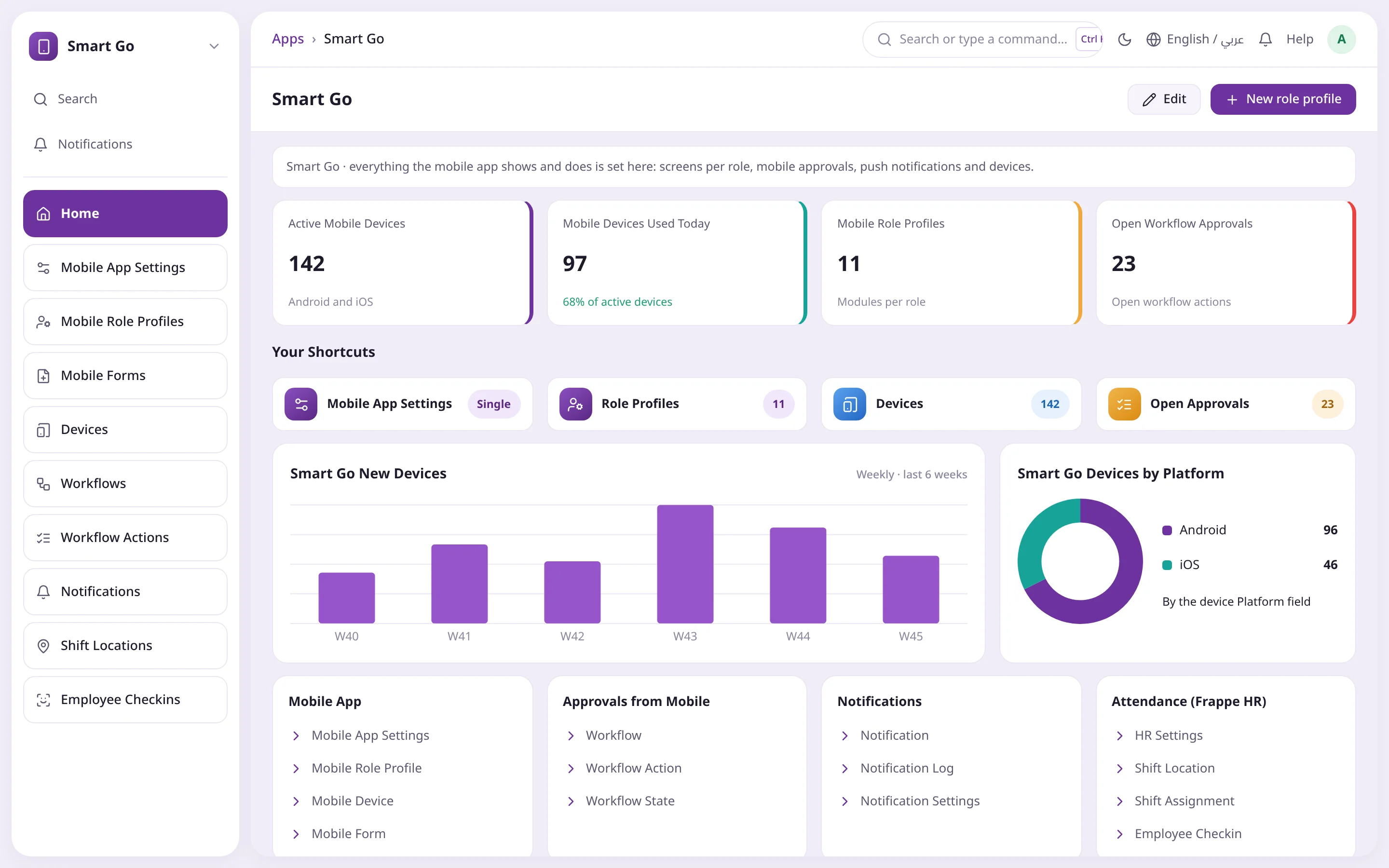
App identity and behaviour, screens per role, forced updates, maintenance mode and devices are all set from the Smart Go workspace.
App name, logo and primary colour
Minimum version with update link, and maintenance mode
Offline drafts sent when the connection returns
Fingerprint or face sign-in
For every role in your company
Every role gets its own app
A Mobile Role Profile decides what each role sees, in what order and where it starts. Users with several roles see all their modules combined.
Owner and finance manager
The company's numbers every morning, no report request
Morning brief and business health
Approve purchase orders by fingerprint
Today's collections against yesterday
Approving manager
No request waits for you to get back to the desk
Every approval in one list
A push alert for each new request
Open the document and attachments before deciding
Employee
Attendance and requests from their own phone
Check in from inside the work location
Request leave, expenses or an advance
Salary slips and leave balances
Sales rep and cashier
Sell and collect on the spot
Sales orders and invoices at the customer's price
A receipt straight from the invoice
A point of sale with full shifts
Storekeeper
Counts by camera, not by clipboard
Scan items by barcode
Review surplus and shortage before booking
Photograph the delivery note and attach it
How it works
From install to every phone in a few steps
Every action on the phone ends as a standard ERPNext document, so your books and stock stay in one place.
01Install smart_go on the site
On Frappe Cloud add the app to your bench group and deploy; self-hosted, install it and run migrate.
02Set Mobile App Settings
Name, logo and colour, minimum version, maintenance mode, biometrics and offline drafts.
03Choose screens per role
In Mobile Role Profile: modules, their order, the start screen and shortcuts to any DocType.
04Pick workflows and shift locations
What can be approved on mobile, what needs a fingerprint, and each work location's radius.
05Install the app on phones
Android from the APK; iOS through TestFlight or the App Store, as agreed with Operion.
06Connect and sign in
Staff enter the company URL once; the app checks the ERPNext version and smart_go, then they sign in with their usual credentials.
Product screenshots
A tour of Smart Go
Screens from the app on demo data, in Arabic and English.
HomeWhat waits for your decision, your check-in, today's collections and the morning brief.
Waiting for your approvalEverything your workflows need from you, with fingerprint approval.
New sales orderCustomer, barcode-scanned items and a server-calculated summary, then save and submit.
Document viewStatus, details, print and attachments, then the next step in the document cycle.
Check-inLog in and out from inside the shift location, with a selfie when required.
Morning briefBusiness health, the month's numbers, cash, receivables and today's team.
Point of saleItems by tap or barcode, a cart and one-tap payment.
Stock countScan by camera and review differences before booking the reconciliation.
ChatA purchasing and stores group with shared documents and photos.
Smart Go workspaceDevices, open approvals and every app setting, inside ERPNext.
Comparison
The difference shows from day one
Without Smart GoWith Smart Go
ApprovalsWait for the manager's deskFrom the phone at once, by fingerprint when needed
Field attendancePaper sheets, checked by handEmployee Checkin verified by location radius
Sales ordersPaper re-keyed at the officeA system document with the customer's price and stock
Stock countsCounted by hand, matched for daysBarcode scan, reconciled differences only
Team chatMessaging apps outside the systemChat inside your system, with documents shared
Custom screensDevelopment and a new releaseA Mobile Role Profile set on the desk
The challenge
ERPNext works at the desk, but work doesn't wait at the desk
When ERPNext is stuck on a PC screen, decisions slow down and paper and side chats creep back in.
Approvals stuck in the queue
Purchase orders, leave and expenses wait for the manager to get back to the office, so supply and staff wait too.
Attendance you can't verify
Biometric terminals don't reach project sites and field branches, and manual logs invite mistakes.
Sales reps off the system
Orders are written on paper and re-keyed at the office, without the customer's price or live stock.
Stock counts on paper
Counting a store by hand and matching it to the system takes days, and differences surface late.
Generic apps ignore your setup
Off-the-shelf mobile apps skip your custom fields, workflows and permissions.
Owners without numbers
Yesterday's sales, cash and overdue invoices need a report from accounts instead of a quick look each morning.
Components
Modules you switch on by settings, not code
24 modules in the app registry, shown to each role by its Mobile Role Profile and by the apps installed on your site. Any other DocType can be added as a filtered shortcut, no code needed.
Approvals & notifications
For every user: workflows, their actions and the notification log.
Check-in
For users linked to an active Employee, inside the shift location's radius.
Self service
Leave, expenses, advances, shifts and salary slips.
Company pulse & morning brief
For finance roles: revenue, cash, receivables and business health.
Sales & leads
Customers, quotations, sales orders, invoices and opportunities.
Point of sale
For every user listed on an enabled POS Profile.
Stock & stock count
Purchase receipts, pick lists, stock entries and barcode counts.
Delivery & buying
Delivery trips and notes, material requests and purchase orders.
Accounts
Payment entries, sales and purchase invoices and journal entries.
Manufacturing & assets
Job cards, work orders, quality inspections and asset maintenance.
Projects & field service
Projects, tasks, timesheets and maintenance visits.
Chat, Helpdesk & Ask the system
Smart Go chat, plus Helpdesk tickets and the Frappe Flow assistant when installed.
Who it is for
Who is Smart Go for?
Managers and approvers
Purchase, leave and expense decisions from anywhere, without waiting for the desk.
Employees in every team
Check-in, leave, expenses and salary slips from the phone.
Site and project teams
Location-verified attendance at projects, branches and warehouses.
Distribution and retail
Sales orders, collections, point of sale and barcode stock counts.
Manufacturing and maintenance
Job cards, quality inspections and maintenance visits from the floor.
Business owners
The morning brief and business health on the phone every morning.
Integration & tech
Built on ERPNext, not beside it
The app keeps no copy of your data and calculates nothing itself: every entry goes to the server, which creates the document and ledger entries as if made from your desk.
Works with ERPNext 16 and later, and checks the version and the smart_go app before connecting
Runs on Frappe Cloud by adding the app to your bench group and deploying, and self-hosted too
Permissions, workflows and validation come from the system; read-only fields stay read-only in the app
Attendance from Frappe HR (Shift Location and Employee Checkin), shown automatically when HRMS is installed
POS on ERPNext's own POS, and stock counts post a standard Stock Reconciliation
Morning brief from the Operion Theme, Helpdesk tickets and the Frappe Flow assistant when installed
Any error shows its reason in the app and is logged in the system's Error Log with a reference
FAQ
See Smart Go running on your own system
Book a demo, and the Operion team will arrange installation, setup and training.
It works with ERPNext 16 and later and needs the smart_go app on the site. When connecting, the app checks the system version and smart_go before going on.
Do we need a new app release to add a screen or role?
No. Screens per role, shortcuts, approvals and notifications are set inside ERPNext, and changes reach phones the next time the app opens.
Does it respect our permissions and customisations?
Yes. Validation and totals run on the server with the same rules, and showing a module grants no rights: without system permission on a DocType, a user can't see or create it.
How does location-checked attendance work?
Work locations and their radius are set in Shift Locations. The server checks the employee is inside the radius, then creates the Employee Checkin. The user must be linked to an active Employee.
How does a cashier get the point of sale?
Add them to the allowed users of an enabled POS Profile that has the warehouse, price list and payment methods, and the POS appears for them automatically.
What does a stock count create?
A Stock Reconciliation with only the items that differ, at the valuation the system sets, after you review surplus and shortage.
Where are chats stored?
Only in your own system, with no extra server app, and only a conversation's members can read it.
Does it work offline?
With offline drafts on, the document types you choose are saved on the phone and sent automatically when the connection returns.
Can we force an update or pause the app?
Set a minimum version and update link and older phones are asked to update; switch on maintenance mode and users see a maintenance message while system managers keep working.
Is the interface in Arabic?
Yes. Arabic and English, switched instantly within the same session, right from the first screen.


 Quick createToday's check-inWaiting for you