1. Home
  2. Operion products
  3. Smart Cash
Smart CashTreasury & cash management for ERPNext

Every pound recorded the moment it moves

Cash boxes, cheques and guarantees fully under control

Smart Cash turns the ERPNext cash account into a complete daily workplace: cash boxes with custodians, limits and a live balance, payment and receipt vouchers a cashier issues in a minute and prints for signature, in-transit transfers, denomination counts and a daily close, plus the full life cycle of cheques, employee custody and letters of guarantee. Every movement lands first in an immutable Treasury Ledger, then posts as standard ERPNext entries your accountant can trust.

Runs onWeb (ERPNext desk)
Treasury Dashboard
Live balance per box 17 cheque actions Daily GL reconciliation
  • 16analytical & control reports
  • 17cheque actions defined as data
  • 7ready-made treasury roles
  • 3posting modes per cash box
Before & after

A day in treasury before and after Smart Cash

The same daily situations, now with a document the payer understands and an entry the reviewer trusts.

Without Smart Cash
  • Paying a petty expense

    A journal entry the accountant books later from a paper receipt.

  • The box balance right now

    Someone phones the cashier to ask.

  • A bounced customer cheque

    Discovered late and fixed by hand.

  • Cash for the coming weeks

    A spreadsheet updated now and then.

vs
With Smart Cash
  • Paying a petty expense

    A payment voucher the cashier issues in a minute and prints for signature.

  • The box balance right now

    A live card on the dashboard for every box and site.

  • A bounced customer cheque

    A "Bounced" action posting to bounced cheques, plus an aging report.

  • Cash for the coming weeks

    An automatic 13-week forecast from cheques and recurring entries.

Product video

Meet Smart Cash

A quick motion tour of what the product does.

Feature tour

Key screens up close

Five screens the treasury team works on every day, from the manager's first look to the accountant's reconciliation.

01Dashboard

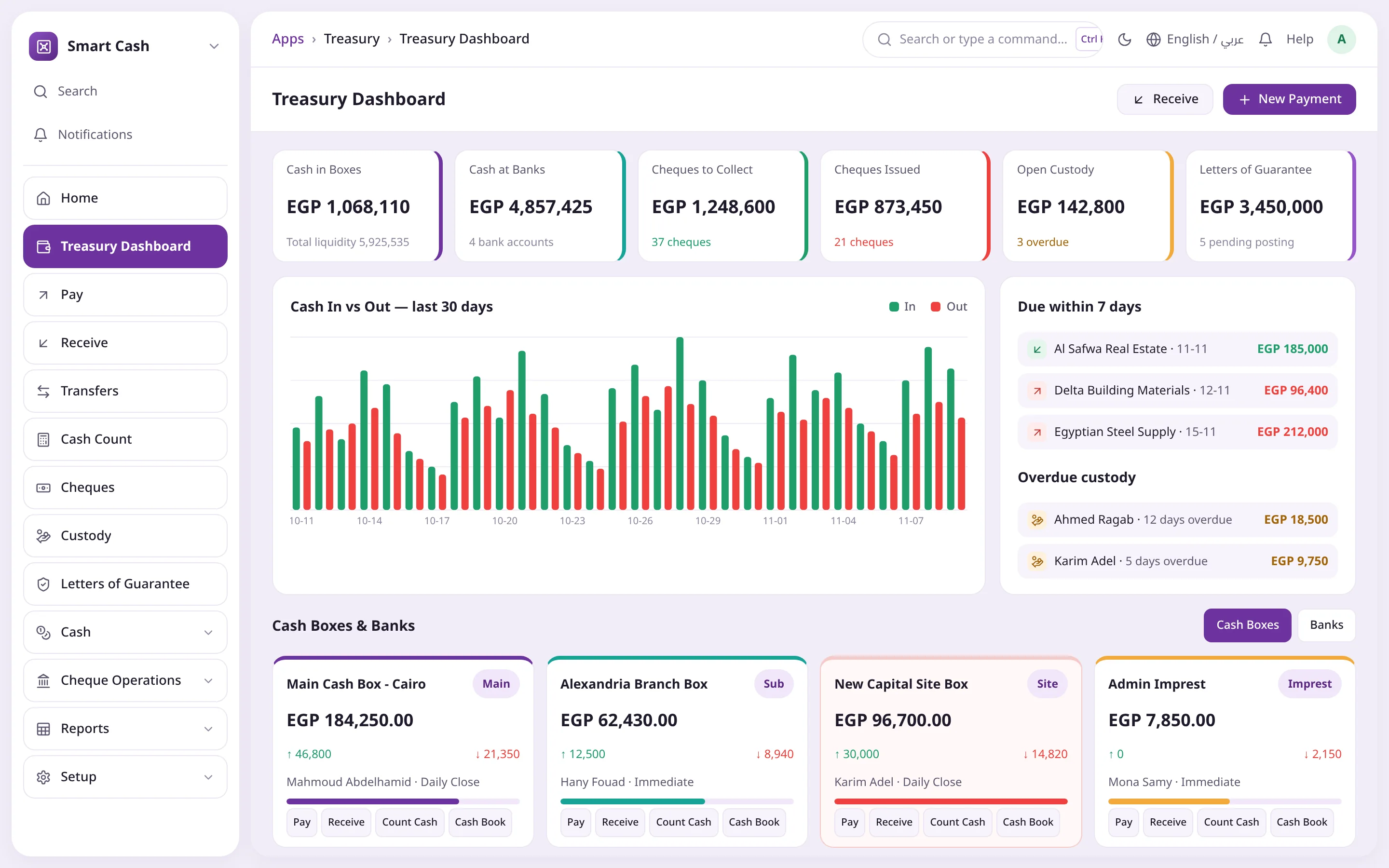
Your whole liquidity on one screen

Six indicators that update with every movement, a 30-day cash in vs out chart and everything due within 7 days. Below them, a card per box and bank with one-click actions.

  • Cash in boxes and banks, cheques, custody and guarantees
  • Limit bar turns orange when a box breaches its limits
  • Pay, receive, count and cash book buttons on each card
  • Users only see the boxes they are permitted to
Your whole liquidity on one screenSix liquidity indicatorsDue within 7 daysBalance & limit per box
02Payment voucher

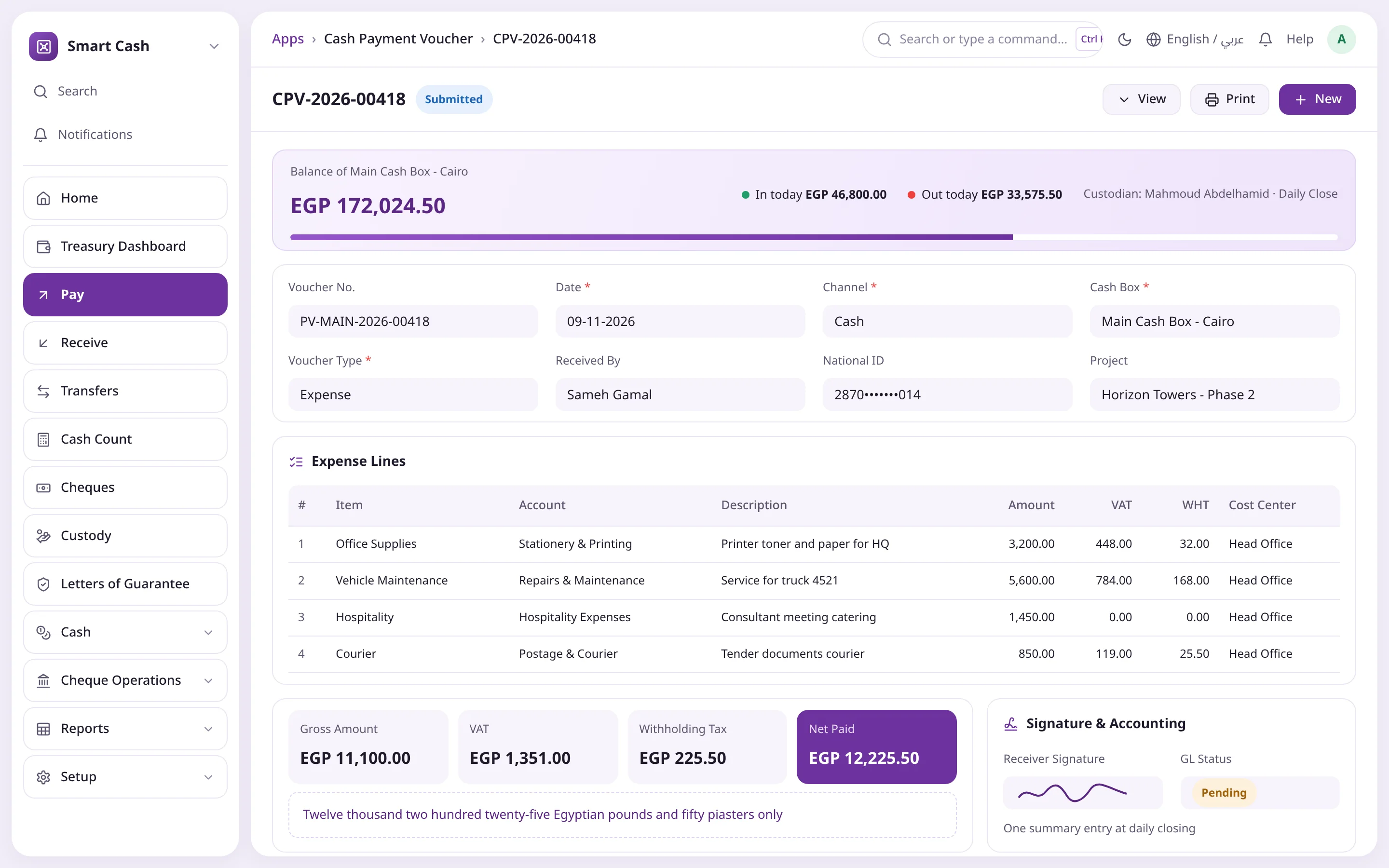
A voucher cashiers understand, an entry accountants trust

The cashier picks a voucher type and an item; account, cost center and taxes fill in. The balance bar warns before paying, and "Pay & Submit" deducts and posts per the box's mode.

  • Seven types: expense, supplier, refund, advance, custody, labor, other
  • VAT, withholding tax and e-invoice UUID
  • Gap-free serial per box and year
  • Arabic print with four signatures
A voucher cashiers understand, an entry accountants trustLive box balanceLines with account & taxesNet paid & amount in words
03Cheques

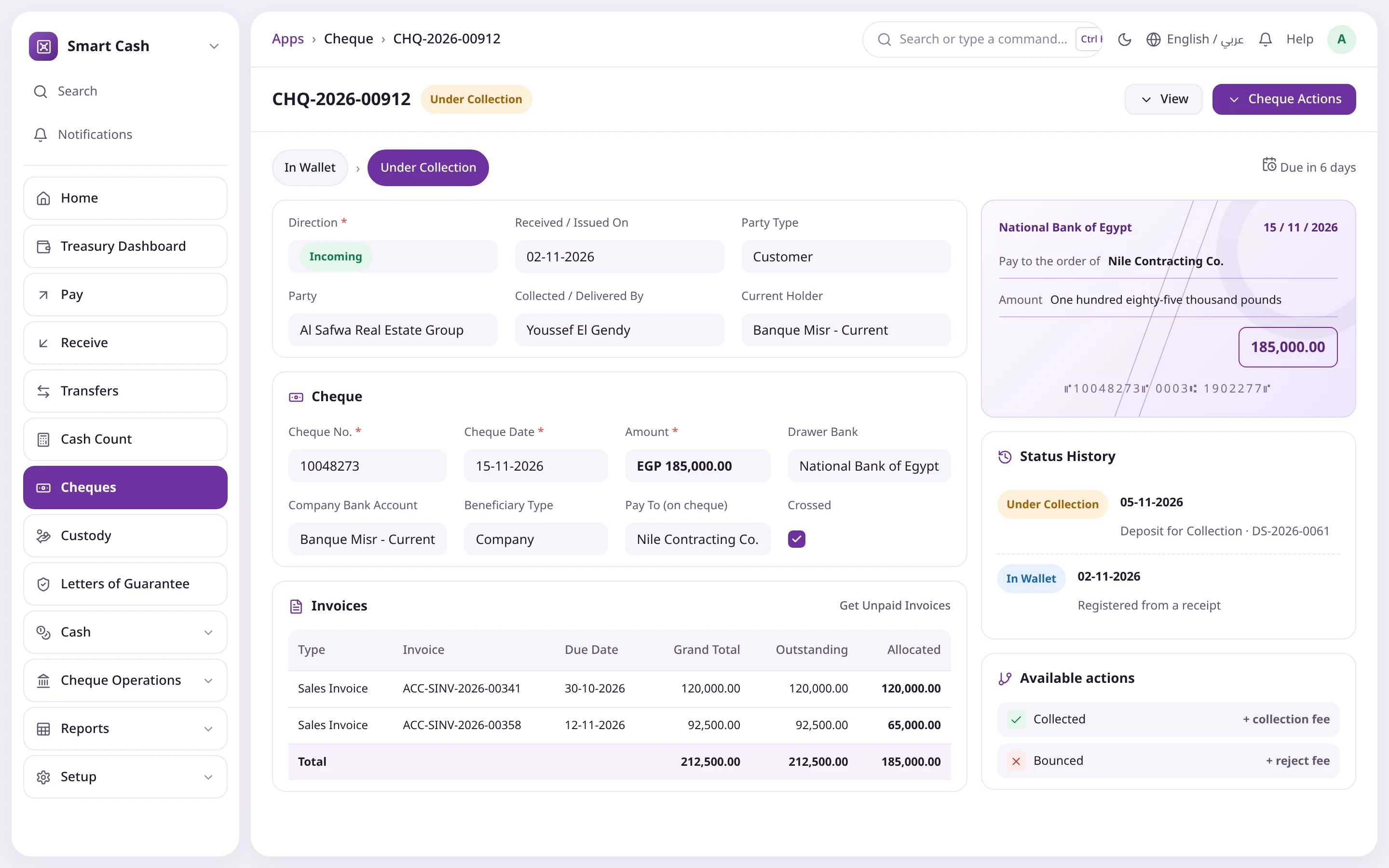
Every cheque knows where it is and what it did

A status path shows where the cheque came from, where it is and how many days to maturity. "Cheque Actions" lists only the valid moves for its state and your role, and each one books a balanced entry.

  • Deposit, collect, bounce, endorse, discount at bank
  • Commissions suggested from the bank's commission table
  • Status history that cannot be edited by hand
  • Duplicate cheque numbers blocked per bank
Every cheque knows where it is and what it didStatus pathOnly valid actionsAllocated to invoices
04Custody

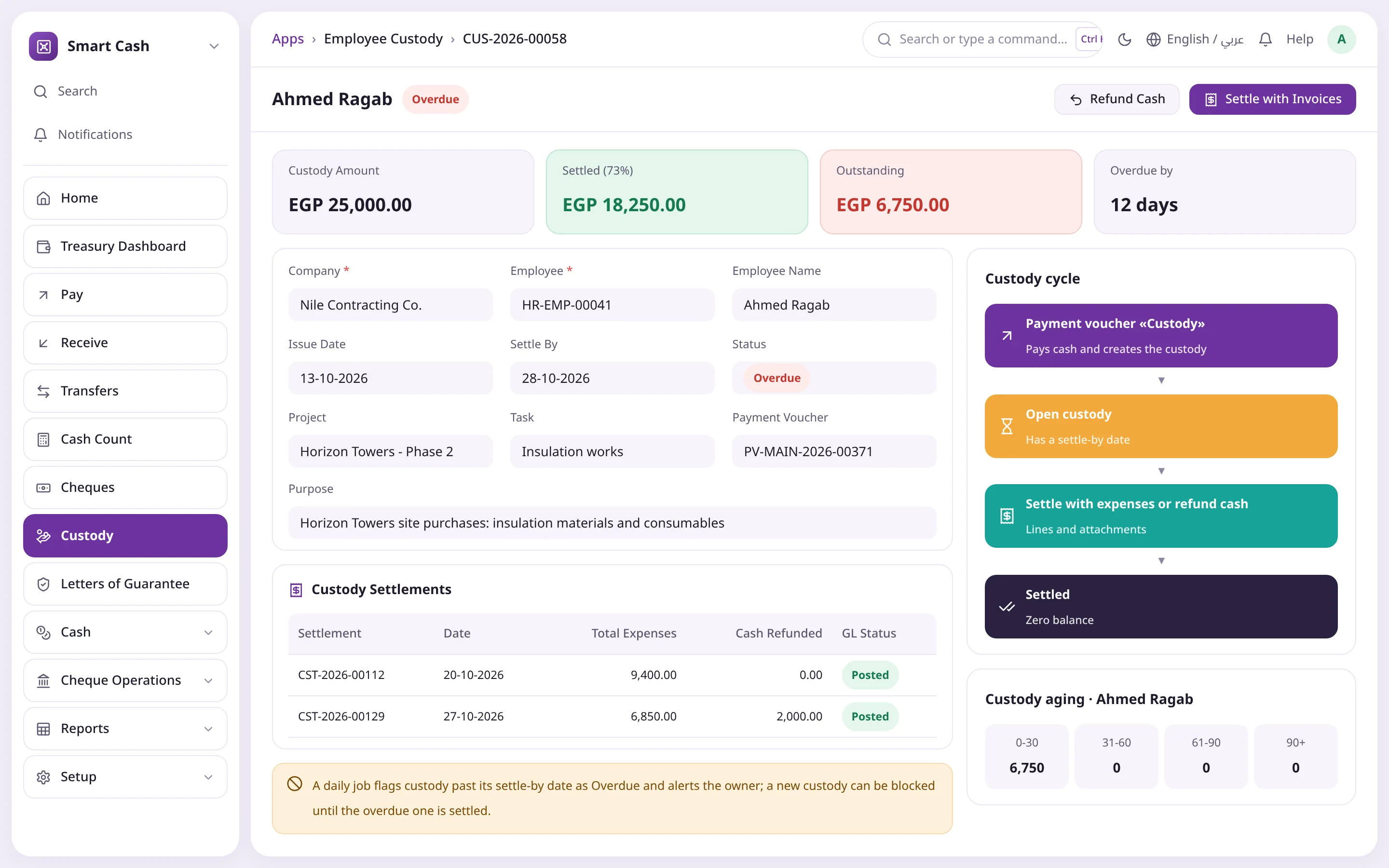
Every amount held by an employee has a deadline

Custody is created from a "Custody" payment voucher and settled with expenses and attachments or a cash refund. Anything past its settle-by date turns Overdue automatically and alerts the owner.

  • Amount, settled and outstanding at a glance
  • Settle with invoices or refund cash in one click
  • Custody aging by overdue bands
  • New custody blocked until the overdue one is settled
Every amount held by an employee has a deadlineOutstanding on employeeSettle with invoicesFull custody cycle
05Reconciliation

Treasury Ledger and GL on one number

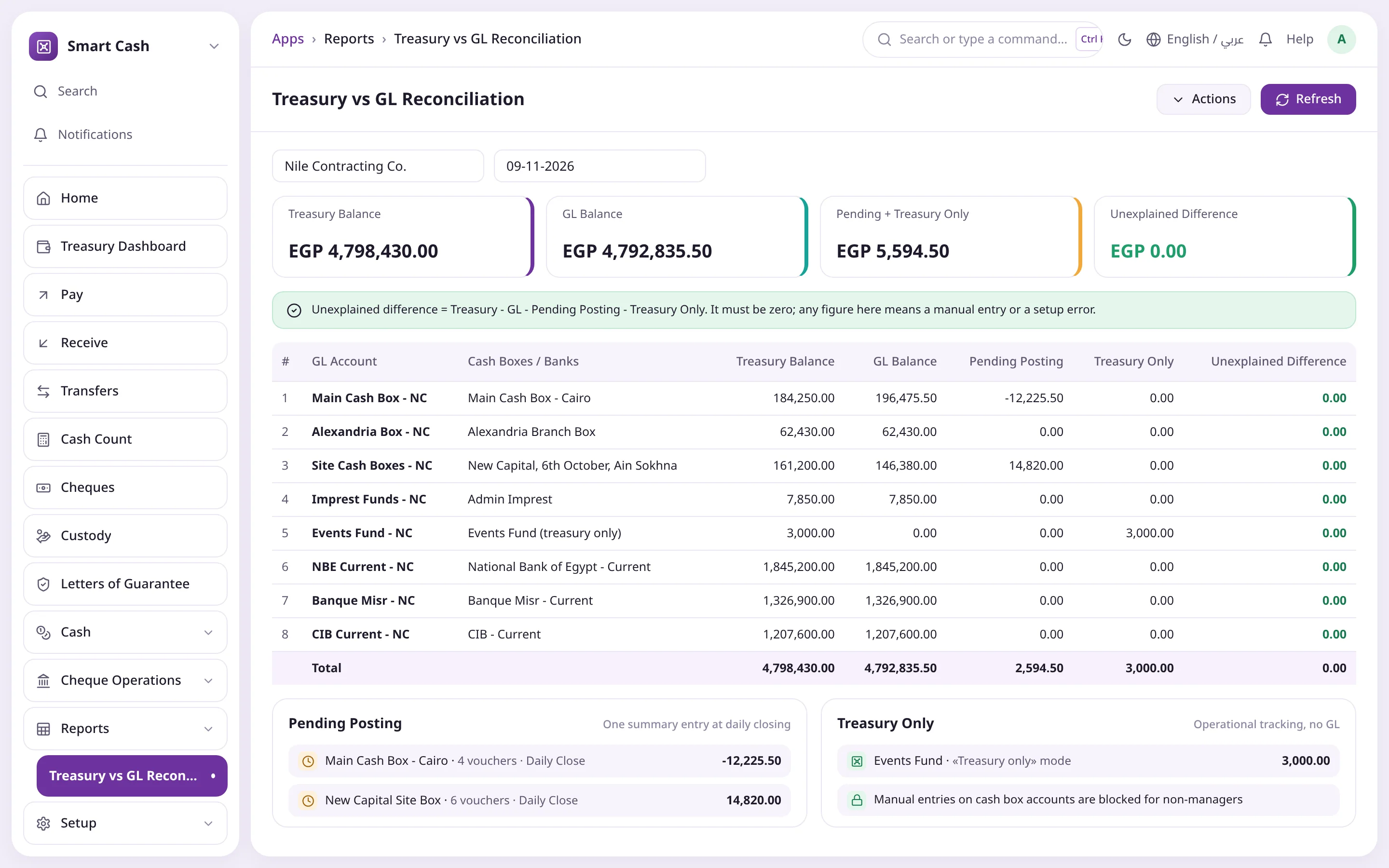
A morning report puts every box and bank against its GL account and explains the gap with pending postings and treasury-only items. What remains must be zero.

  • One line per GL account linked to a box or bank
  • Pending closing separated from real differences
  • Manual entries on cash box accounts are blocked
  • Part of the accountant's month-end routine
Treasury Ledger and GL on one numberZero unexplained differenceMatched per accountWaiting for closing
Your whole liquidity on one screenSix liquidity indicatorsDue within 7 daysBalance & limit per box
A voucher cashiers understand, an entry accountants trustLive box balanceLines with account & taxesNet paid & amount in words
Every cheque knows where it is and what it didStatus pathOnly valid actionsAllocated to invoices
Every amount held by an employee has a deadlineOutstanding on employeeSettle with invoicesFull custody cycle
Treasury Ledger and GL on one numberZero unexplained differenceMatched per accountWaiting for closing
Every feature

Twelve capabilities covering the whole cash cycle

Everything that happens in treasury, from the first voucher in the morning to the daily close, and from receiving a cheque to collecting it, inside ERPNext.

Cash boxes

Main, sub, imprest and site boxes, each with a custodian, an account, limits, a color and a short code used in voucher numbers.

  • Max/min balance with a "deposit the surplus" alert
  • Posting mode per box: immediate, daily close or treasury only
  • Additional users with specific permissions
  • Site custodians only see their own box

Payment voucher

The most-used screen: the cashier picks a voucher type and an expense item, and the account, cost center and taxes fill in automatically.

  • Expense, supplier, customer refund, employee advance, custody, labor sheet, other
  • Balance bar turns red when the box cannot cover it
  • VAT, withholding tax and amount in words
  • Daily labor sheet with days, wage and deductions

Receipt voucher

Collect in cash, by bank transfer or by cheque, fetch the customer's open invoices and allocate the amount.

  • Customer, misc income, custody refund, advance repayment
  • Standard Payment Entry closes invoices instantly
  • A refund larger than the open custody is rejected

Transfers

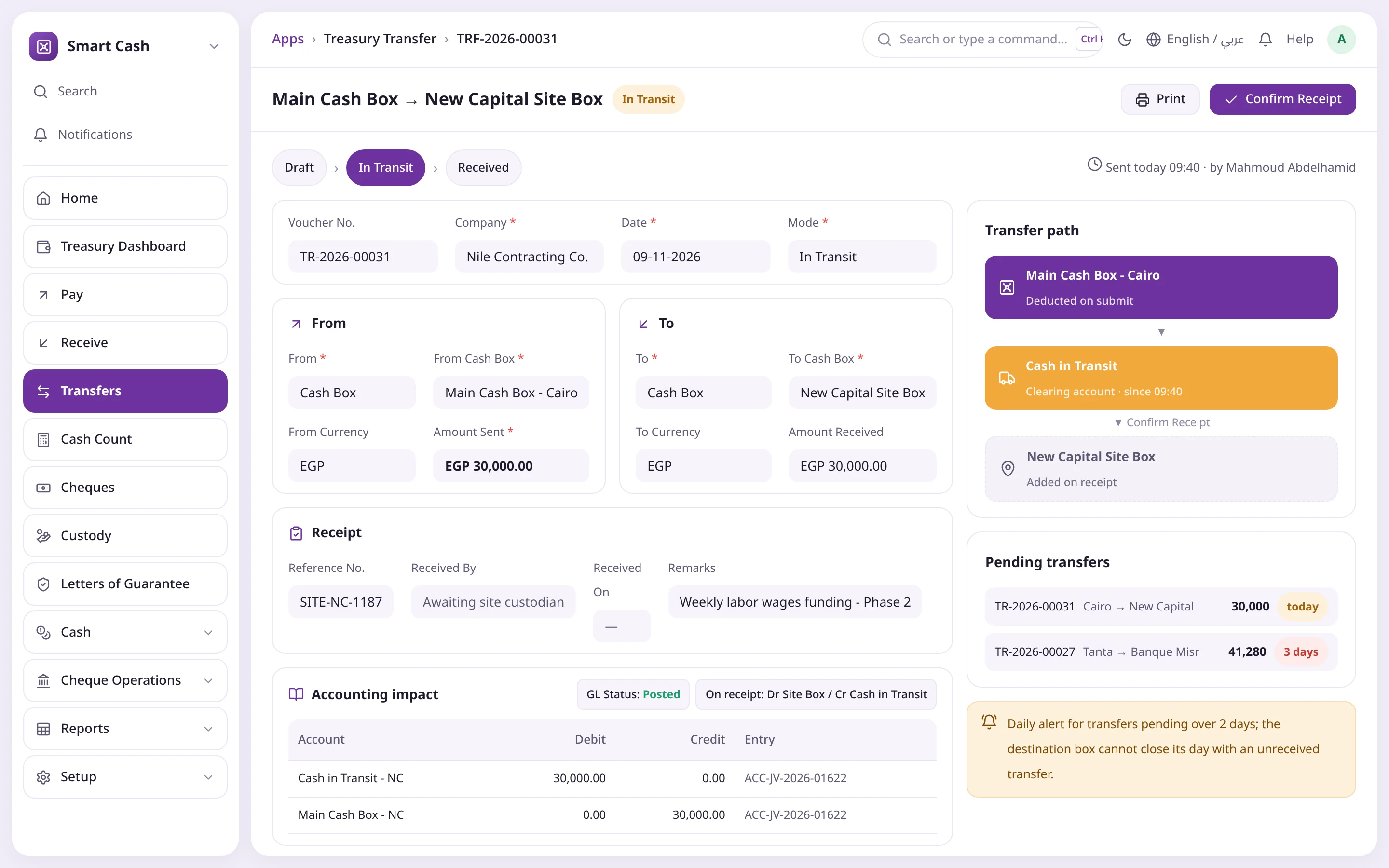
Move cash between boxes and banks directly, or in transit through a Cash in Transit account until the receiver confirms.

  • Draft, In Transit, Received, Cancelled
  • Cross-currency at an exchange rate
  • Daily alert for transfers pending over 2 days
  • A box cannot close with an unreceived transfer

Count & daily close

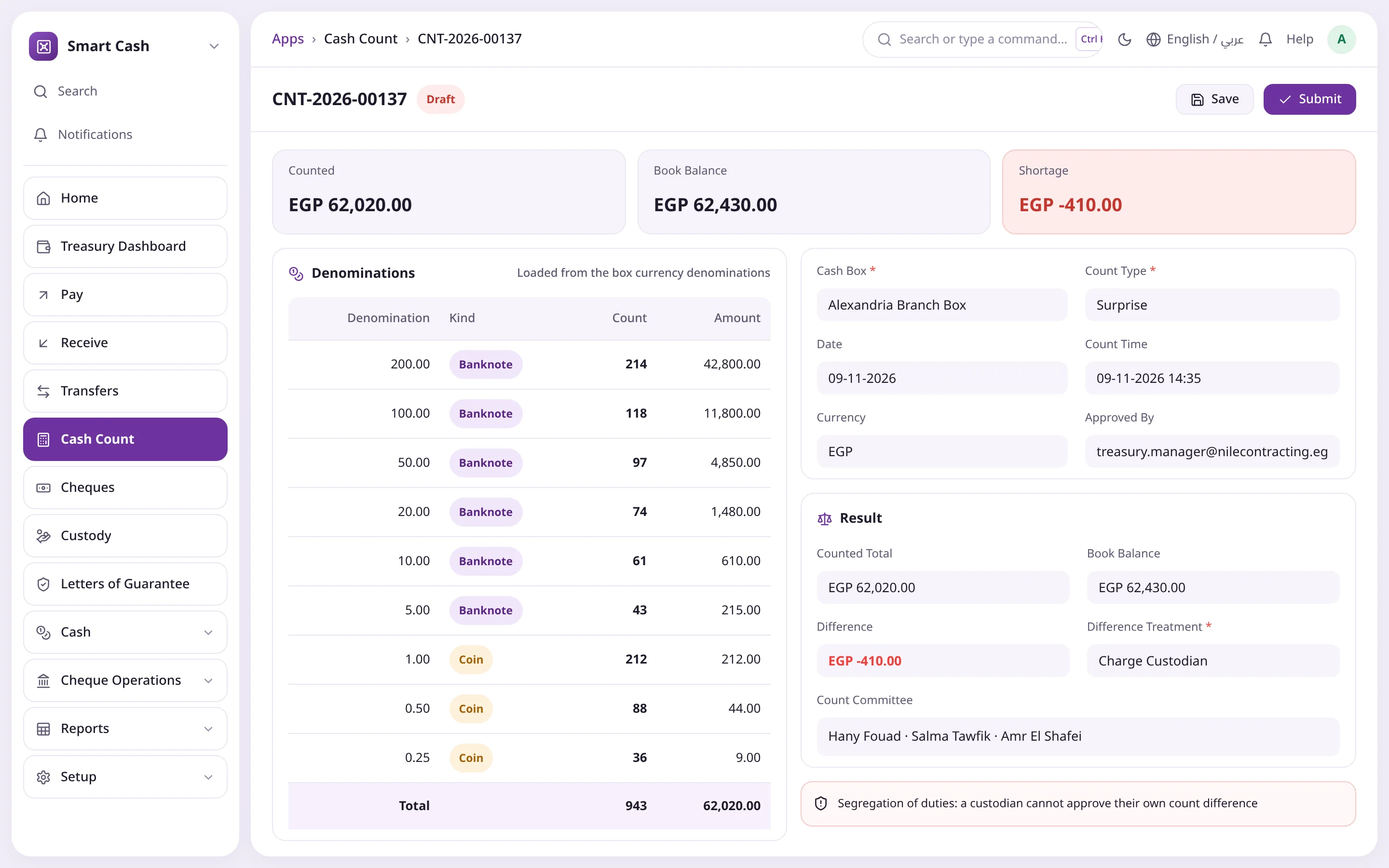
A denomination count computes and books the difference, then a daily close posts one summary entry and locks the day.

  • Periodic, surprise and handover counts
  • Shortage expense, charge custodian or surplus suspense
  • Closing conditions checked by the system
  • Only the treasury manager can reopen a day, with a reason

Custody & imprest

Custody is created from the payment voucher with a settle-by date, then settled with expenses or a cash refund and tracked by age.

  • Open, Partly Settled, Settled, Overdue
  • Daily job flags overdue custody and alerts
  • Block new custody for an employee with an overdue one
  • Imprest replenishment in a single transfer

Cheques

Incoming and outgoing cheques with a full life cycle; every action books a balanced entry, and only valid actions for the current state and your role appear.

  • Wallet, collect, bounce, endorse, discount, reject, recover
  • Deposit slips and bulk actions from the list
  • Cheque books generate leaves automatically
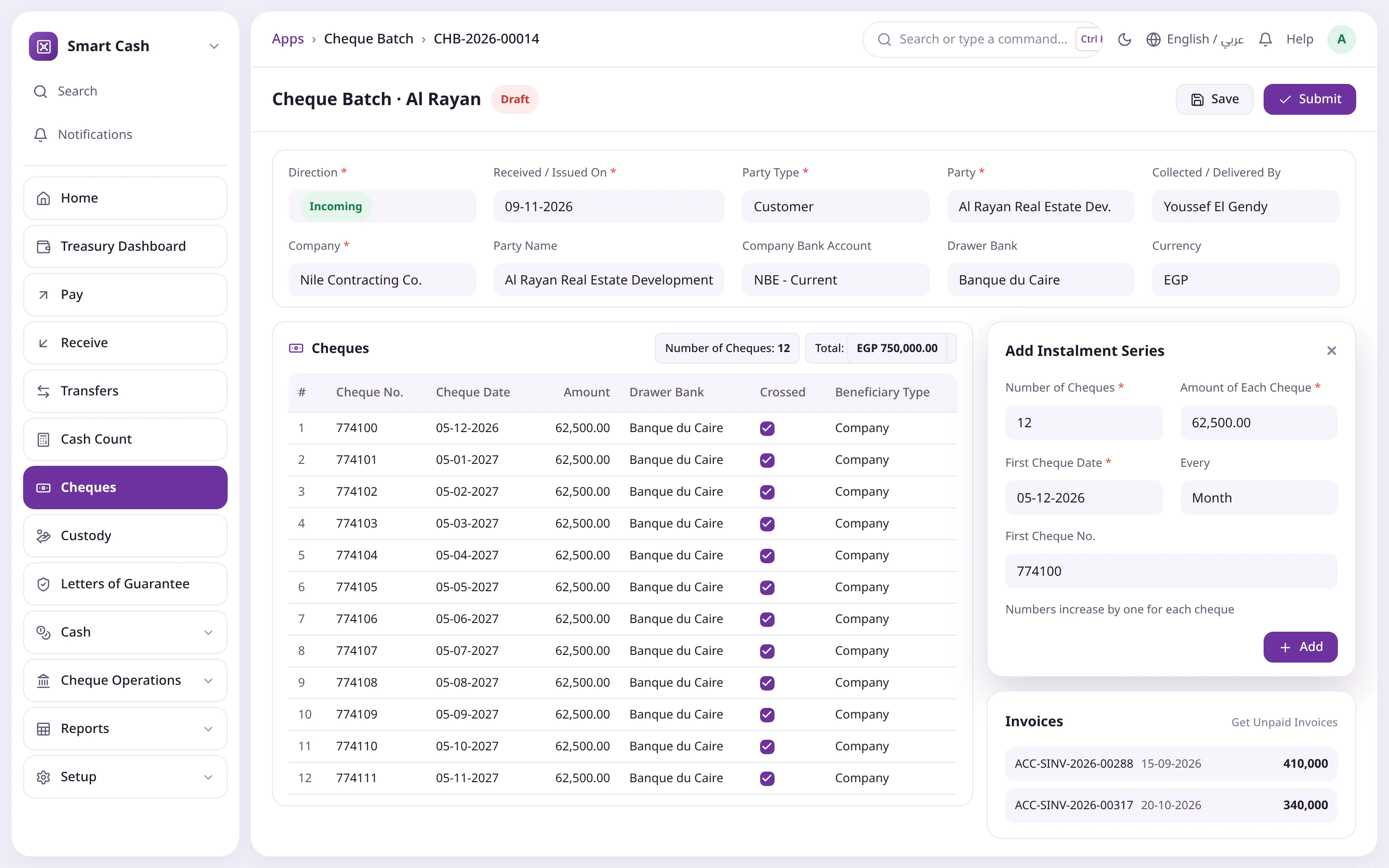
  • Cheque batches with monthly, quarterly or weekly instalments

Letters of guarantee

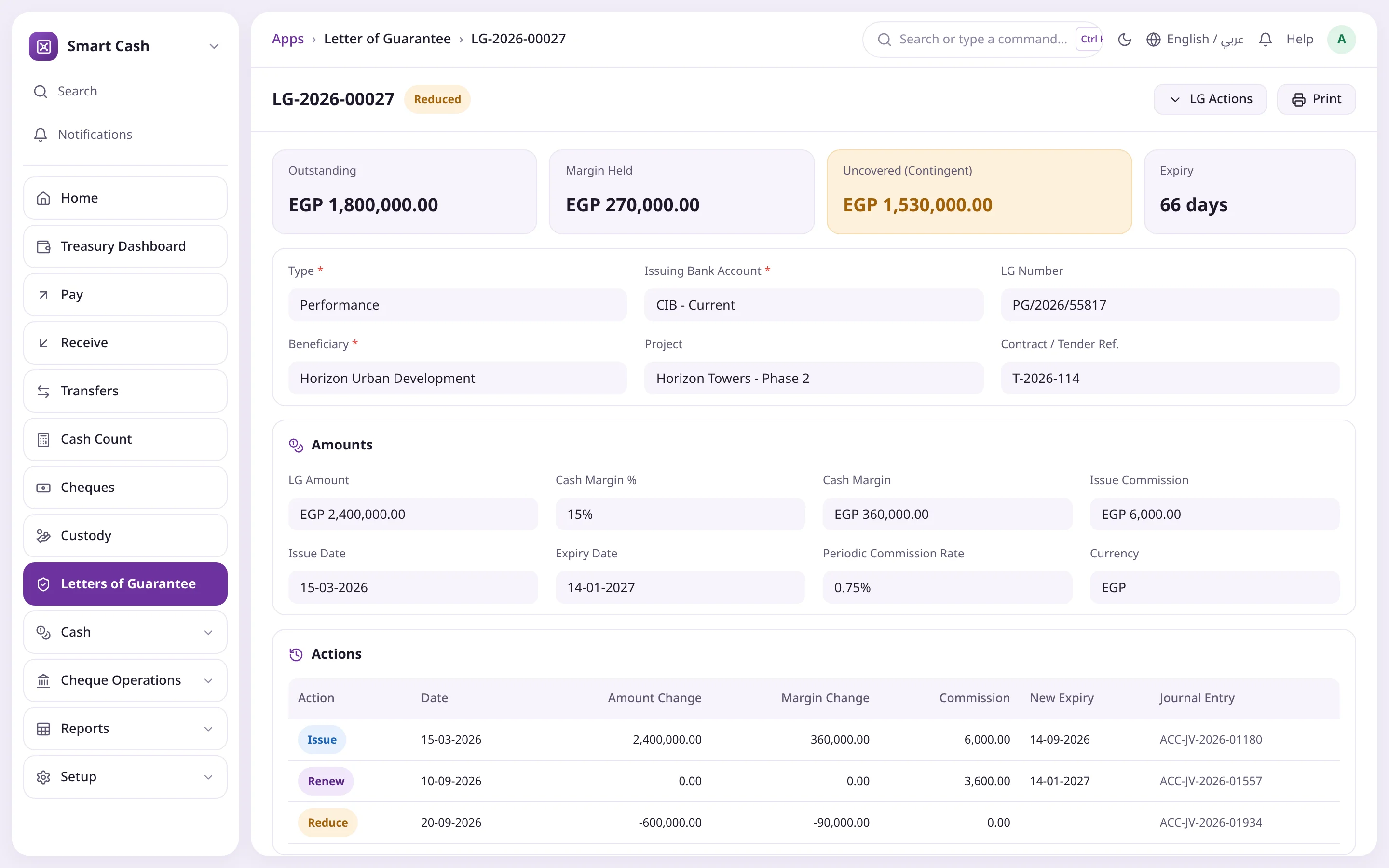
Bid, performance, advance payment and maintenance LGs with a computed cash margin and a contingent exposure you see before it surprises you.

  • Issue, renew, reduce, release and liquidate
  • Issue and periodic commissions
  • Expiry alert (30 days by default)
  • Contingent liabilities report and LG register

Forecasting & reports

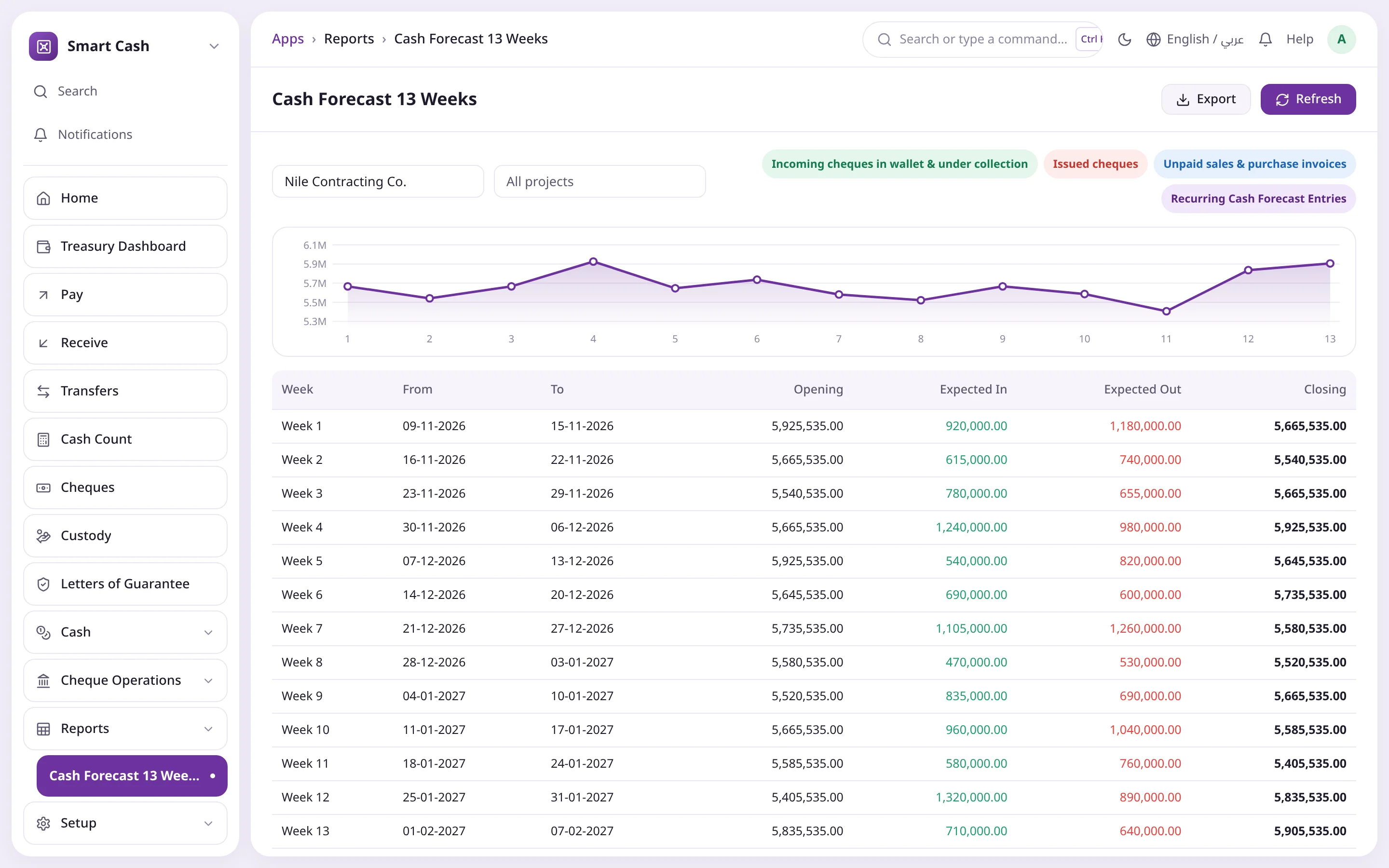
Sixteen reports built straight from the Treasury Ledger, from the cash book to the 13-week forecast.

  • 13-week forecast from cheques, invoices and recurring entries
  • Direct-method cash flow statement
  • Treasury vs GL reconciliation
  • Excel export and print from the standard menu

Controls

Built-in controls instead of paper instructions: amount-based approvals, segregation of duties and no manual entries on cash box accounts.

  • Payment requests routed by amount, box and project
  • Creators cannot approve; custodians cannot approve their own count
  • Cash payment limits under Egyptian Law 18/2019
  • Cancellation by reversal entries with a written reason

Printing & serials

Arabic print formats for payment, receipt, transfer and cash count, with a gap-free voucher serial per box and fiscal year.

  • Amount in words generated automatically
  • Four signatures: receiver, cashier, approver, accountant
  • "Copy" stamped on any reprint
  • Voucher Serial Register exposes gaps

Alerts

Six scheduled jobs watch your treasury around the clock.

  • Daily: due cheques, overdue custody, LG expiry, pending transfers
  • Nightly: a cash position snapshot per box and bank
  • Hourly: boxes above or below their limits
For every role in your company

For every role its screen and its rights

Seven ready roles granted from the user screen, with segregation of duties built into the rules.

Cashier

Pays, collects and closes the day without accounting skills

  • Vouchers the moment cash moves
  • Confirms incoming transfers
  • Counts, then closes the day
Cheque Clerk

Follows every cheque from wallet to collection

  • Registers cheques on arrival
  • Deposit slips for due cheques
  • Collections and bounces from the bank statement
Approver

Decides before cash leaves

  • Notified of every waiting request
  • Clear Approve and Reject buttons
  • Approval log inside each document
Treasury Accountant

Standard entries instead of manual input

  • Daily Treasury vs GL reconciliation
  • Follows vouchers pending posting
  • Settles advanced custody
Treasury Manager

Visibility, decisions and controls in one place

  • 13-week forecast for decisions
  • Contingent liabilities and guarantees
  • Cash limit exceptions and count differences
How it works

From voucher to journal entry with no manual posting

One idea behind every screen: the Treasury Ledger first, then the accounting entry according to the box's posting mode.

  1. 01Set up once

    Accounts and Treasury Settings per company, then banks and commissions, cash boxes and limits, then the rules.

  2. 02Request & approve when needed

    Large amounts go through a payment request whose approvers depend on amount band, box and project.

  3. 03A voucher in a minute

    Pay, receive or transfer with a live balance and limit checks, then print for signature.

  4. 04Treasury Ledger

    An immutable row is written; it feeds live balances and every report.

  5. 05Post to accounting

    A standard Journal or Payment Entry, immediately or as one summary entry at daily close.

  6. 06Count & close

    Count by denomination, treat the difference, then close and lock the day.

  7. 07Reconcile & forecast

    A morning reconciliation with zero unexplained difference and a 13-week forecast for decisions.

Product screenshots

A tour of Smart Cash

Screens drawn in the Operion theme after the app's real ERPNext interface, with demo data.

Treasury Dashboard
Treasury DashboardSix liquidity indicators, cash in vs out, 7-day dues and a card per cash box.
Cash Payment Voucher
Cash Payment VoucherLive balance bar, taxed expense lines, net paid and amount in words.
In-Transit Transfer
In-Transit TransferFrom the main box to a site box through Cash in Transit until receipt is confirmed.
Cash Count
Cash CountCount by denomination against the book balance, with independently approved shortage treatment.
Employee Custody
Employee CustodyAmount, settled, outstanding, days overdue and the custody settlements.
Incoming Cheque
Incoming ChequeStatus path, allocated invoices, status history and cheque actions.
Cheque Batch with Instalments
Cheque Batch with InstalmentsA series of 12 monthly cheques from one customer in a single document.
Letter of Guarantee
Letter of GuaranteeOutstanding amount, cash margin, contingent exposure and the action history.
Cash Forecast 13 Weeks
Cash Forecast 13 WeeksOpening, expected in and out, and the closing cash of every week.
Treasury vs GL Reconciliation
Treasury vs GL ReconciliationTreasury vs ledger balances with pending postings, and a zero unexplained difference.
Comparison

The difference in everyday details

Without Smart CashWith Smart Cash
Petty expenseJournal entry later, from paperVoucher in a minute, printed for signature
Box balanceA phone call to the cashierLive card and limit bar per box
ChequesSeparate books, no entries17 balanced, reversible actions
Count differencesFound late, fixed by handDenomination count, independent approval
Custody & guaranteesExcel files, missed datesDaily alerts, aging and exposure reports
Upcoming liquidityAn occasional spreadsheetAutomatic 13-week forecast
The challenge

In ERPNext, a cash box is just an account

Standard ERPNext models cash as a line in the chart of accounts, so the daily work escapes to paper receipts and spreadsheets.

No custodian, no limits, no count

Nobody owns the box, there is no maximum or minimum, no denomination count and no daily close.

No real expense voucher

Cashiers are pushed into Journal Entries or Payment Entries designed for accountants, so expenses are late or kept in side books.

Cheques without a life cycle

No wallet, under-collection, bounced or endorsed states with proper entries, so nobody knows where a cheque is or what it did.

Custody and guarantees off-system

Tracked in Excel, settlements slip and contingent liabilities never reach the statements or the liquidity outlook.

Count differences undocumented

Shortages are found late and fixed by hand, with no independent approval or clear accounting.

Upcoming liquidity is a guess

A spreadsheet updated now and then instead of a forecast built from due cheques, invoices and recurring items.

Components

Inside Smart Cash

Integrated modules on top of ERPNext using custom fields and document events only, without overriding any core class.

Treasury Dashboard

Six liquidity indicators, cash in vs out, 7-day dues and a card per box and bank.

Cash Boxes

Custodians, limits, posting mode and additional users.

Payment Voucher

Seven voucher types with ready expense items.

Payment Request

Prior permission with an approval path before cash leaves.

Receipt Voucher

Collections with invoice allocation, custody and advance refunds.

Transfers

Direct or in transit with receipt confirmation.

Count & Closing

Denomination count and a daily summary close.

Custody

Custody, settlement and imprest replenishment.

Cheques

Cheque actions, deposit slips, books and batches.

Letters of Guarantee

The LG, its actions, margin and commissions.

Treasury Ledger

The source of truth for balances: never edited or deleted, cancelled by mirrored rows.

Reports

Sixteen reports for cashier, accountant, manager and auditor.

Who it is for

Built for teams who handle cash every day

Contractors

Project-linked site boxes, daily labor sheets, engineer custody and tender and performance guarantees.

Trading & distribution

Cash collections, many customer cheques in instalments, multiple branches.

Manufacturers

Petty expenses, imprest funds, supplier cheques and their maturities.

Multi-branch groups

A box per branch with separate permissions and a dashboard that stays fast with hundreds of boxes.

Finance & audit teams

Approvals, segregation of duties, daily GL reconciliation and a voucher serial register.

Integration & tech

Built inside ERPNext

A standard Frappe app that respects ERPNext's accounting design, so its standard reports keep working as they are.

  • Works with ERPNext v15 and v16, with a v16 desktop icon, workspace and sidebar
  • No direct GL writes: every accounting effect is a standard Journal or Payment Entry carrying the source voucher type and number
  • No overrides of ERPNext classes, only custom fields and document events, so upgrades stay safe
  • Seven ready roles plus user permissions at cash box level
  • Egyptian Law 18/2019, EGP and USD denominations ready, and an e-invoice / e-receipt UUID field
  • Supports cash flow (IAS 7), contingent liabilities (IAS 37) and FX (IAS 21) disclosures
  • Accounting dimensions, cost centers, projects, multi-currency and four Arabic print formats
ERPNextFrappe partner
FAQ

Run your treasury inside ERPNext

Talk to the Operion team for a Smart Cash demo on your own data and a rollout plan for your boxes and branches.

Does Smart Cash replace ERPNext Payment Entries?

It builds on them. A voucher issued by a cashier automatically creates a standard Journal Entry or Payment Entry linked to the source document.

When do movements reach the general ledger?

It depends on the box's posting mode: immediately per voucher, as one summary Journal Entry at daily close, or kept in the Treasury Ledger only with no GL effect.

Why does a voucher have two numbers?

The document number is reserved on save, even for drafts; the printed voucher serial is assigned only on submit, per box and fiscal year, so printed vouchers have no gaps.

How are cash count differences handled?

The difference is computed and must be treated: shortage expense, charged to the custodian or held as surplus. A custodian cannot approve their own box's difference.

Can a closed day be changed?

No voucher can be created or edited on a closed date. Reopening means cancelling the closing, which only the treasury manager can do with a reason.

Can a wrong cheque action be reversed?

Yes. Cancelling the last action returns the cheque to its previous state and cancels its entry; older actions are reversed in order.

Does it enforce cash payment limits?

Yes. It aggregates a party's payments over the period, compares them with the limit and warns or blocks; exceptions need the treasury manager and a reason, and appear in the Cash Limit Exceptions report.

Can we add a bank-specific cheque action?

Yes. Cheque transitions are data records you can add or edit without code; the app ships with 17 ready ones.

Does it support multiple currencies?

Yes. Each box has its currency and denominations, cross-currency transfers keep both amounts, and every ledger row stores box and company currency.


Which ERPNext versions are supported?

ERPNext v15 and v16.

Ready to switch to ERPNext?

See how ERPNext can make your business more efficient and cut costs, with Operion beside you from analysis to go-live and support.