Run your contracting business from tender to final handover
Smart Buildex links tender, rate analysis, BOQ, contract, quantity survey, payment certificate, invoice, collection and retention release in one cycle on ERPNext. Previous, current and cumulative figures, retention, advance recovery and deductions are computed from what was approved, subcontract certificates are checked against the owner's, and revenue is measured monthly under EAS 48 / IFRS 15, so every number traces back to its document.
Runs onWeb (ERPNext desk)Website portal for owners, consultants and subcontractors
Self-calculating certificatesSubcontracts checked vs ownerIFRS 15 revenue
Tenders and rate analysisVersioned bill of quantitiesLetter of award and contractCumulative owner certificatesAdvances, retention and deductionsSubcontractingBudget and cash flowVariations and claimsMonthly valuation and earned valueSite and technical officeInternal controlPortal and smart entry toolsTenders and rate analysisVersioned bill of quantitiesLetter of award and contractCumulative owner certificatesAdvances, retention and deductionsSubcontractingBudget and cash flowVariations and claimsMonthly valuation and earned valueSite and technical officeInternal controlPortal and smart entry tools
v15 + v16one codebase, both versions
48contracting DocTypes
11built-in reports
EG + SAcountry profile per company
Before & after
From scattered files to one calculated cycle
The difference isn't a new screen; it's that every number is computed from the previous document instead of typed by hand.
Without Smart Buildex
Certificates
'Previous' is copied from last month's file and deductions are worked out on a calculator.
Subcontractors
Their certificates are approved and paid without checking what the owner certified on the same line.
Cost
It shows up when invoices arrive at month end, and nobody knows what is committed per cost code.
Profit
Revenue follows billing, so a losing project is only spotted at the end.
vs
With Smart Buildex
Certificates
Previous comes from the last approved certificate, and submitting raises the invoice and deductions entry.
Subcontractors
Every line shows the owner-certified quantity, and payment waits until the owner pays.
Cost
Attendance and equipment logs charge cost on submit, and the budget shows committed, actual and available.
Profit
Monthly valuation by completion posts the contract asset or liability and any onerous provision immediately.
Product video
Meet Smart Buildex
A quick motion tour of what the product does.
Feature tour
A tour of Smart Buildex
Five screens from a contractor's daily cycle, with the same fields and buttons your team will use.
01Owner billing
A certificate that calculates and posts itself
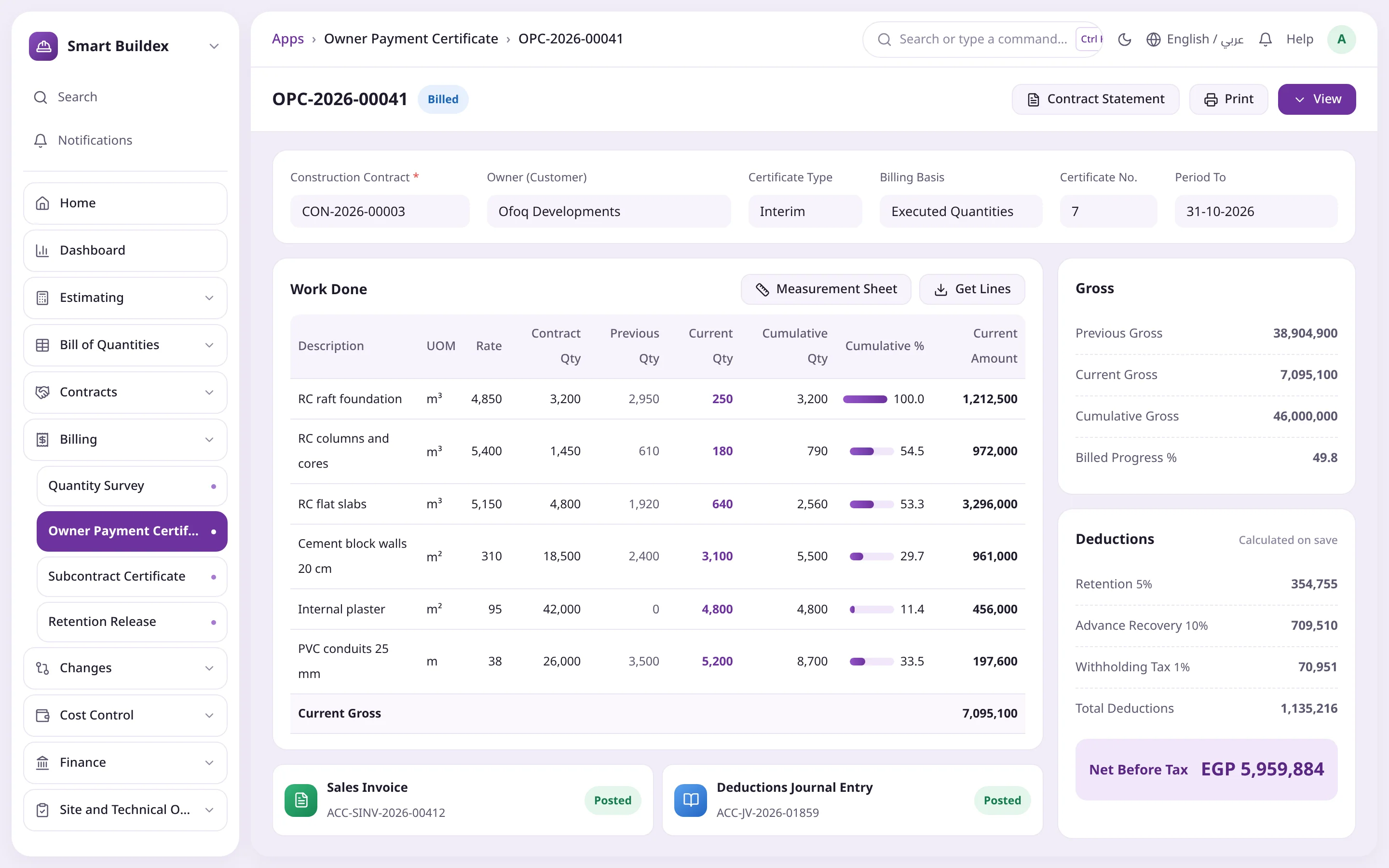
Pick the contract and press Get Lines to pull previously billed lines and approved, unbilled survey quantities. Enter the current quantity or cumulative %, and the rest is calculated.
Previous comes from the last approved certificate
Retention, advance recovery and deductions calculated on save
Submitting raises the Sales Invoice and deductions entry
One draft per contract, so previous is never counted twice
Current = cumulative − previousDeductions on saveInvoice and journal, automatic
02Estimating
Price tenders from resources, not memory
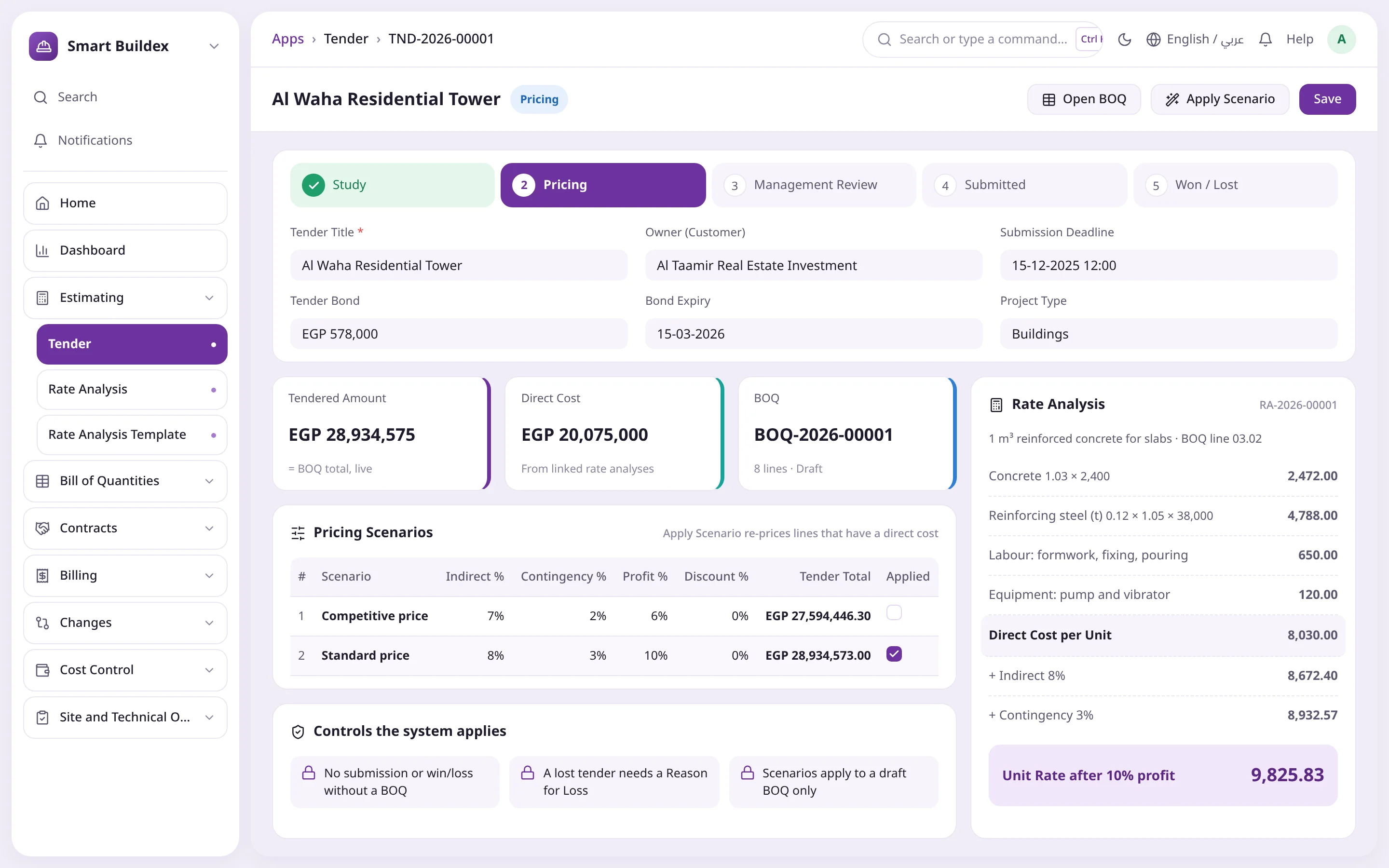
Rate analysis builds each line's rate from materials with wastage, labour and equipment, then adds indirects, contingency and profit. Pricing scenarios compare options before you submit.
Stages from Study to Won or Lost
Tender value = BOQ total, kept up to date
Apply Scenario re-prices lines with a direct cost
Templates for recurring rate analyses
Tender stageApplied scenarioFinal unit rate
03Subcontract tender
Compare subcontract quotes and award in a click
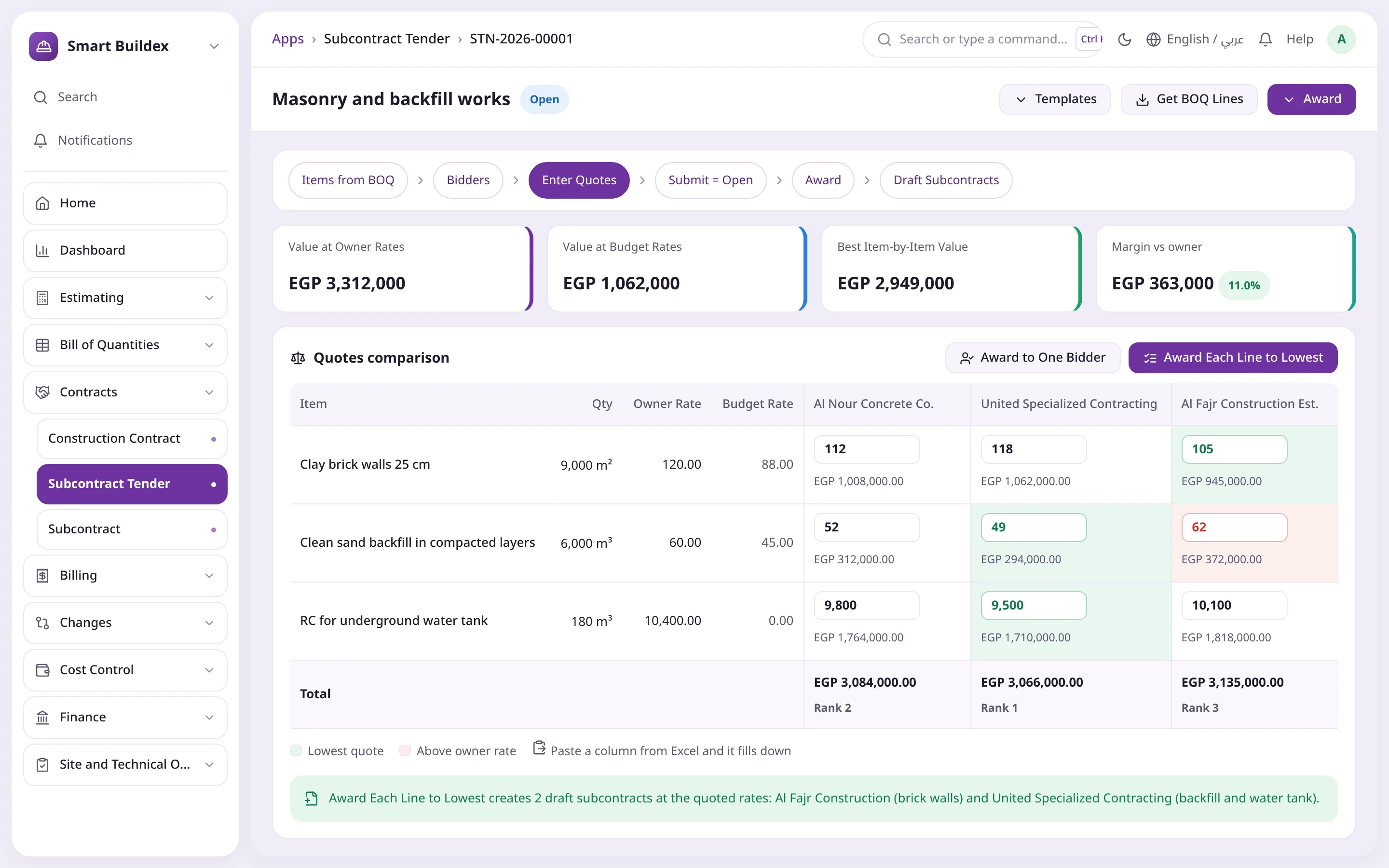
Put BOQ lines out to several subcontractors and paste their rates from Excel; quotes are compared with each other, the owner rate and the budget, with totals and rank.
Green for the lowest quote, red above the owner rate
Best line-by-line value vs value at owner rates
Award to one bidder or each line to the lowest
Draft subcontracts created at the quoted rates
Lowest quote in greenAbove owner rateOne-click award
04Cost control
Know what's available before you commit
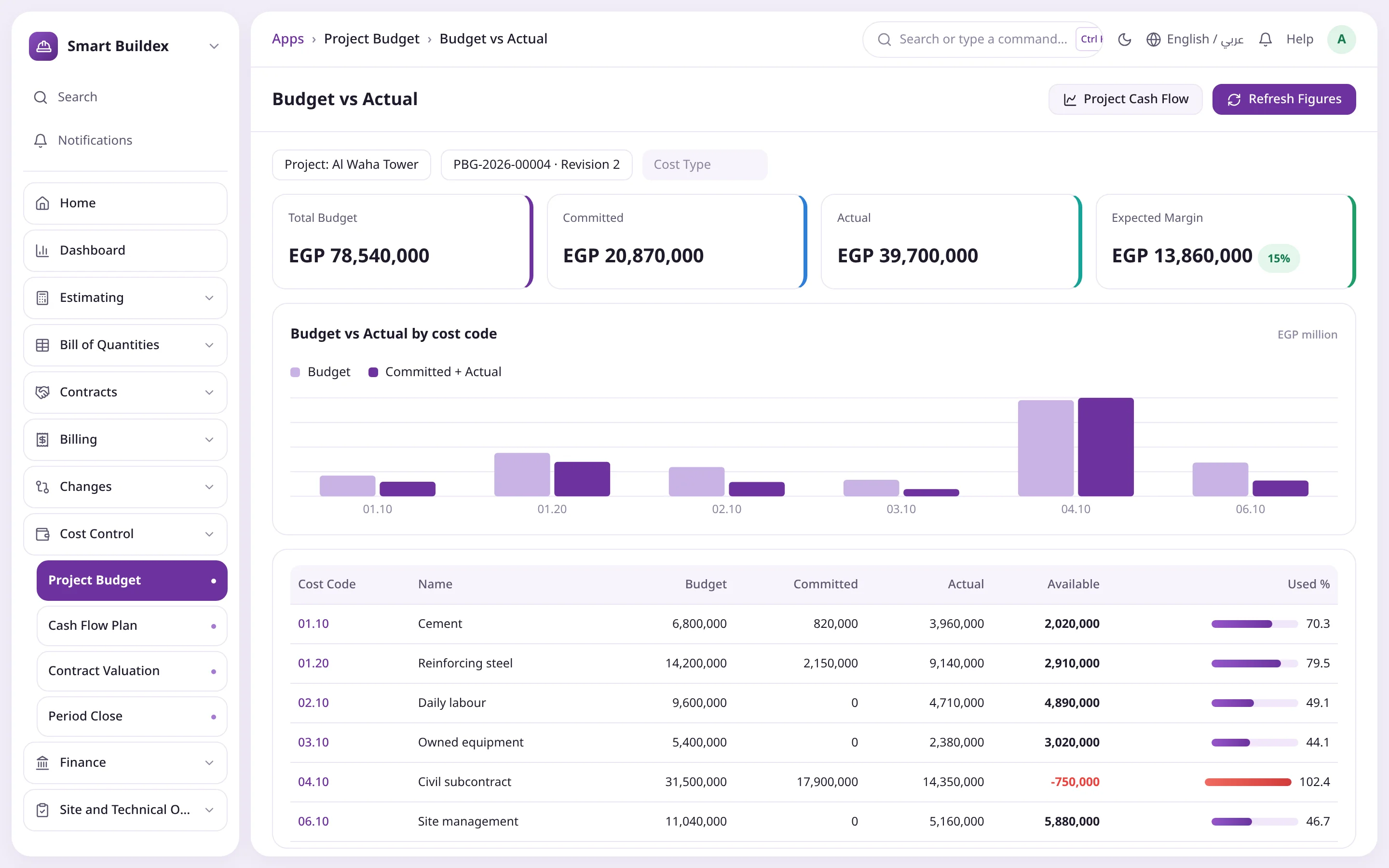
The budget is built from the BOQ by cost code, and Refresh Figures pulls committed from purchase orders and subcontracts and actual from postings.
Available = budget − committed − actual
Overruns shown in red
Control set to none, warn or block on PO and subcontract approval
Expected margin = contract value − budget
Overrun in redRefresh committed and actualCommitted from POs and subcontracts
05Site
The whole site day on one screen
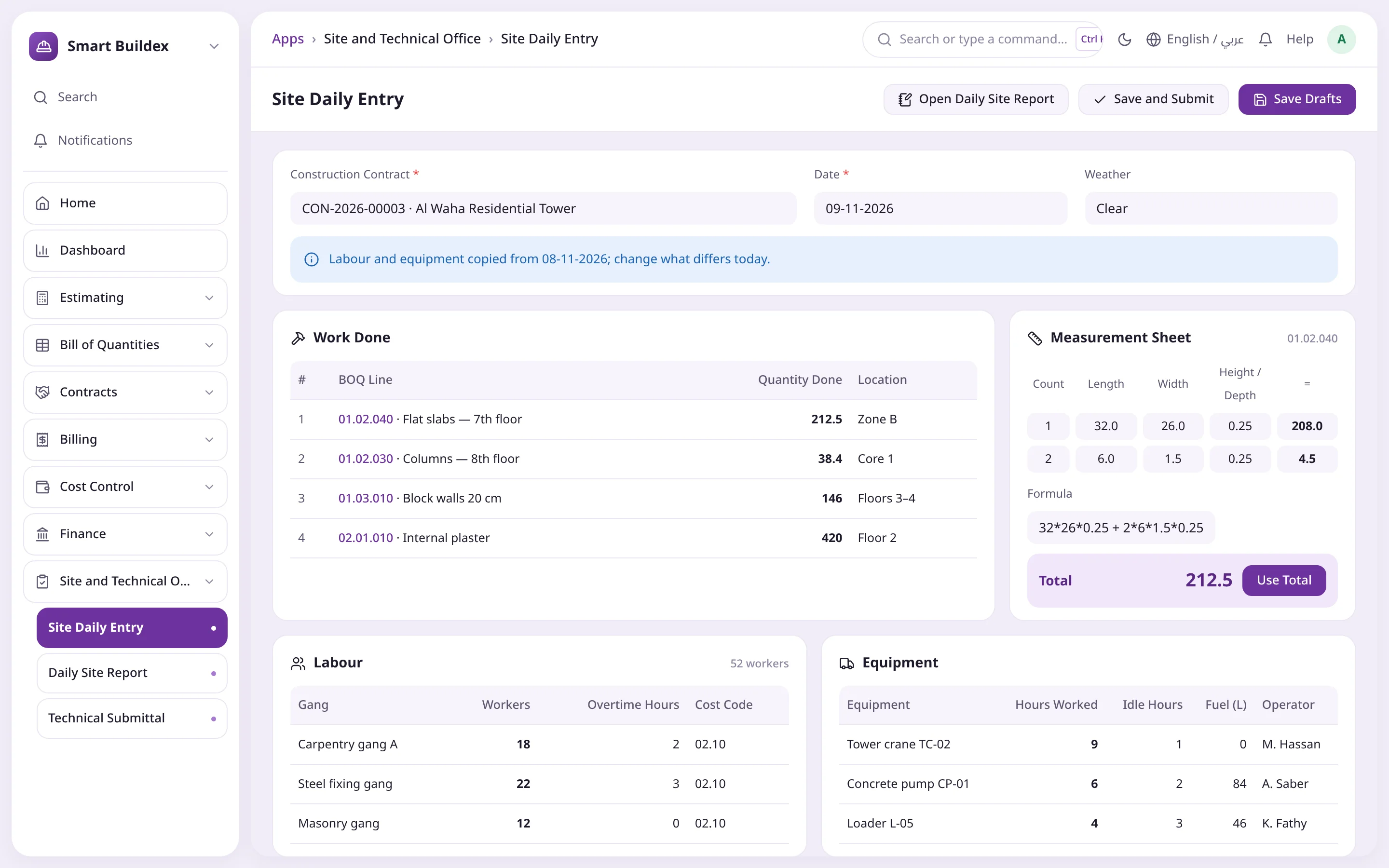
Work done on BOQ lines, labour by gang and equipment hours and fuel are captured together, and a new day starts from the last recorded day's labour and equipment.
Save Drafts or Save and Submit creates the report, attendance and logs
Measurement sheet by dimensions or free formula
Cost charged to the project by cost code on submit
The monthly survey is built from daily reports
Copied from the last dayMeasurement sheetSave everything at once
Current = cumulative − previousDeductions on saveInvoice and journal, automatic
Tender stageApplied scenarioFinal unit rate
Lowest quote in greenAbove owner rateOne-click award
Overrun in redRefresh committed and actualCommitted from POs and subcontracts
Copied from the last dayMeasurement sheetSave everything at once
Every feature
The whole contracting cycle on standard ERPNext documents
Five areas cover the full work of a contractor. Each step creates a document, and its Create button opens the next step with the data already filled in.
Tenders and rate analysis
Tenders move through Study, Pricing, Management Review and Submitted to Won or Lost. Rate analysis builds each line's rate from its resources per unit, wastage included, then adds indirects, contingency and profit.
Materials with wastage, labour, equipment, subcontract and expenses
Pricing scenarios at different mark-ups, compared and applied in one click
Rate analysis templates for recurring items
Tender bond tracking, and a loss reason required for lost tenders
Versioned bill of quantities
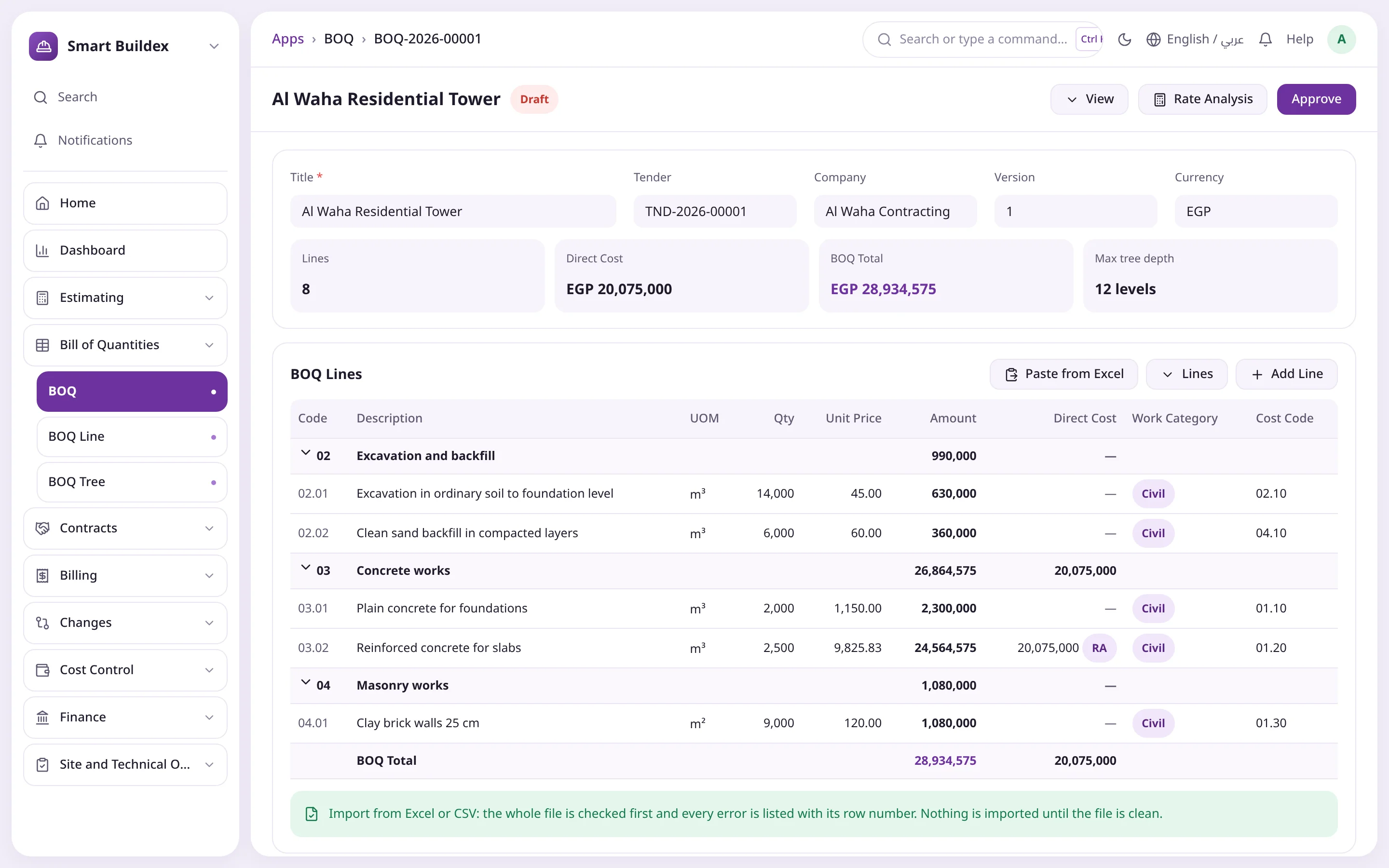
Hierarchical lines with code, work category and cost code; each line is its own record, so a BOQ holds thousands of items without slowing down. Approval makes it the active version and locks its lines.
Excel/CSV import that checks the whole file and lists every error by row
Code 03.02 nests under 03 automatically, up to 12 levels
Create Revision makes the next version; the old one becomes Superseded
Copy lines from an earlier BOQ
Letter of award and contract
The won tender issues the letter of award, which creates the owner contract with nothing re-typed; the duration starts from the site handover. A snapshot of the country rules in force is stored on the contract.
Remeasurement, milestones, lump sum by progress or cost plus
Advance and recovery %, retention and cap, delay penalty and cap
Revised value = original + approved variations
Suspensions extend the completion date on resumption
Cumulative owner certificates
Each line holds the quantity to date and the current amount is the difference from the last approved certificate, so any earlier error is corrected next time. Submitting raises the Sales Invoice and the deductions Journal Entry.
Bill by executed quantities or progress percentage
Get Lines pulls approved, unbilled survey lines
Warning when cumulative exceeds the contract quantity
Status Draft, Billed, Paid, updated daily from payments
Advances, retention and deductions
Retention and advance recovery are added on save; other deductions come from the deduction catalogue with their account and tax effect. Materials on site are certified before installation.
Advances recovered at a fixed % per certificate until cleared
Retention released partly at taking over and the rest at final
Bank guarantees on bank facilities with cash margin and commission
Approved price adjustment added to the certificate automatically
Subcontracting
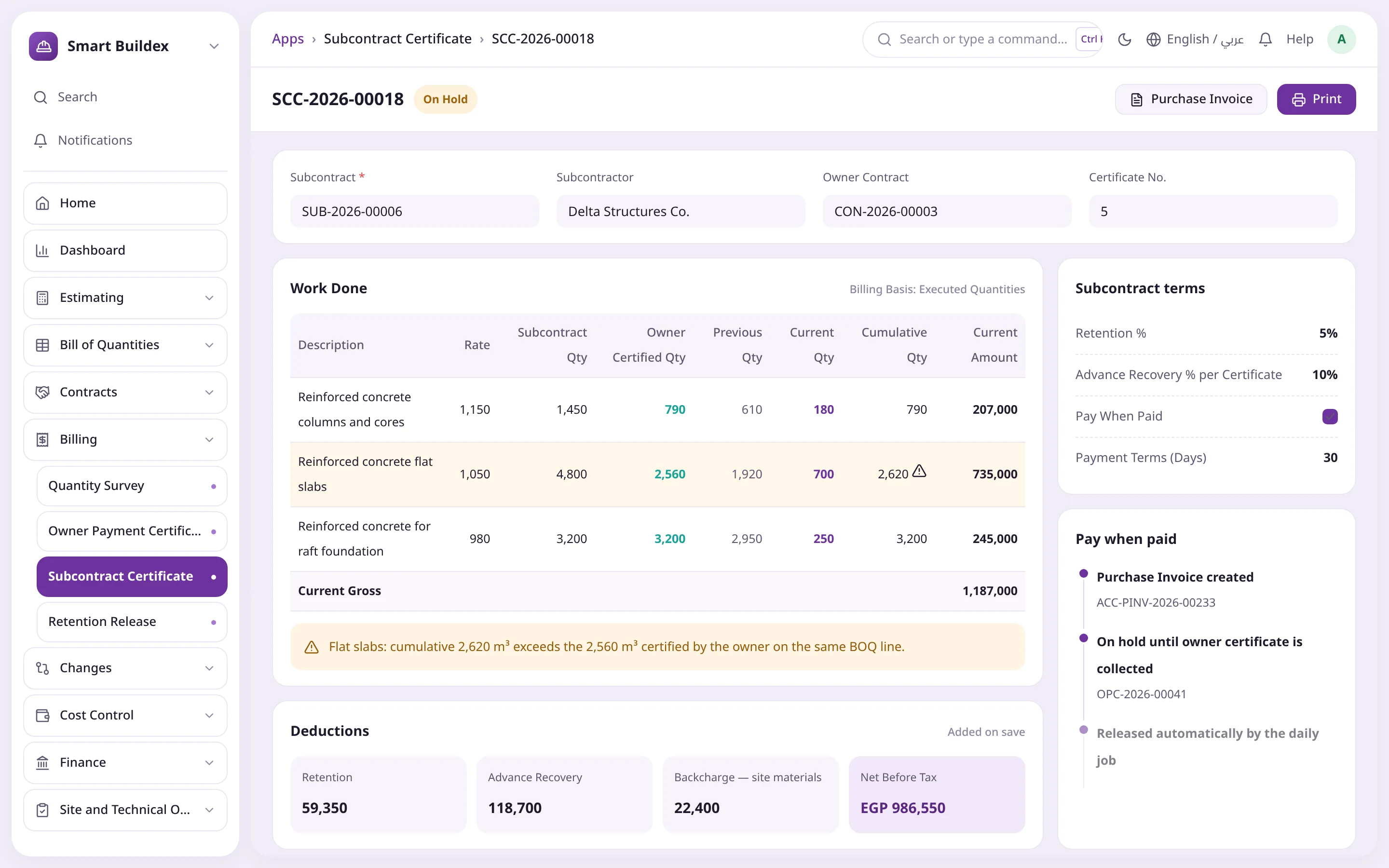
A subcontract tender compares quotes against each other, the owner rate and the budget, then awards in one click. Subcontract certificates show what the owner certified on each line, and approved backcharges are deducted automatically.
Green marks the lowest quote, red anything above the owner rate
Award to one bidder, or each line to the lowest
Pay when paid: invoice On Hold until the owner certificate is collected
Backcharges raised directly or from a non-conformance report
Budget and cash flow
The budget is built from the BOQ by cost code, with committed from purchase orders and subcontracts, actual from postings, and available for every code. Budget control can warn or block on overrun.
Build from BOQ and Refresh Figures
Cash flow plan on an even or S-curve, with peak funding need and month
Materials planned on BOQ lines and Material Request from the BOQ
Create an ERPNext Budget from the project budget
Variations and claims
An approved variation issues a new BOQ version and updates contract value and duration, while earlier certificates carry on against the same line codes.
Quantity change, rate change or new line
Claim decisions create an extension of time and a draft variation
Warning when variations exceed the contract cap
Price adjustment by P = a + Σ b × Ln / Lo
Monthly valuation and earned value
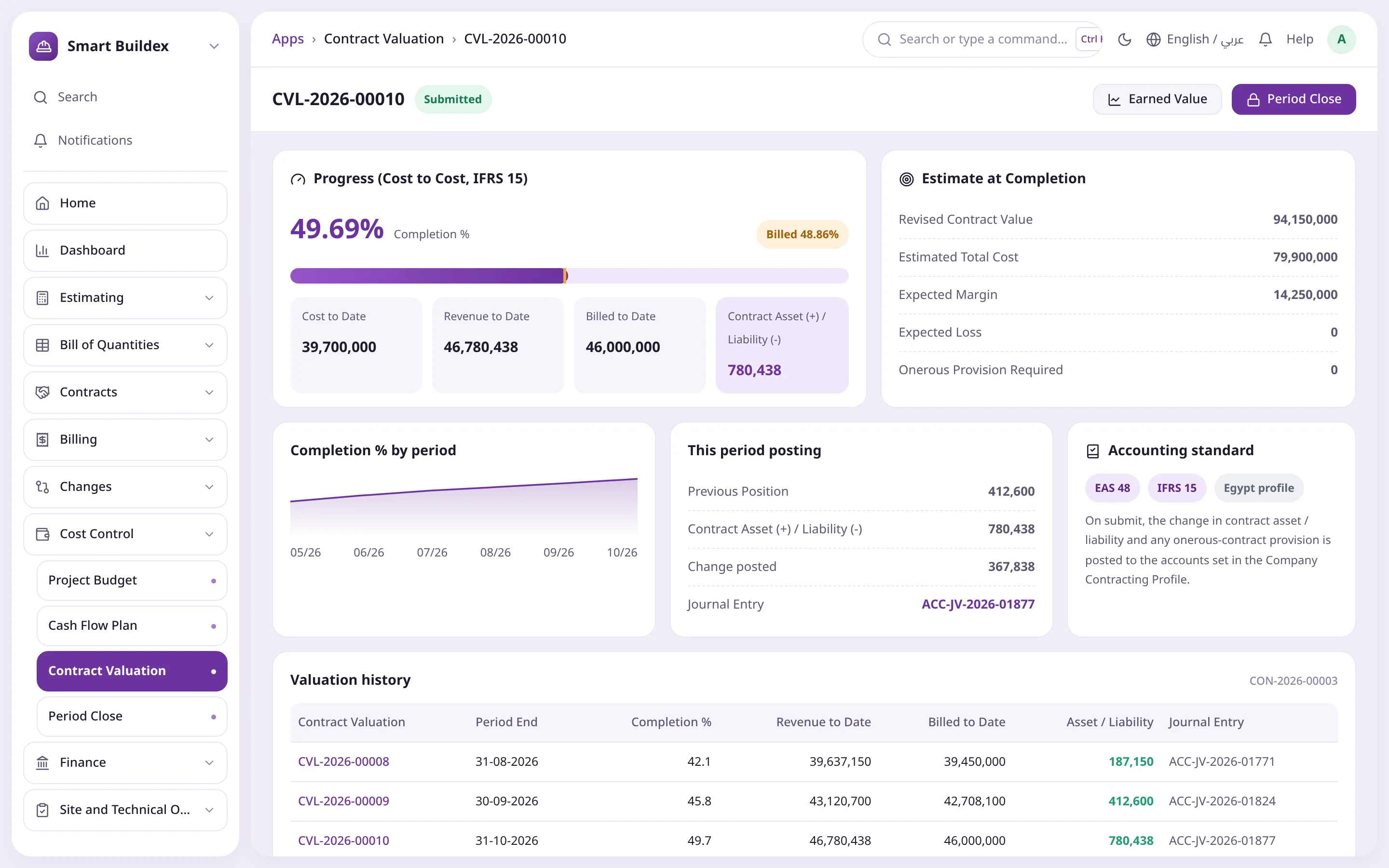
Cost-to-cost valuation under EAS 48 / IFRS 15 posts the contract asset or liability and an onerous-contract provision as soon as one is needed. The schedule compares planned with actual from certified quantities.
Revenue to date = completion % × revised contract value
Import activities from Primavera or MS Project
Earned Value (CPI, SPI) and Look Ahead reports
Month-end checklist that locks the accounting period
Site and technical office
Daily site reports with labour and work done, submittals with the consultant, inspection requests, NCRs, RFIs and HSE. A Site Daily Entry screen captures the whole site day at once.
Create a quantity survey from the daily reports for a period
An open NCR blocks surveying that line
Labour attendance and equipment logs charge cost by cost code on submit
Incoming and outgoing correspondence with reply deadlines
Internal control
Approval rules set who approves each document type and up to what amount, and compliance documents stop you working with a subcontractor whose papers have expired.
The creator cannot approve their own document
Amount limits per role; zero means no limit
Compliance status: valid, expiring soon or expired
No contract closeout with open snag items
Portal and smart entry tools
Owners, consultants and subcontractors follow their contracts on the website without a desk login. Every screen has templates, paste from Excel, fill column, copy from previous and a measurement sheet.
Consultants answer submittals with codes A/B/C/D
Measurement sheet by dimensions or free formula
Paste accepts =25.5*12, Arabic digits and 1,250
Opening certificates and advances to go live mid-project
For every role in your company
Value for every team in a contracting company
15 desk roles and 3 portal roles; each user sees only the screens and buttons for their role, and small firms can combine roles.
Management and project managers
A live view of every contract
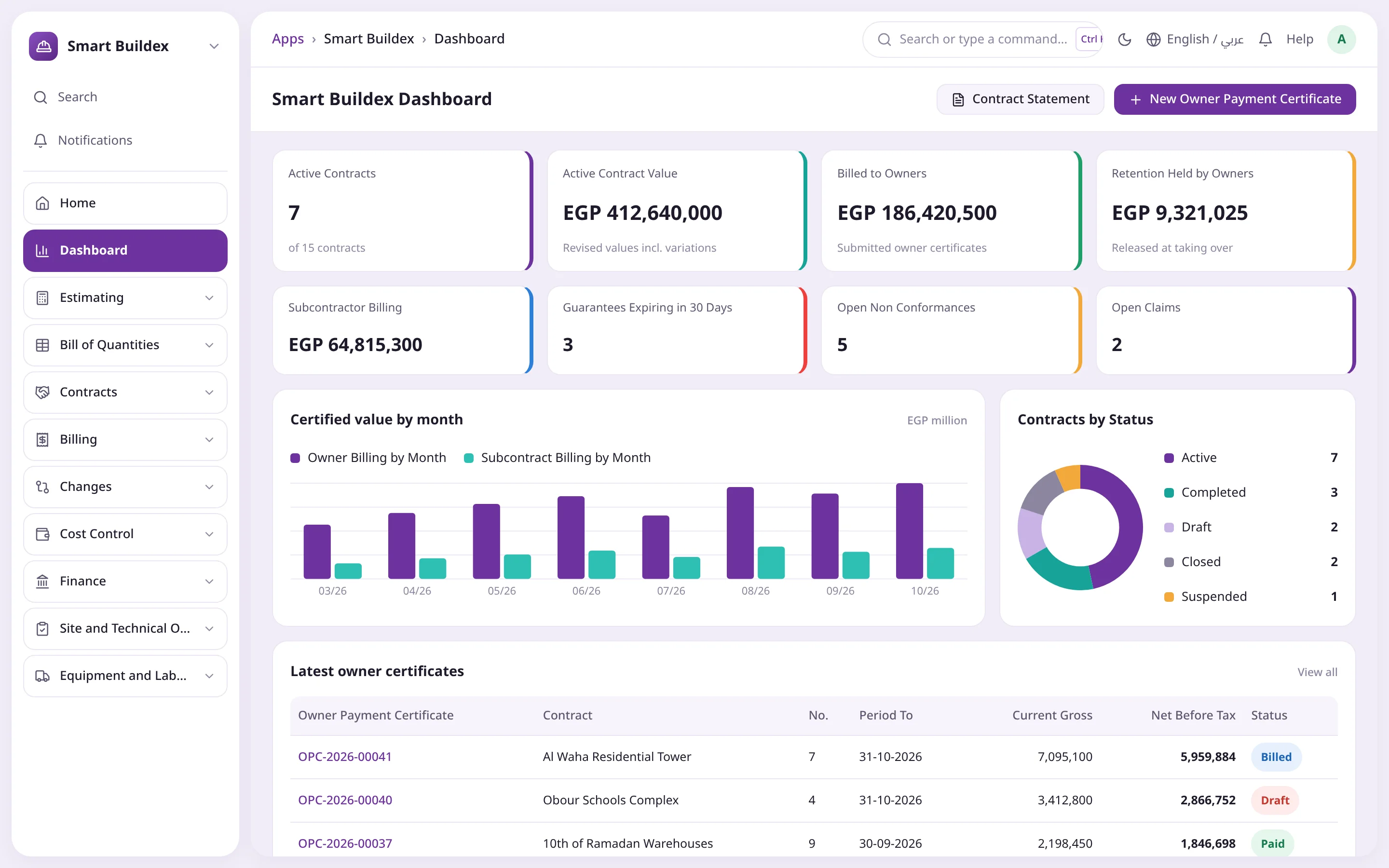
Dashboard of contracts, billing, retention and expiring guarantees
Approve contracts, subcontracts and variations within amount limits
Earned value and look-ahead from the schedule
Technical office and quantity surveyors
BOQs and certificates with no re-keying
Rate analysis, scenarios and Excel BOQ import
Surveys from daily reports, certificates from surveys
Submittals and RFIs with the consultant
Site engineers and site accountants
The site day on one screen
Work done, labour and equipment together
Measurement sheets by dimensions or formula
Cost charged by cost code on submit
Contract accountants and CFO
Standard postings, standard-compliant revenue
Invoice and deductions entry from every certificate
Monthly EAS 48 / IFRS 15 valuation and close checklist
Advances, retention and guarantees on bank facilities
Procurement
Subcontract awards backed by numbers
Subcontract tenders with comparison and one-click award
Material requests from the BOQ by cost code
Subcontractor compliance tracking
How it works
How it works
Every step ends as a standard ERPNext document, so your books and stock stay in one place.
01Tender and BOQ
Study the tender, analyse rates, compare pricing scenarios, approve the BOQ and record the win.
02Award and contract
The letter of award creates the owner contract, then site handover, budget and subcontracts after their tender.
03Daily site work
Daily report, labour attendance and equipment logs from one screen, then a survey from the daily reports.
04Owner certificate
The approved survey becomes a certificate; submitting it raises the Sales Invoice and deductions entry.
05Subcontract certificates
Checked against owner-certified quantities and billed by Purchase Invoice, with pay when paid.
06Valuation and close
Monthly IFRS 15 valuation and a checklist that locks the accounting period.
07Taking over and release
Taking over starts the defects period; final acceptance needs closed snags, then retention is released.
Product screenshots
Inside the system
Smart Buildex screens on ERPNext with the Operion theme, in Arabic and English.
Contracting dashboardActive contracts, owner and subcontract billing, retention held, expiring guarantees and open NCRs.
Tender and rate analysisTender stages, pricing scenarios and a line rate built from resources with wastage and mark-ups.
Bill of quantitiesHierarchical lines with work category, cost code and direct cost, plus paste from Excel and import.
Owner payment certificatePrevious, current and cumulative per line, calculated deductions, and the posted invoice and journal.
Subcontract certificateEach line checked against the owner-certified quantity, with pay when paid and backcharges.
Subcontract tenderQuotes compared with each other, the owner rate and the budget, then awarded in one click.
Budget vs actualBudget, committed, actual and available per cost code, with overruns in red.
Contract valuation (WIP)Cost-to-cost completion and contract asset or liability under EAS 48 / IFRS 15.
Site daily entryWork done, labour, equipment and measurement sheet on a single screen.
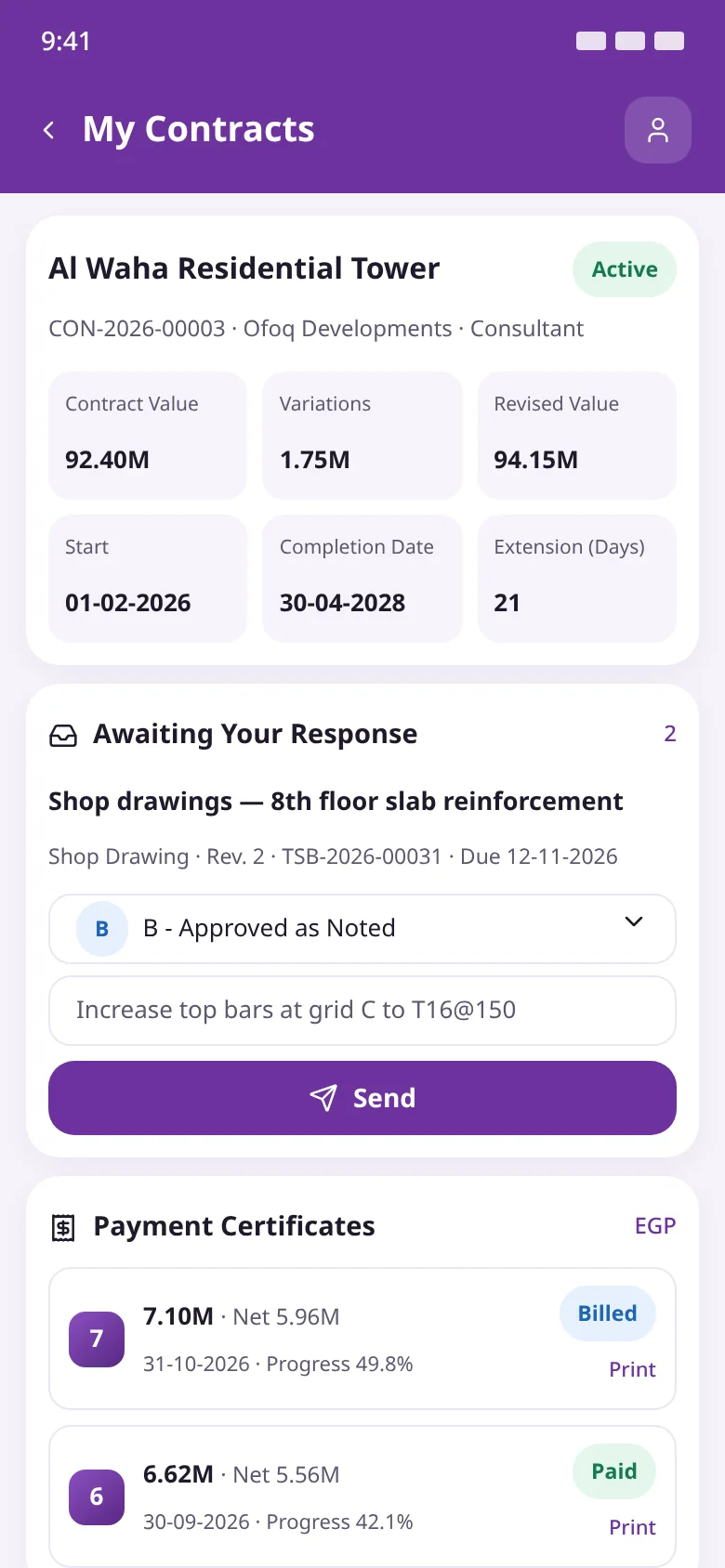
Consultant portalContract values, certificates and submittal responses on a phone, no desk login needed.
Comparison
Before and after Smart Buildex
Without Smart BuildexWith Smart Buildex
Previous on certificatesCopied by hand between filesComputed from the last approved certificate
Invoice and journalRe-keyed into accountingRaised automatically on submit
Subcontract certificatesNo check against the ownerOwner-certified quantity on every line
Retention and advancesSide spreadsheets, often forgottenHeld, recovered and tracked to release
Budget overrunsFound after the money is spentWarned or blocked at approval
RevenueFollows billingBy completion under IFRS 15
The challenge
Contractors win or lose in the details
When the BOQ lives in Excel, certificates in Word and postings in another system, nobody knows which number is right or where it came from.
Scattered tools
The BOQ lives in Excel, certificates in Word and postings in the accounting system, so data is re-keyed and nobody knows which number is right.
Manual 'previous' and 'to date'
Previous quantities are copied by hand between certificates, and retention, advance recovery and deductions are worked out on a calculator.
Measured but never billed
Work measured on site never reaches a certificate, or gets billed twice, because nothing ties the survey to the invoice.
Subcontractors paid ahead of the owner
Subcontract certificates get approved without checking what the owner certified on the same line, so you pay for work you haven't billed.
Forgotten retention, advances and guarantees
Retention held by owners isn't chased, advances aren't fully recovered and bank guarantees expire unnoticed.
A project that looks profitable but loses
Revenue follows billing instead of progress, so losses only show up at the end and postings don't follow the revenue standard.
Components
Smart Buildex modules in one workspace
48 DocTypes and 11 reports grouped into clear sidebar sections, plus a dashboard and a website portal.
Estimating
Tenders, rate analysis, templates and pricing scenarios.
Bill of Quantities
BOQ, BOQ lines and BOQ tree, with import and versions.
Contracts
Letter of award, owner contract, site handover, suspension, subcontract tenders and subcontracts.
Billing
Quantity survey, owner and subcontract certificates, backcharges and retention release.
Changes
Variation orders, claims, extensions of time and price adjustment.
Subcontract tenders
Put BOQ lines out to several subcontractors, compare quotes and award.
Cost Control
Project budget, cash flow plan, BOQ material balance, contract valuation and period close.
Finance
Contract advances, bank guarantees, bank facilities and insurance policies.
Site and Technical Office
Site daily entry, daily reports, correspondence, submittals, inspections and HSE.
Equipment and Labour
Equipment and logs, labour gangs, attendance and project schedule.
Setup and masters
Company contracting profile, deduction types, work categories and cost codes.
Approval limits and compliance
Amount-based approval rules by role, and subcontractor compliance documents.
Dashboard
Eight number cards plus charts for billing, contracts and non-conformances.
Who it is for
Who is Smart Buildex for?
General contractors
Building and structural contractors running several contracts with monthly certificates.
Infrastructure contractors
Roads, utilities and plant projects on remeasurement contracts with price adjustment.
MEP contractors
Firms acting as main contractor or subcontractor that need accurate certificates both ways.
Contracting finance teams
Contract accountants and controllers applying EAS 48 or IFRS 15.
Technical office and QS teams
The people who build BOQs, surveys and certificates and track submittals with the consultant.
Egypt and KSA groups
Groups with companies in both countries, each on its own rules in one system.
Integration & tech
Built into ERPNext, not bolted on
Smart Buildex never overrides ERPNext accounting DocTypes; it works through standard documents and accounting dimensions.
Runs on Frappe / ERPNext v15 and v16 from the same codebase; every stage is tested on both.
Works alone or with the other Smart apps, and depends on ERPNext only: standard Sales and Purchase Invoices, Journal Entries, Payment Entries, Purchase Orders and Bank Guarantees.
The contract itself posts nothing; postings start with advances and certificates. Cancelling any document reverses its postings, and balances are computed, never stored.
Cost Code is an accounting dimension added on install to journals, purchase invoices and stock entries.
One contracting profile per company with a 14-account map, validated so no account belongs to another company or is a group.
15 desk roles and 3 portal roles, with amount-based approval limits, company / project user permissions and a change log on every document.
Country engine for Egypt and KSA: withholding tax, social insurance, stamp duty and VAT rules as dated settings, with standard invoices picked up by the separate ETA and ZATCA apps.
FAQ
Ready to run your projects on ERPNext?
Book a Smart Buildex demo on one of your own projects, with the Operion team from setup to go-live.
Both. The same code runs on v15 and v16, and CI tests each version.
Does it change ERPNext accounting?
No. Everything posts through standard documents: a Sales Invoice for owner certificates, a Purchase Invoice for subcontract certificates and Journal Entries for deductions and valuation. Cancelling reverses them.
How is an interim certificate calculated?
Certificates are cumulative: each line holds the quantity to date, and the current amount is the difference from the last approved certificate, so any earlier error is corrected next time. You can bill by executed quantities or by progress percentage.
Can one system serve Egyptian and Saudi companies?
Yes. Each company has a contracting profile (Egypt, Saudi Arabia or General). Rates are dated settings your tax adviser confirms, and they are frozen on each contract when it is created.
Is e-invoicing included?
ETA and ZATCA e-invoicing and cheque management are separate apps. Smart Buildex issues standard ERPNext invoices that those apps pick up directly.
Can owners and consultants see the certificates?
Yes, through the website portal. Owners see the contract, certificates with print and variations; consultants respond to submittals and RFIs; subcontractors see their subcontracts and certificates.
How do I start with a project that is already running?
Enter an opening certificate with the last certificate number from the old system and the cumulative quantities, with no invoice or journal, plus an opening advance that later certificates recover. Balances go in through normal ERPNext opening entries.
Can I import the BOQ from Excel?
Yes. Download the import template and fill it with Arabic or English headers; the whole file is checked first and every error is listed with its row number, and nothing is imported until it is clean. You can also paste straight from Excel into any table.
How do I stop subcontractors being certified above the owner?
Subcontract certificates show, next to each line, the quantity the owner has certified on the same BOQ line to date. With pay when paid, the subcontract invoice stays On Hold until the matching owner certificate is collected.
Who approves documents, and up to what amount?
Approval rules set, per document type, which roles approve and each role's amount limit, and the creator cannot approve their own document. An ERPNext workflow can be added on top.



 Current = cumulative − previousDeductions on saveInvoice and journal, automatic