From unit release to key handover, the whole property cycle in one system
Smart Estate is a complete platform for property development and investment inside ERPNext v16. It runs every project down to the last unit, sells off-plan or ready on flexible payment plans, collects instalments and recognises revenue at handover under EAS 48 / IFRS 15 with the financing component carved out. Leasing, third-party property management and customer and broker portals are built in, every activity and accounting policy is switched on from settings, and every document posts its own entry to the ledger.
EAS 48 revenueAuto instalment demandsOne-step handover
Projects and unitsPrice lists and payment plansA disciplined sales pathInstalments and collectionsEAS 48 / IFRS 15 revenueHandover: the moment of truthCost allocation to unitsContract amendmentsEAS 49 / IFRS 16 leasingThird-party property managementSettings engine and accounting profileProjects and unitsPrice lists and payment plansA disciplined sales pathInstalments and collectionsEAS 48 / IFRS 15 revenueHandover: the moment of truthCost allocation to unitsContract amendmentsEAS 49 / IFRS 16 leasingThird-party property managementSettings engine and accounting profile
v16Built on Frappe and ERPNext v16
6Activities switched on in settings: off-plan, ready, leasing, third-party, after-sales, portals
5Contract amendment types: transfer, reschedule, unit swap, price, cancellation
3Country tax packs: Egypt, Saudi Arabia, UAE
Before & after
Your property business, before and after Smart Estate
Instalment sales run for years, and every small error in a schedule or an entry compounds. Here is what changes when the system runs the whole cycle.
Without Smart Estate
Unit status
A spreadsheet edited by hand, so reserved units get offered and units get sold twice.
Instalments
Hundreds of instalments tracked from memory, and arrears found too late.
Revenue
Revenue booked with each payment and financing ignored, so the accounts break EAS 48.
Unit margin
Cost is one project total, so nobody knows a unit's or a phase's margin at handover.
vs
With Smart Estate
Unit status
Status changes only through documents, and timed holds expire on their own.
Instalments
Daily runs raise demands and penalties, with aging and collection forecasts ready.
Revenue
A contract liability until handover, then revenue and interest split by effective interest.
Unit margin
Cost is allocated to units and every entry carries the unit dimension, so margin shows.
Product video
Meet Smart Estate
A quick motion tour of what the product does.
Feature tour
A tour of the heart of Smart Estate
From the sales contract to the handover entry and the broker portal: real screens from the system on ERPNext v16 with the Operion theme.
01Sales contract
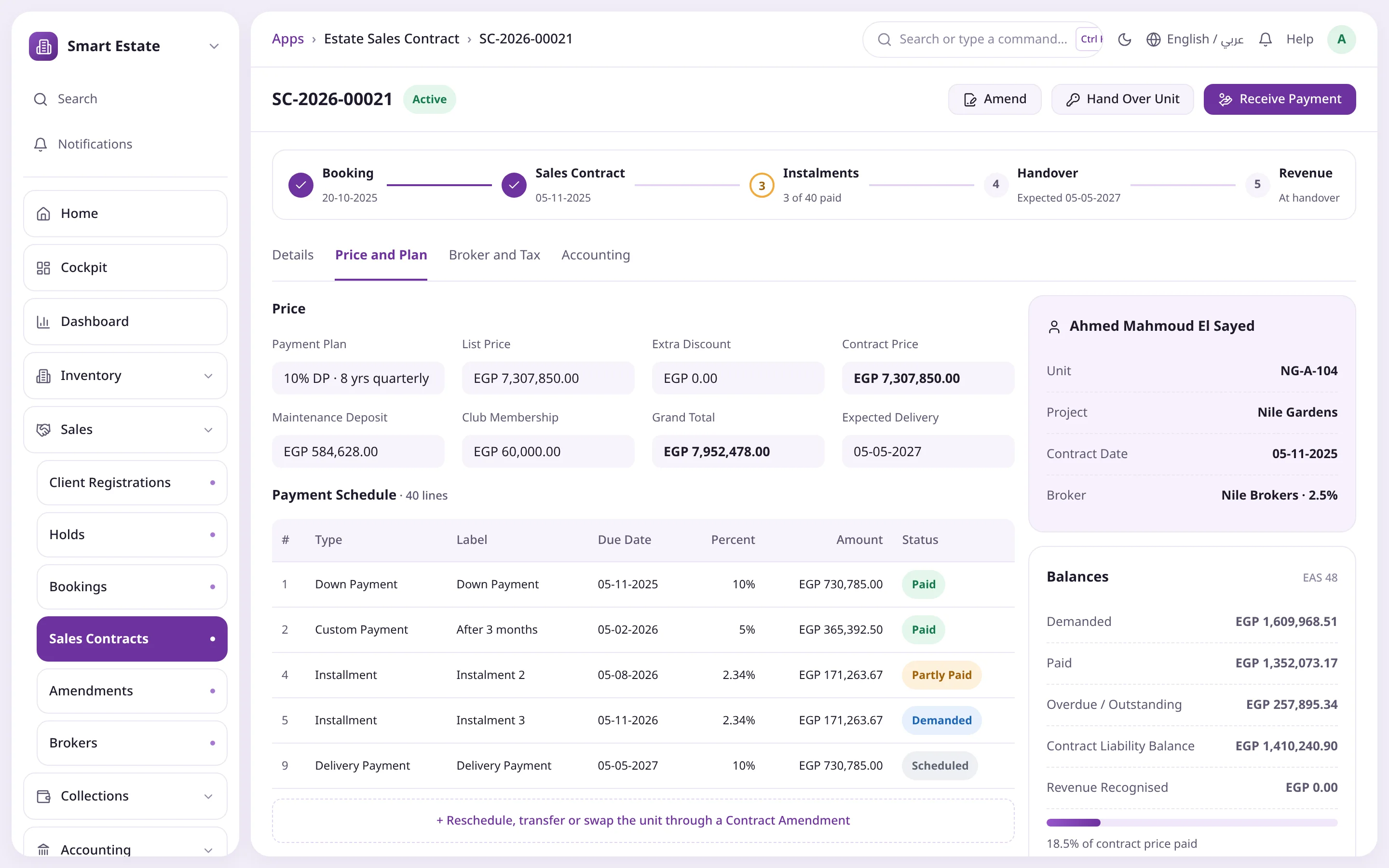
The whole contract on one screen
The document path shows where the contract stands, from booking to revenue. Price, payment plan and the schedule with each line's status sit beside live EAS 48 balances.
Path from booking to revenue
Schedule with per-instalment status
Contract liability and revenue recognised
Receive payment, hand over or amend in a click
Document pathOne-click handoverContract liability
02Handover
Revenue recognised in one step
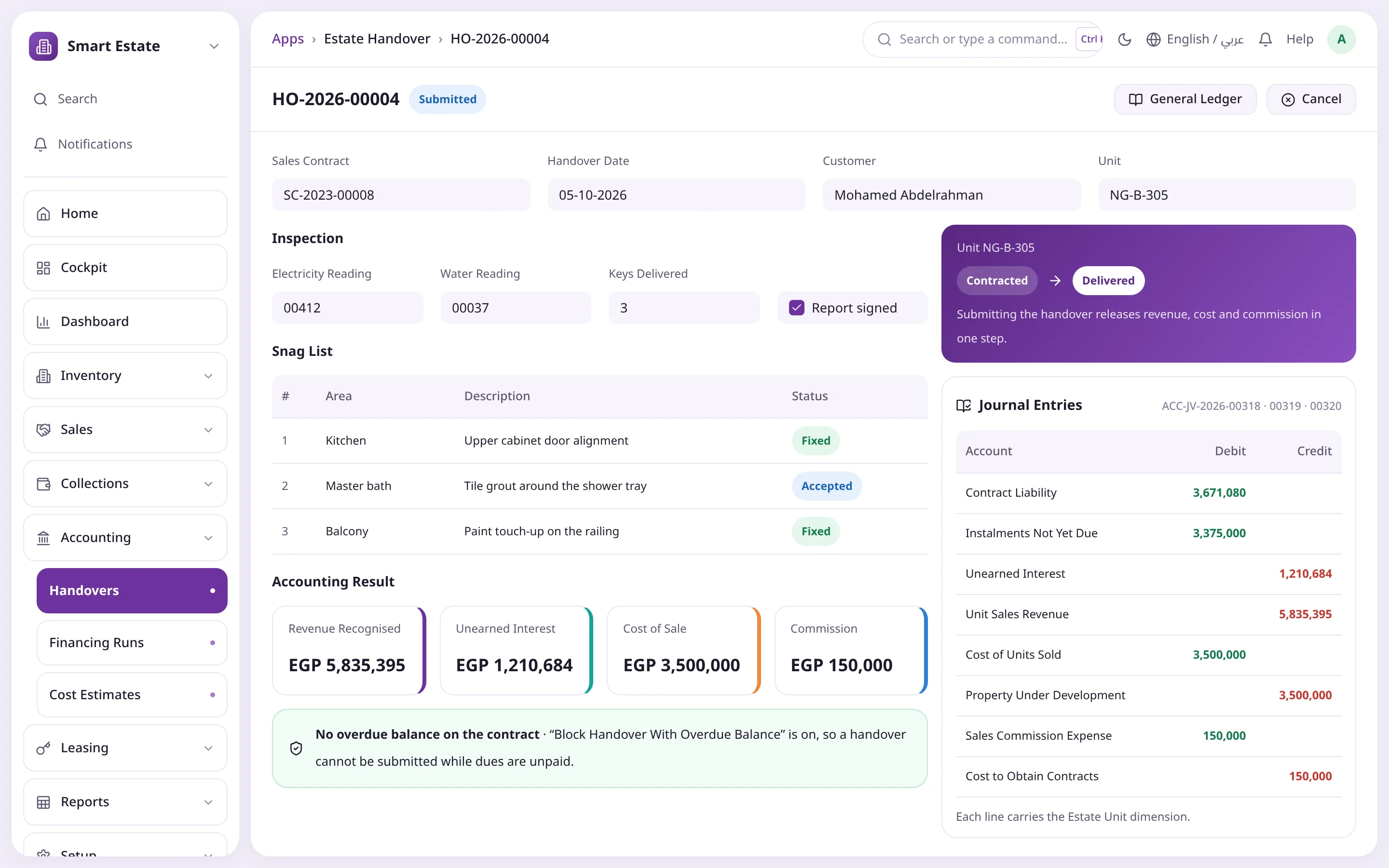
The handover team records readings, keys and snags, then submitting releases revenue, cost of sale and commission together. The unit moves to Delivered on its own.
Meter readings and keys
Snag list with status
Revenue, cost and commission entries
Blocked while dues are overdue
Unit now DeliveredBalanced entriesRevenue recognised
03Accounting profile
Your policy, written into the system
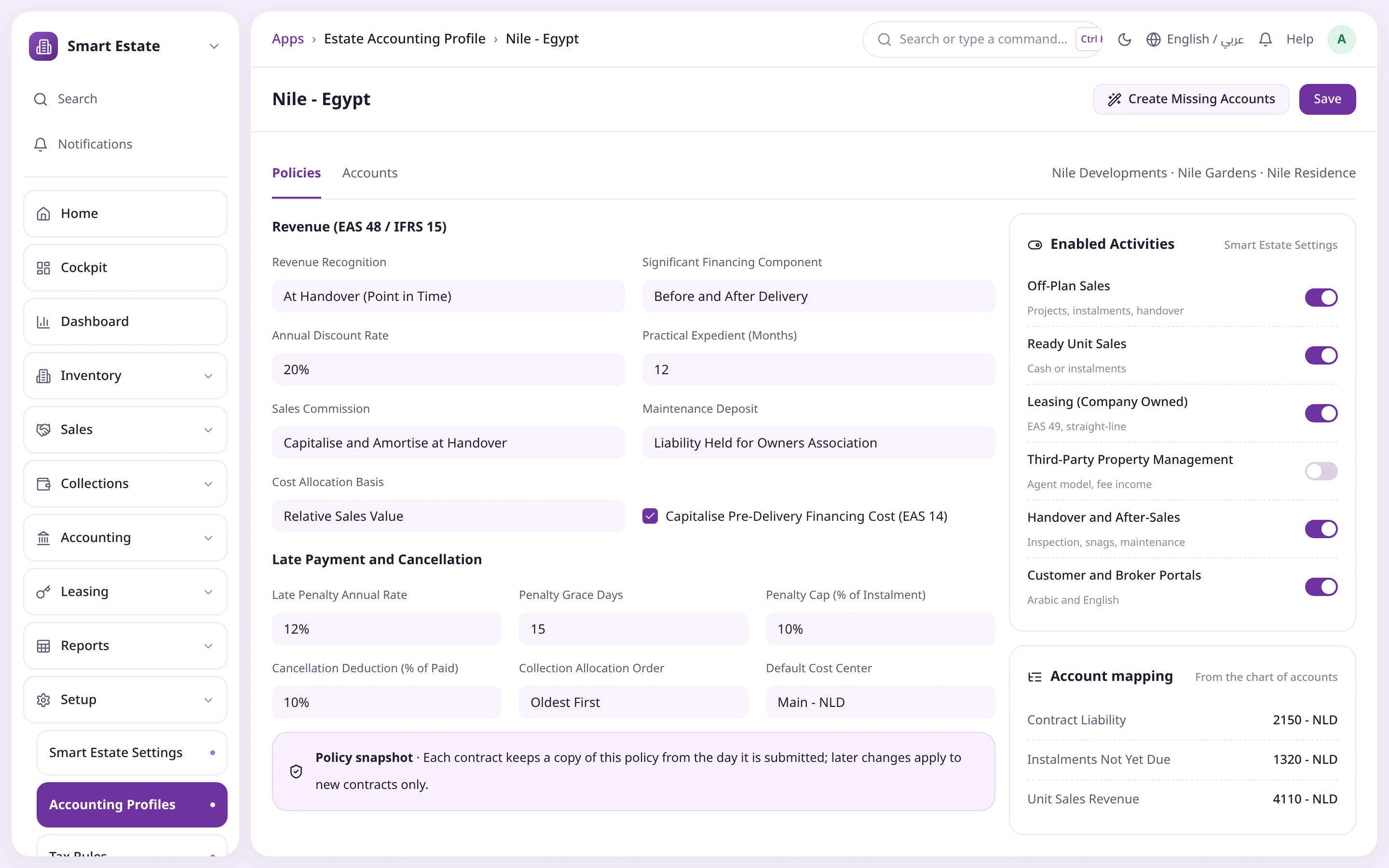
Revenue timing, financing component, discount rate, commission and maintenance deposit treatment, penalties and cancellation are settings, not numbers in code. Every contract keeps a copy.
Financing before and after delivery
Capitalised commission and financing cost
Penalties with grace and a cap
Activities switched on per company
Revenue timingEnabled activitiesPolicy snapshot
04Cockpit
The whole portfolio at a glance
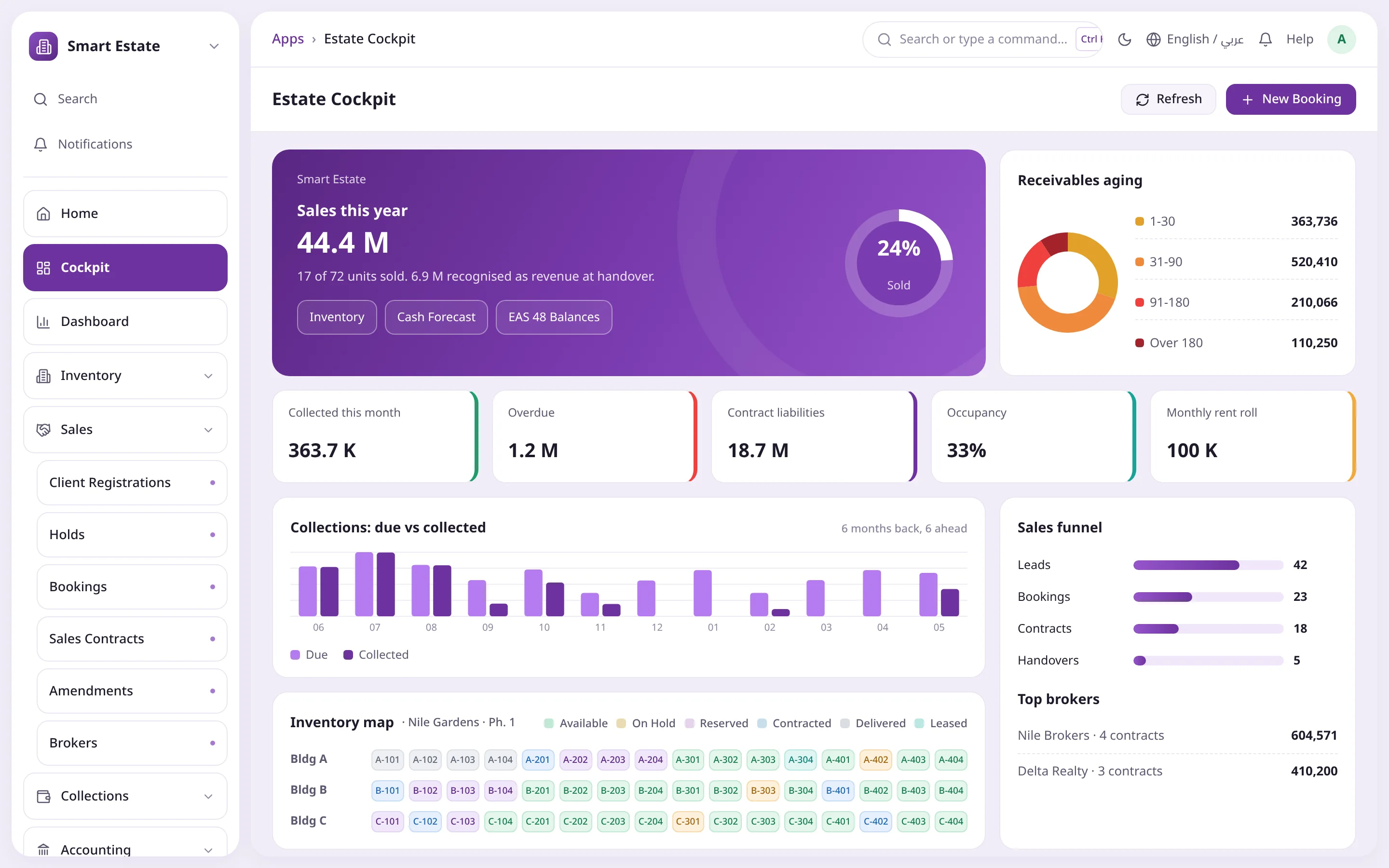
Sales this year and percent sold, collected, overdue, contract liabilities and occupancy, then due versus collected, the inventory map, the sales funnel and top brokers.
Sales this year and percent sold
Receivables aging
Inventory map coloured by status
Sales funnel and top brokers
Sales this yearContract liabilitiesInventory map
05Leasing
Rent straight-lined, not invoiced
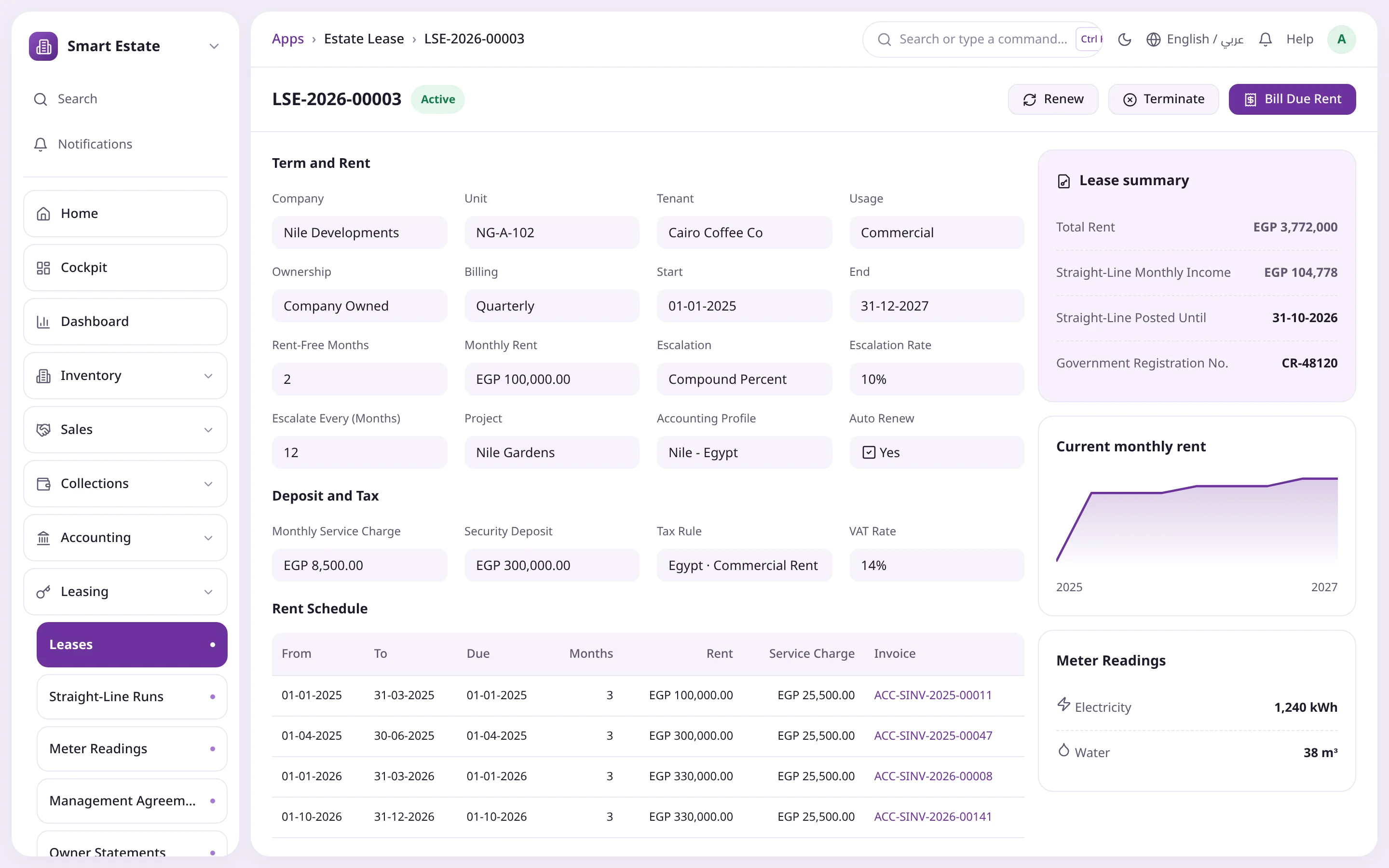
A lease with compound escalation, rent-free months, a deposit and service charges. Billing follows the contract automatically while income is spread evenly over the term under EAS 49.
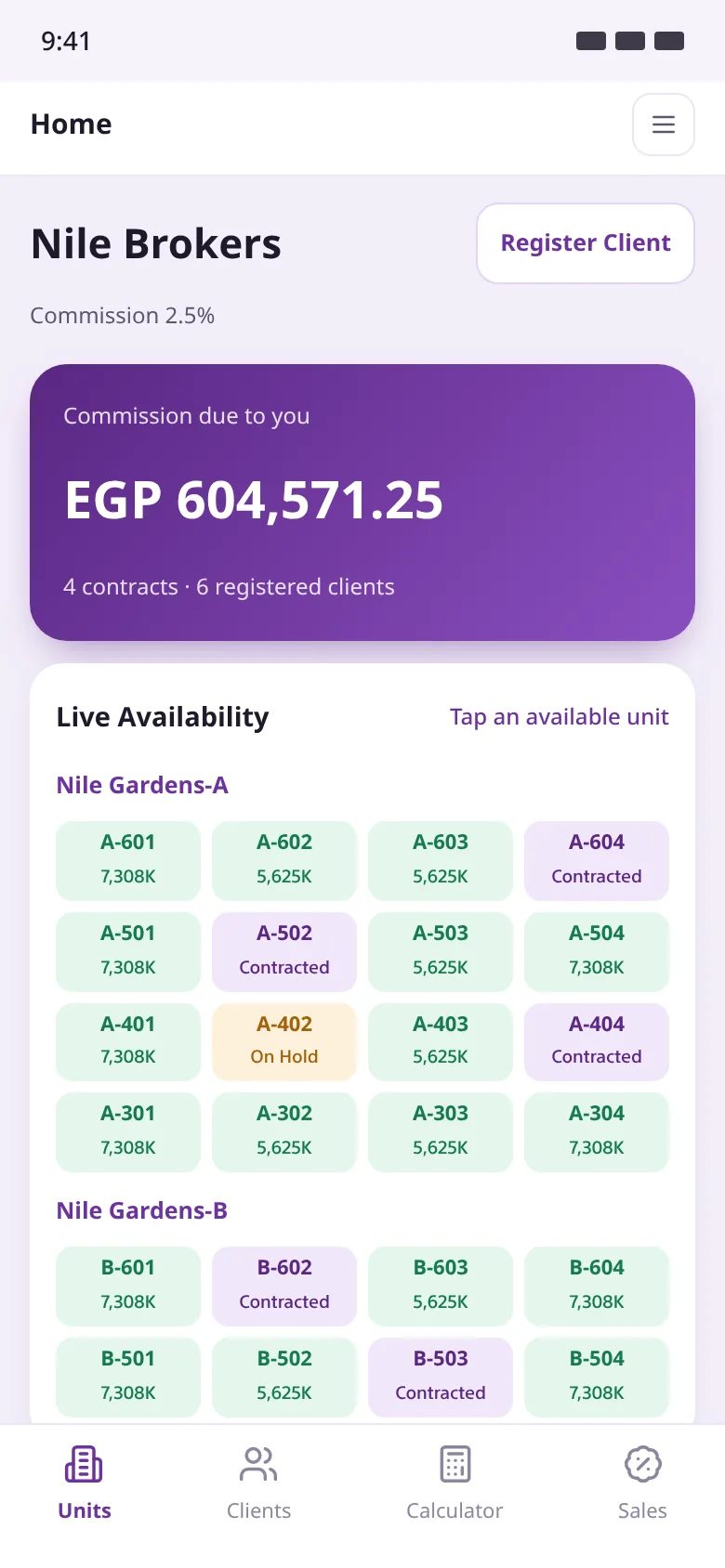
Live unit availability coloured by status, commission due, client registration under the broker's name with duplicate protection, hold requests and a payment plan calculator.
Live availability per building
Commission due and contracts
Protected client registration
Payment plan calculator
Register a clientCommission dueLive availability
Document pathOne-click handoverContract liability
Unit now DeliveredBalanced entriesRevenue recognised
From the project tree to the handover entry, every step is an ERPNext document that updates the unit and posts its own accounting, aligned with Egyptian and international standards.
Projects and units
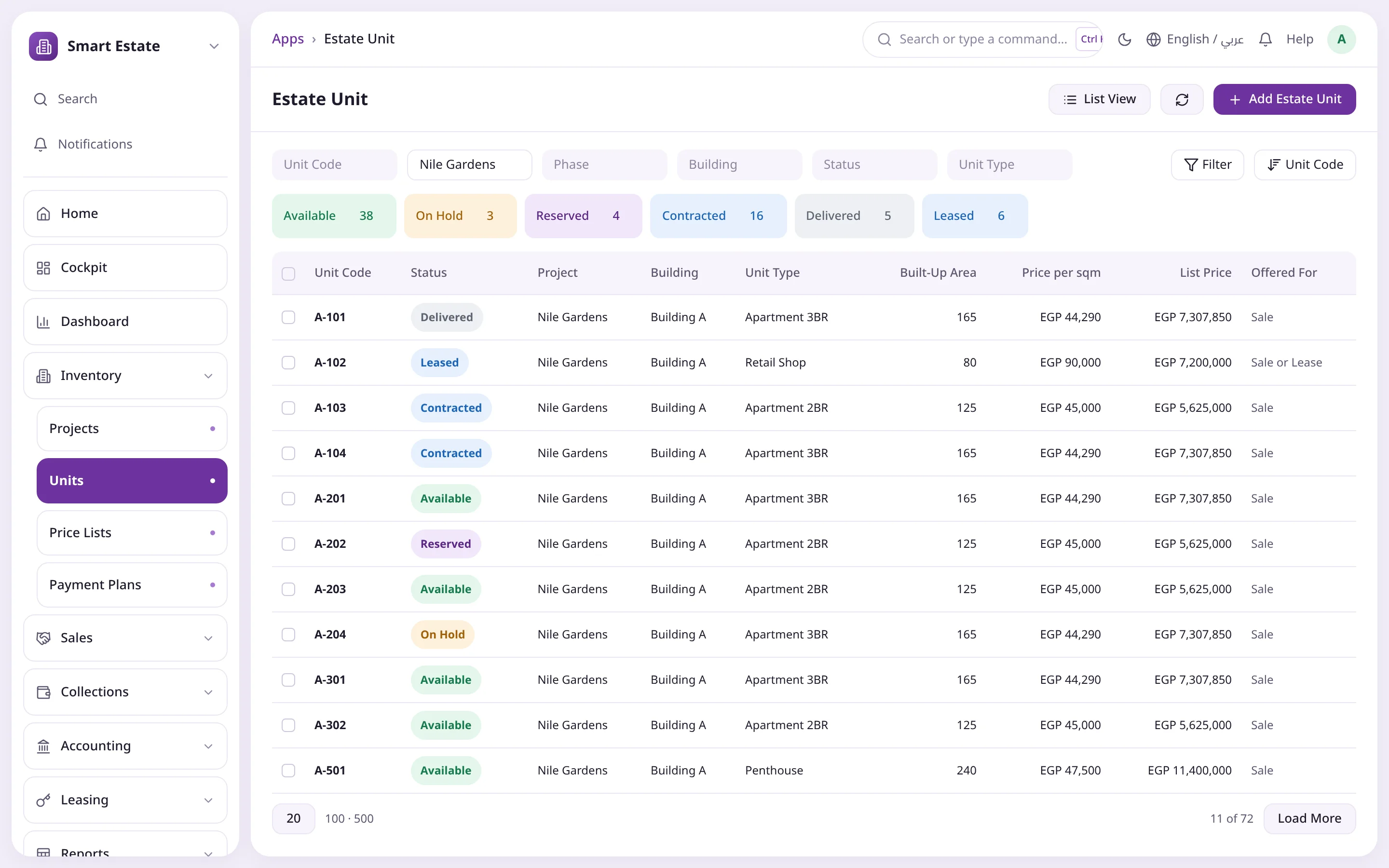
A full tree of project, phase, building and unit, with unit types, features and premiums. Unit status changes only through documents, never by hand.
Not Released, Available, On Hold, Reserved, Contracted, Delivered, Leased
Built-up, land, garden, roof and terrace areas
Premiums by percent, amount or per sqm
The same unit can be offered for sale or lease
Price lists and payment plans
Versioned price lists per sqm or fixed; submitting one releases units for sale. Payment plans combine down payment, instalments, delivery payment and custom payments.
Monthly, quarterly, semi-annual or annual instalments
Maintenance deposit and club membership as separate lines
Cap on extra discount without approval
Preview the schedule before you contract
A disciplined sales path
Broker client registration with duplicate protection, a timed hold that expires on its own, a paid booking, then a sales contract that keeps a snapshot of the accounting policy.
Broker lead protection in days
Holds expire automatically
Commission from the broker agreement
Booking deposits held as a liability until contract
Instalments and collections
Each instalment is its own record with status and balance. Demand runs post one Journal Entry per contract, and payments are standard Payment Entries, so bank reconciliation just works.
Late penalties with grace days and a cap
Allocation: oldest first or penalties first
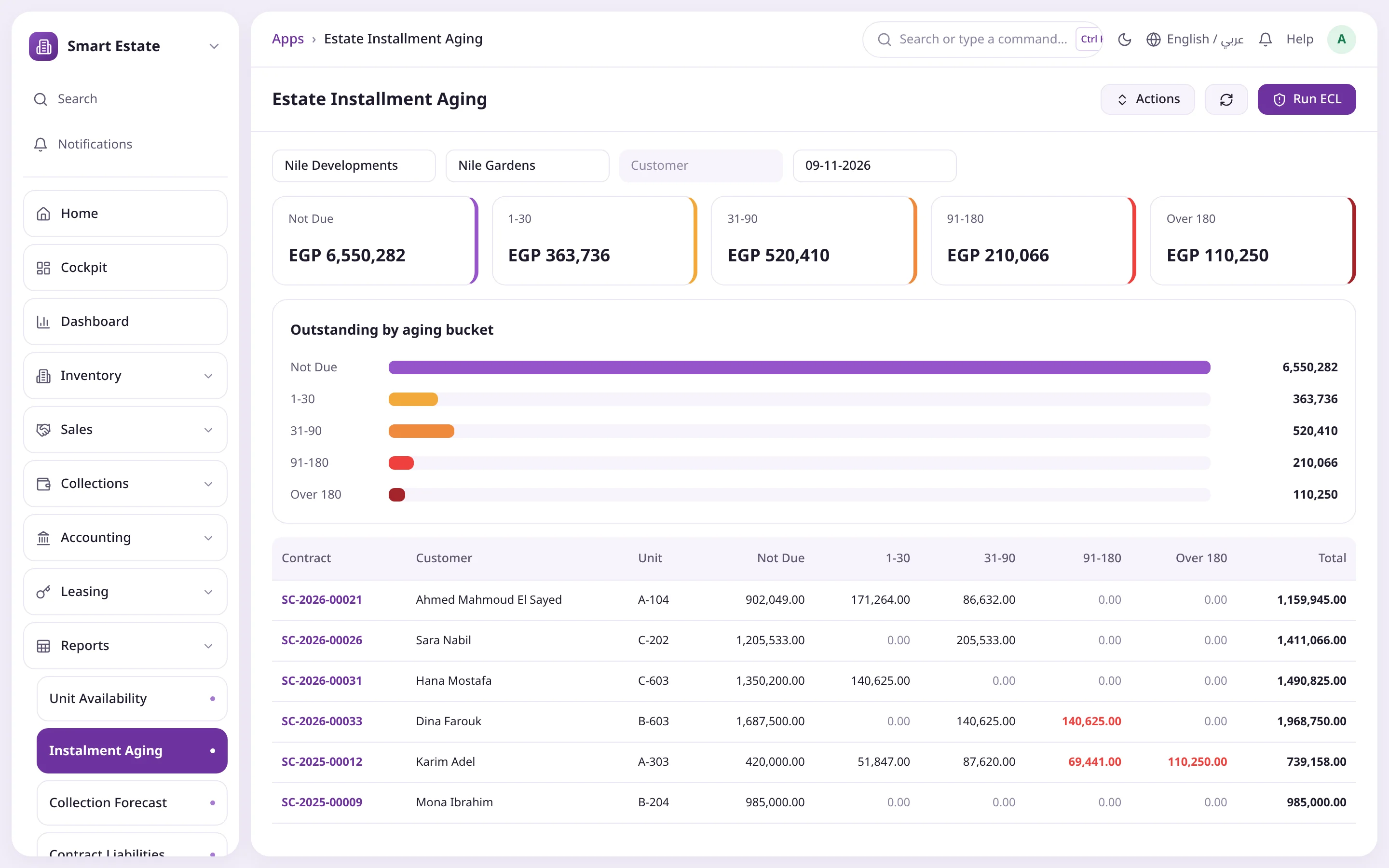
Instalment aging in five buckets
Expected credit losses from an aging matrix (EAS 47 / IFRS 9)
EAS 48 / IFRS 15 revenue
Everything collected before delivery is a contract liability; revenue is recognised at handover. The significant financing component runs on the effective-interest method before and after delivery.
12-month practical expedient
Capitalised pre-delivery financing cost (EAS 14)
Post-delivery interest income that declines as customers pay
Contract liability and revenue report
Handover: the moment of truth
Submitting the handover is the accounting event that releases revenue, cost of sale and commission together, after the unit is inspected and snags are logged.
Electricity and water readings, keys delivered
Snag list with status per item
Optional block on handover while dues are overdue
Unit moves to Delivered automatically
Cost allocation to units
Project cost estimates by category, from land and permits to construction and borrowing costs, allocated to units by relative sales value or saleable area.
Cost of sale posted at handover
Provision for cost to complete on early handovers
A record of every estimate version
Estate Unit dimension for per-unit margin
Contract amendments
One document with five types, each with its full accounting effect, keeping the contract's previous state.
Transfer to a new customer with a fee
Reschedule the remaining instalments
Unit swap and price adjustment
Cancellation with deduction, refund and the unit back on sale
EAS 49 / IFRS 16 leasing
Leases with fixed or compound escalation, rent-free months and security deposits. Income is straight-lined while billing follows the contract automatically.
Auto-generated rent schedule
Monthly service charge with the rent
Electricity, water and gas meter readings, billed
Renewal, termination and a rent roll report
Third-party property management
The company acts as agent: rent is collected for the owner, and its income is the management fee, a percent of collections or a fixed monthly amount.
Owner statements that work out the net due
Expenses recovered from the owner's balance
Remittance entry posted from the statement
Maintenance requests with priority and warranty
Settings engine and accounting profile
Two levels: activities switched on per company, and an accounting profile that sets revenue, financing, cost, penalty and cancellation policies plus account mapping.
Role-based access: manager, sales, accountant, broker and customer each see what is theirs.
Estate manager
The whole portfolio under control
Cockpit for sales, collections and occupancy
Approve discounts above the plan's cap
Set activities and policies
Sales team
From hold to contract without errors
Units that are really available
Holds that expire on their own
Contracts that build their own schedule
Estate accountant
Correct entries from the document itself
Contract liability and revenue under EAS 48
Financing, penalties and credit losses by runs
Margin per unit, building and project
Broker
A portal that protects client and commission
Live unit availability
Client registration with duplicate protection
Clear commission due
Customer
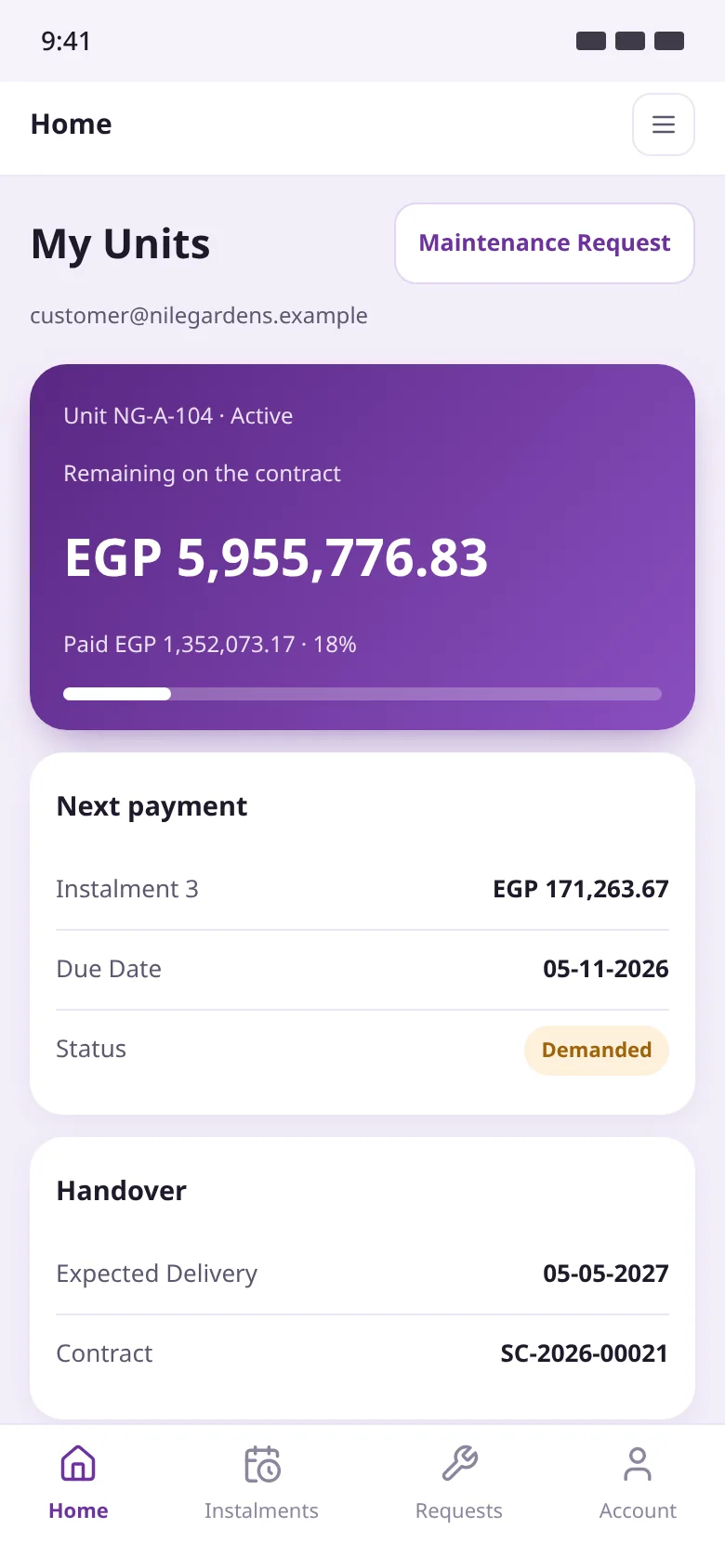
Their contract and instalments in their pocket
Remaining balance and percent paid
Next payment and handover date
Maintenance requests from the portal
How it works
From release to handover
Every step is an ERPNext document, and every document updates the unit and posts its own entry.
01Switch on and set policy
Pick the activities you run, create an accounting profile per company and let it create missing accounts in one click.
02Build and price inventory
Projects, phases, buildings and units, then a price list that releases them for sale, and ready payment plans.
03Hold, book, contract
Broker registration, a timed hold, a paid booking, then a sales contract that generates instalments and freezes the policy.
04Demand and collect
Daily runs raise demands and penalties, monthly runs accrue financing; customers pay through Payment Entries.
05Amend when needed
Transfer, reschedule, swap the unit or cancel, in one document that posts its full accounting effect.
06Hand over and recognise
A handover with readings, keys and snags posts revenue, cost of sale and commission in one go.
Product screenshots
A tour of Smart Estate
Screens from the system in the Operion theme on ERPNext v16, in Arabic and English.
Estate CockpitSales, collections, contract liabilities and the inventory map on one page.
Unit listEvery unit with its status, type, area and list price.
Sales contractDocument path, price, payment plan and EAS 48 balances in one document.
Unit handoverInspection, snags and the revenue, cost and commission entries together.
Accounting profileRevenue, financing and penalty policies with the enabled activities.
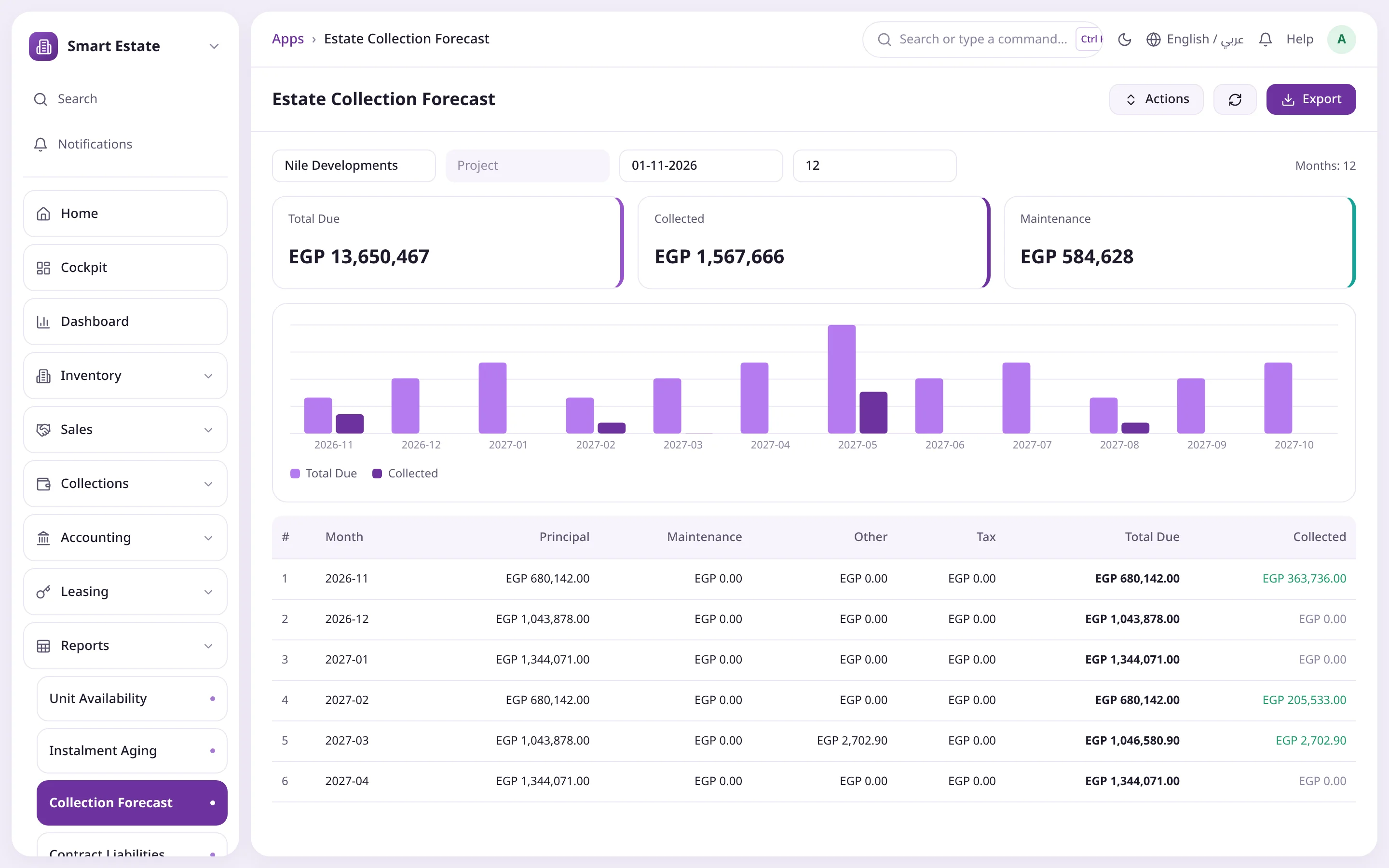
Collection ForecastDue versus collected, month by month, twelve months ahead.
Instalment AgingWhat each contract still owes, spread over aging buckets.
LeaseTerm, rent, escalation, deposit, rent schedule and straight-line income.
Customer portalRemaining balance, next payment and the schedule on a phone.
Broker portalLive availability, commission due and client registration.
Comparison
The difference shows from the first project
Without Smart EstateWith Smart Estate
Unit statusEdited by hand, conflictingChanged only by documents
Instalment demandsManual, often lateAutomatic daily runs
Revenue timingWith every paymentAt handover under EAS 48
Financing componentIgnoredEffective interest before and after delivery
Contract changesManual entries, unclear trailFive types, full accounting effect
Unit marginUnknownA dimension on every entry
The challenge
When property projects run on scattered spreadsheets
Instalment sales stretch over years, so every small error in a schedule or an entry keeps compounding.
Unit status you cannot trust
The same unit gets sold twice or a reserved unit is still offered, because status is edited by hand instead of by documents.
Instalments tracked in Excel
Hundreds of instalments across dozens of contracts with no regular demands, so cash arrives late and overdue balances surface too late.
Revenue in the wrong period
Booking revenue with each payment instead of at handover, and ignoring the financing component, distorts the accounts and breaks EAS 48.
Costs never reach the units
Project cost stays a single total, so nobody knows the margin of a unit, a building or a phase at handover.
Brokers without clear rules
The same client registered by several brokers, disputes over commission and no live view of what is still available.
Messy contract changes
Transfers, reschedules, unit swaps and cancellations done by hand, with no clear accounting trail or record of the previous state.
Policy lives in someone's head
Commission, financing and maintenance deposits are treated differently contract by contract because the policy is not in the system, so it can be neither audited nor repeated.
Components
Inside Smart Estate
44 doctypes plus ready dashboards and reports, each activity switched on from Smart Estate Settings.
Estate Cockpit
Sales this year, collections, occupancy, inventory map, sales funnel and top brokers on one page.
Settings and accounting profile
Enabled activities, revenue, financing and cost policies, and account mapping per company.
Inventory
Projects, phases, buildings, units, unit types and features.
Pricing
Submitted price lists that release units for sale, and reusable payment plans.
Sales
Client registrations, holds, bookings, sales contracts, amendments and brokers.
Collections
Instalments, demand runs, penalty runs and payments.
Accounting
Handovers, financing runs, credit loss runs, cost estimates and allocation.
Handover and after-sales
Inspection and snag list, then the revenue, cost and commission entry, plus warranty maintenance.
Yes. Each is a separate activity in Smart Estate Settings, and both can run in the same company.
When is revenue recognised?
At handover, under EAS 48 / IFRS 15. Until then demands build a contract liability, and the significant financing component follows the project's accounting profile.
What happens when a handover is submitted?
It posts revenue and separates unearned interest, posts cost of sale from the cost allocation, and expenses the capitalised commission, all in one step.
Can I change the accounting policy after sales start?
Yes, and the change applies to new contracts only: each contract keeps a copy of the revenue and financing policy from the day it was submitted.
Does it support over-time revenue recognition?
The current release recognises revenue at handover. Over-time recognition (input method) for qualifying contracts is on the roadmap.
How are late penalties calculated?
With an annual rate, grace days and a cap as a percent of the instalment, all set in the accounting profile and posted by penalty runs.
Does it manage leases and third-party property?
Yes: fixed or compound escalation, rent-free months, deposits, meters and automatic billing with straight-line income. For third-party property the company acts as agent, earns a management fee and issues owner statements.
What do customers and brokers see in the portals?
Customers see their units, balance, percent paid, next payment, handover date and schedule, and can raise maintenance requests. Brokers see live availability and commission, register clients, request holds and quote payment plans.
Is it suitable for Saudi companies?
Yes. The Saudi pack includes the 5% Real Estate Transaction Tax, and every tax rule can be reviewed and edited with your tax adviser.
Can I see profit per unit?
Yes. Every entry carries the Estate Unit accounting dimension, so margin is visible per unit, building and project.



 Document pathOne-click handoverContract liability